Friday, May 4, 2018

Installing Emulated Virtual Environment Next Generation (EVE-NG)

I was looking for an alternative network emulator to study for my CCNP ROUTE v2. The EVE-NG (a.k.a. UNetLab) caught my attention since it's free, easy to use and supports a wide range of images and platforms. I've downloaded and installed the EVE Community Edition.ova and VMware Workstation 14.

Just follow the installation wizard for VMware Workstation.


Leave the Enhanced Keyboard Driver unchecked and click Next.


Choose the default Use VMware Workstation 14 Player for free for non-commercial use and click Next.


Click Open a Virtual Machine > choose the EVE Community Edition.ova file > click Import.


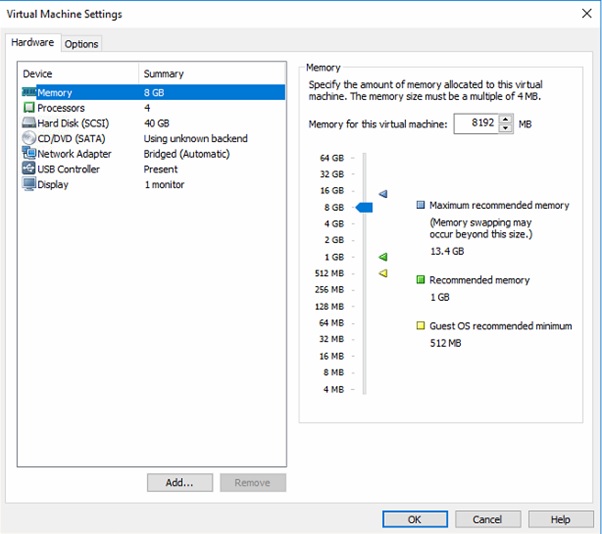
Click Edit Virtual Machine Settings.


The VM settings will adjust according to your machine's specs. I just left the default settings of 8 GB RAM and 40 GB HD space.


Under Network Adapter > choose NAT.


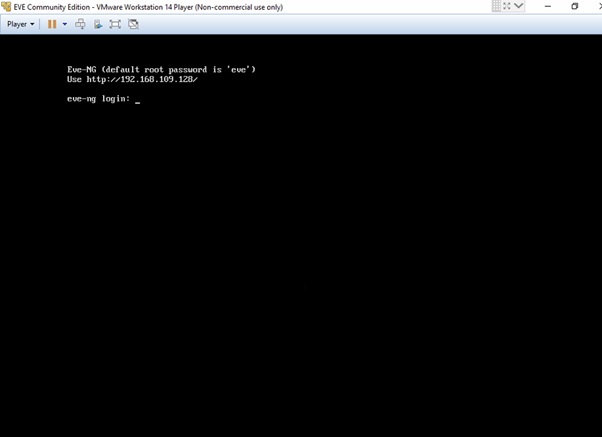
Login by typing root / eve on command the prompt.


Type the root password (twice to confirm).


Optionally edit the hostname.


Optionally edit the domain name.


Optionally choose DHCP or Static IP address. It should be the same range used on your machine's VMNet adapter.


Optionally type an NTP server.


Choose direct connection.


The EVE NG installation will take several minutes to finish.


Once installation is complete, login again using root / eve (or to the changed password). Issue a ping 8.8.8.8 to verify Internet connectivity. The Internet connection is needed to perform updates on the EVE NG Linux package.


Issue an apt-get update and apt-upgrade commands. The upgrade will take several minutes to finish.


Open a PuTTY and SSH to the EVE NG IP address.


You'll need to generate a license key in order to run Dynamips IOS. Copy/paste these commands and take note of the license key string.


wget https://gist.githubusercontent.com/paalfe/8edd82f780c650ae2b4a/raw/bd7b6b8a81c338359e6de4ff0ed0def9f7dc9146/CiscoKeyGen.py


chmod +x CiscoKeyGen.py


./CiscoKeyGen.py


Once the license key is generated, type these commands:

echo [license] > /opt/unetlab/addons/iol/bin/iourc


echo "neve-ng = <LICENSE>;" >> /opt/unetlab/addons/iol/bin/iourc


cat /opt/unetlab/addons/iol/bin/iourc     //VERIFICATION COMMAND


Download and install FileZilla (or WinSCP).


Type the EVE NG IP, username/password (root / eve), port number is optional and click Quickconnect (or just hit Enter).


On the Remote site either browse or just type the directory below. Drag and drop the IOS image from your machine's folder or directory on the left to EVE NG directory on the right.

/opt/unetlab/addons/dynamips

Type these commands to verify and unzip the .bin file. You can only run Dynamips .image files.

cd /opt/unetlab/addons/dynamips     // GO TO DYNAMIPS DIRECTORY

ls      // LIST FILES


unzip c7200-adventerprisek9-mz.152-4.S6.bin      // UNZIP THE .bin FILE

mv C7200-AD.BIN c7200-adventerprisek9-mz.152-4.S6.image      // RENAME THE FILE USING THE MOVE OR mv COMMAND


Open a web browser (I used FireFox Mozilla) and login using admin / eve


Click Add new lab (page icon).


Type the necessary info and click Save.


To add a node, click the plus symbol (+) or right-click then choose Add Node.


Under the Template, choose Cisco IOS 7200VXR (Dynamips). The only available options will be in blue text.


Optionally edit the node's NVRAM, RAM and Slot settings (Ethernet or Serial interface modules).


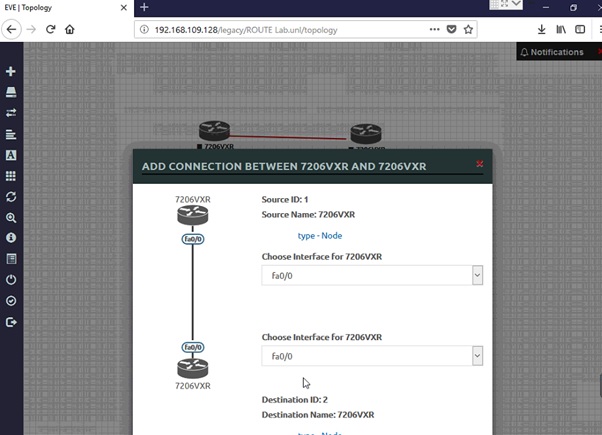
Click and hold the node and drag the connector (plug icon) to the adjacent node. Choose the source and destination interface to be used.


Right-click on a node and choose Start.


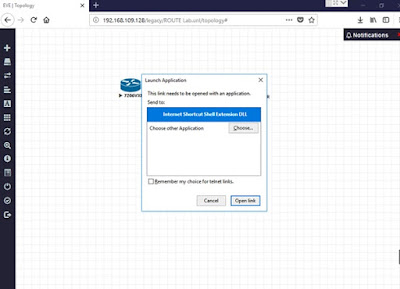
Double-click on a node to launch a console session (PuTTy). Choose Open link.


Friday, April 20, 2018

Upgrading a Cisco ASR 920 Router

The Cisco ASR 920 router has dual power supply, gigabit and ten gigabit SFP ports.


It has a modular fan tray at the back of the chassis.


The serial number sticker is found on top of the chassis.


Refer to this link for connecting the ASR 920 USB console cable. The Cisco ASR920 uses a USB console cable which is included in the box. There are a total of 4 USB ports on the ASR 920 front panel. You insert the USB console cable on the lower right USB port labeled: USB CONSOLE), which is under USB MEM slot. The other USB end goes to your PC USB port. You need to install the appropriate USB driver on your PC.


These are the USB-to-RJ45 serial console kit (920-CONS-KIT-S), which is used for console out-of-band server. This cable adapter uses the lower left USB port labeled: CONSOLE, which is under the MGMT port and near the Cisco logo.


You can insert a compatible USB key on the upper right USB port in order to transfer files such as the IOS-XE software.


Notice the LED lights on ports (G0/0/12-23) and Te0/0/24-27 are off (shutdown). You'll need a L-ASR920-1G-12 license in order to activate them.

For the USB console driver, double-click installer .exe file and follow the installation wizard.


Open HyperTerminal and create a new connection.


HyperTerminal will auto detect the COM port to be used.


Click Restore Defaults.


Once you know which COM to use, you can now open your favorite terminal emulator such as PuTTY, TeraTerm or SecureCRT. These are the settings I used in SecureCRT.


Below is the initial bootup and upgrade process for the Cisco ASR 920 router.


UEA platform with 3670016 Kbytes of main memory

no valid BOOT image found
Final autoboot attempt from default boot device...
Warning: filesystem is not clean
Located asr920-universalk9_npe.03.18.03.SP.156-2.SP3-ext.bin
Image size 333554684 inode num 12, bks cnt 81435 blk size 8*512
##################################################################################
##################################################################################

Boot image size = 333554684 (0x13e1a3fc) bytes
pid_str[ASR-920-24SZ-M]

ROM:RSA Self Test hash Mismatch in long long word No. 0
ROM:Sha512 Self Test
Package header rev 2 structure detected
Calculating SHA-1 hash...done
validate_package_cs: SHA-1 hash:
        calculated a3b0b3bc:8880efd3:2305ad5c:7c3ce271:d46331e3
        expected   a3b0b3bc:8880efd3:2305ad5c:7c3ce271:d46331e3

RSA Signed RELEASE Image Signature Verification Successful.
Image validated
Passing control to the main image..
%IOSXEBOOT-4-FILESYS_ERRORS_CORRECTED: (rp/0): bootflash 1 contained errors which were auto-corrected.
%IOSXEBOOT-4-FILESYS_ERRORS_CORRECTED: (rp/0): bootflash 5 contained errors which were auto-corrected.
%IOSXEBOOT-4-FILESYS_ERRORS_CORRECTED: (rp/0): bootflash 6 contained errors which were auto-corrected.
%IOSXEBOOT-4-FILESYS_ERRORS_CORRECTED: (rp/0): bootflash 7 contained errors which were auto-corrected.
%IOSXEBOOT-4-FILESYS_ERRORS_CORRECTED: (rp/0): bootflash 8 contained errors which were auto-corrected.

              Restricted Rights Legend

Use, duplication, or disclosure by the Government is
subject to restrictions as set forth in subparagraph
(c) of the Commercial Computer Software - Restricted
Rights clause at FAR sec. 52.227-19 and subparagraph
(c) (1) (ii) of the Rights in Technical Data and Computer
Software clause at DFARS sec. 252.227-7013.

           cisco Systems, Inc.
           170 West Tasman Drive
           San Jose, California 95134-1706


Cisco IOS Software, ASR920 Software (PPC_LINUX_IOSD-UNIVERSALK9_NPE-M), Version 15.6(2)SP3, RELEASE SOFTWARE (fc4)
Technical Support: http://www.cisco.com/techsupport
Copyright (c) 1986-2017 by Cisco Systems, Inc.
Compiled Tue 19-Sep-17 22:12 by mcpre


Cisco IOS-XE software, Copyright (c) 2005-2017 by cisco Systems, Inc.
All rights reserved.  Certain components of Cisco IOS-XE software are
licensed under the GNU General Public License ("GPL") Version 2.0.  The
software code licensed under GPL Version 2.0 is free software that comes
with ABSOLUTELY NO WARRANTY.  You can redistribute and/or modify such
GPL code under the terms of GPL Version 2.0.  For more details, see the
documentation or "License Notice" file accompanying the IOS-XE software,
or the applicable URL provided on the flyer accompanying the IOS-XE
software.


 Tmpdisk creation successful, status = 0
flashfs[16]: 0 files, 1 directories
flashfs[16]: 0 orphaned files, 0 orphaned directories
flashfs[16]: Total bytes: 1935360
flashfs[16]: Bytes used: 1024
flashfs[16]: Bytes available: 1934336
This product contains cryptographic features and is subject to United
States and local country laws governing import, export, transfer and
use. Delivery of Cisco cryptographic products does not imply
third-party authority to import, export, distribute or use encryption.
Importers, exporters, distributors and users are responsible for
compliance with U.S. and local country laws. By using this product you
agree to comply with applicable laws and regulations. If you are unable
to comply with U.S. and local laws, return this product immediately.

A summary of U.S. laws governing Cisco cryptographic products may be found at:
http://www.cisco.com/wwl/export/crypto/tool/stqrg.html

If you require further assistance please contact us by sending email to
export@cisco.com.


 registering for ASR ONLY!!!cisco ASR-920-24SZ-M (Freescale P2020) processor (revision 1.2 GHz) with 900304K/6147K bytes of memory.
Processor board ID CAT2204ABCD
24 Gigabit Ethernet interfaces
4 Ten Gigabit Ethernet interfaces
32768K bytes of non-volatile configuration memory.
3670016K bytes of physical memory.
1328927K bytes of SD flash at bootflash:.


Press RETURN to get started!


*Mar  7 18:27:55.219: %SMART_LIC-6-AGENT_READY: Smart Agent for Licensing is initialized
*Mar  7 18:27:57.249: %IOS_LICENSE_IMAGE_APPLICATION-6-LICENSE_LEVEL: Module name = ASR-920-24SZ-M Next reboot level = advancedmetroipaccess and License = advancedmetroipaccess
*Mar  7 18:28:19.237: %SPANTREE-5-EXTENDED_SYSID: Extended SysId enabled for type vlanCannot Get the number of ports in MAC notification
*Mar  7 18:28:22.156: %LINK-3-UPDOWN: Interface Lsmpi0, changed state to up
*Mar  7 18:28:22.157: %LINK-3-UPDOWN: Interface EOBC0, changed state to up
*Mar  7 18:28:22.157: %LINEPROTO-5-UPDOWN: Line protocol on Interface LI-Null0, changed state to up
*Mar  7 18:28:22.158: %LINK-3-UPDOWN: Interface GigabitEthernet0, changed state to down
*Mar  7 18:28:22.176: %LINK-3-UPDOWN: Interface LIIN0, changed state to up
*Mar  7 18:28:22.353: %PNP-6-PNP_DISCOVERY_STOPPED: PnP Discovery stopped (Aborted by non-PnP bootstrapping)
*Mar  7 18:28:22.949: %LINEPROTO-5-UPDOWN: Line protocol on Interface Lsmpi0, changed state to up
*Mar  7 18:28:22.949: %LINEPROTO-5-UPDOWN: Line protocol on Interface EOBC0, changed state to up
*Mar  7 18:28:22.949: %LINEPROTO-5-UPDOWN: Line protocol on Interface GigabitEthernet0, changed state to down
*Mar  7 18:28:22.950: %LINEPROTO-5-UPDOWN: Line protocol on Interface LIIN0, changed state to up
*Mar  7 18:28:23.205: %IOSXE_MGMTVRF-6-CREATE_SUCCESS_INFO: Management vrf Mgmt-intf created with ID 1, ipv4 table-id 0x1, ipv6 table-id 0x1E000001
*Mar  7 18:28:27.081: %SYS-5-CONFIG_I: Configured from memory by console
*Mar  7 18:28:27.095: %IOSXE_OIR-6-REMSPA: SPA removed from subslot 0/0, interfaces disabled
*Mar  7 18:28:27.129: %SPA_OIR-6-OFFLINECARD: SPA (24xGE-4x10GE-FIXED-S) offline in subslot 0/0
*Mar  7 18:28:27.326: %SYS-5-RESTART: System restarted --
Cisco IOS Software, ASR920 Software (PPC_LINUX_IOSD-UNIVERSALK9_NPE-M), Version 15.6(2)SP3, RELEASE SOFTWARE (fc4)
Technical Support: http://www.cisco.com/techsupport
Copyright (c) 1986-2017 by Cisco Systems, Inc.
Compiled Tue 19-Sep-17 22:12 by mcpre
*Mar  7 18:28:29.767: %IOSXE_OIR-6-INSCARD: Card (fp) inserted in slot F0
*Mar  7 18:28:29.767: %IOSXE_OIR-6-ONLINECARD: Card (fp) online in slot F0
*Mar  7 18:28:29.768: %IOSXE_OIR-6-INSCARD: Card (cc) inserted in slot 0
*Mar  7 18:28:29.768: %IOSXE_OIR-6-ONLINECARD: Card (cc) online in slot 0
*Mar  7 18:28:29.852: %IOSXE_OIR-6-INSSPA: SPA inserted in subslot 0/0
Authentication passed

Router>enable
Router#
*Mar  7 18:29:41.269: %SPA_OIR-6-ONLINECARD: SPA (24xGE-4x10GE-FIXED-S) online in subslot 0/0
*Mar  7 18:29:41.270: %LICENSE-1-REQUEST_FAILED: License request for feature 24portGE-4port10GE 1.0 failed. UDI=ASR-920-24SZ-M:CAT2204ABCD
*Mar  7 18:29:42.817: %LINK-3-UPDOWN: Interface GigabitEthernet0/0/0, changed state to down
*Mar  7 18:29:43.033: %LINK-3-UPDOWN: Interface GigabitEthernet0/0/1, changed state to down
*Mar  7 18:29:43.034: %LINK-3-UPDOWN: Interface GigabitEthernet0/0/2, changed state to down
*Mar  7 18:29:43.233: %LINK-3-UPDOWN: Interface GigabitEthernet0/0/3, changed state to down
*Mar  7 18:29:43.234: %LINK-3-UPDOWN: Interface GigabitEthernet0/0/4, changed state to down
*Mar  7 18:29:43.234: %LINK-3-UPDOWN: Interface GigabitEthernet0/0/5, changed state to down
*Mar  7 18:29:43.234: %LINK-3-UPDOWN: Interface GigabitEthernet0/0/6, changed state to down
*Mar  7 18:29:43.234: %LINK-3-UPDOWN: Interface GigabitEthernet0/0/7, changed state to down
*Mar  7 18:29:43.234: %LINK-3-UPDOWN: Interface GigabitEthernet0/0/8, changed state to down
*Mar  7 18:29:43.234: %LINK-3-UPDOWN: Interface GigabitEthernet0/0/9, changed state to down
*Mar  7 18:29:43.234: %LINK-3-UPDOWN: Interface GigabitEthernet0/0/10, changed state to down
*Mar  7 18:29:43.234: %LINK-3-UPDOWN: Interface GigabitEthernet0/0/11, changed state to down
Router#
*Mar  7 18:29:47.199: %IOSXE-5-PLATFORM: R0/0: kernel: [  279.986726] scsi 0:0:0:0: Direct-Access     Imation  Nano             1.20 PQ: 0 ANSI: 2
*Mar  7 18:29:47.204: %IOSXE-5-PLATFORM: R0/0: kernel: [  279.990877] sd 0:0:0:0: Attached scsi generic sg0 type 0
*Mar  7 18:29:47.204: %IOSXE-5-PLATFORM: R0/0: kernel: [  279.991327] sd 0:0:0:0: [sda] 3948544 512-byte logical blocks: (2.02 GB/1.88 GiB)
*Mar  7 18:29:47.525: %IOSXE-5-PLATFORM: R0/0: kernel: [  280.313878] sd 0:0:0:0: [sda] Attached SCSI removable disk
Router#[OK]
Router#dir usb0:
Directory of usb0:/

<OUTPUT TRUNCATED>

  124  -rwx         73635840  Aug 14 2017 10:51:06 +00:00  asa944-5-smp-k8.bin
  125  drwx            32768   Feb 5 2018 10:27:50 +00:00  Anyconnect 3.1
  126  -rwx        104970520   Feb 5 2018 15:53:40 +00:00  c3900-universalk9-mz.SPA.154-3.M6a.bin
  127  -rwx        490064992   Feb 5 2018 15:53:10 +00:00  asr1001x-universalk9.03.13.05.S.154-3.S5-ext.SPA.bin
  128  -rwx        311284732   Mar 8 2018 09:05:40 +00:00  asr920-universalk9_npe.03.16.07.S.155-3.S7-ext.bin

2013200384 bytes total (399638528 bytes free)

Router#show version
Cisco IOS XE Software, Version 03.18.03.SP.156-2.SP3-ext
Cisco IOS Software, ASR920 Software (PPC_LINUX_IOSD-UNIVERSALK9_NPE-M), Version 15.6(2)SP3, RELEASE SOFTWARE (fc4)
Technical Support: http://www.cisco.com/techsupport
Copyright (c) 1986-2017 by Cisco Systems, Inc.
Compiled Tue 19-Sep-17 22:12 by mcpre

Cisco IOS-XE software, Copyright (c) 2005-2017 by cisco Systems, Inc.
All rights reserved.  Certain components of Cisco IOS-XE software are
licensed under the GNU General Public License ("GPL") Version 2.0.  The
software code licensed under GPL Version 2.0 is free software that comes
with ABSOLUTELY NO WARRANTY.  You can redistribute and/or modify such
GPL code under the terms of GPL Version 2.0.  For more details, see the
documentation or "License Notice" file accompanying the IOS-XE software,
or the applicable URL provided on the flyer accompanying the IOS-XE
software.

ROM: IOS-XE ROMMON

Router uptime is 3 minutes
Uptime for this control processor is 5 minutes
System returned to ROM by reload
System image file is "bootflash:/asr920-universalk9_npe.03.18.03.SP.156-2.SP3-ext.bin"
Last reload reason: PowerOn


This product contains cryptographic features and is subject to United
States and local country laws governing import, export, transfer and
use. Delivery of Cisco cryptographic products does not imply
third-party authority to import, export, distribute or use encryption.
Importers, exporters, distributors and users are responsible for
compliance with U.S. and local country laws. By using this product you
agree to comply with applicable laws and regulations. If you are unable
to comply with U.S. and local laws, return this product immediately.

A summary of U.S. laws governing Cisco cryptographic products may be found at:
http://www.cisco.com/wwl/export/crypto/tool/stqrg.html

If you require further assistance please contact us by sending email to
export@cisco.com.

License Level: advancedmetroipaccess
License Type: Permanent
Next reload license Level: advancedmetroipaccess

cisco ASR-920-24SZ-M (Freescale P2020) processor (revision 1.2 GHz) with 900304K/6147K bytes of memory.
Processor board ID CAT2204ABCD
24 Gigabit Ethernet interfaces
4 Ten Gigabit Ethernet interfaces
32768K bytes of non-volatile configuration memory.
3670016K bytes of physical memory.
1328927K bytes of SD flash at bootflash:.
1974239K bytes of USB flash at usb0:.

Configuration register is 0x2102

Router#show ip interface brief
Interface              IP-Address      OK? Method Status                Protocol
GigabitEthernet0/0/0   unassigned      YES NVRAM  down                  down   
GigabitEthernet0/0/1   unassigned      YES NVRAM  down                  down   
GigabitEthernet0/0/2   unassigned      YES NVRAM  down                  down   
GigabitEthernet0/0/3   unassigned      YES NVRAM  down                  down   
GigabitEthernet0/0/4   unassigned      YES NVRAM  down                  down   
GigabitEthernet0/0/5   unassigned      YES NVRAM  down                  down   
GigabitEthernet0/0/6   unassigned      YES NVRAM  down                  down   
GigabitEthernet0/0/7   unassigned      YES NVRAM  down                  down   
GigabitEthernet0/0/8   unassigned      YES NVRAM  down                  down   
GigabitEthernet0/0/9   unassigned      YES NVRAM  down                  down   
GigabitEthernet0/0/10  unassigned      YES NVRAM  down                  down   
GigabitEthernet0/0/11  unassigned      YES NVRAM  down                  down   
GigabitEthernet0/0/12  unassigned      YES NVRAM  administratively down down   //LICENSED
GigabitEthernet0/0/13  unassigned      YES NVRAM  administratively down down   
GigabitEthernet0/0/14  unassigned      YES NVRAM  administratively down down   
GigabitEthernet0/0/15  unassigned      YES NVRAM  administratively down down   
GigabitEthernet0/0/16  unassigned      YES NVRAM  administratively down down   
GigabitEthernet0/0/17  unassigned      YES NVRAM  administratively down down   
GigabitEthernet0/0/18  unassigned      YES NVRAM  administratively down down   
GigabitEthernet0/0/19  unassigned      YES NVRAM  administratively down down   
GigabitEthernet0/0/20  unassigned      YES NVRAM  administratively down down   
GigabitEthernet0/0/21  unassigned      YES NVRAM  administratively down down   
GigabitEthernet0/0/22  unassigned      YES NVRAM  administratively down down   
GigabitEthernet0/0/23  unassigned      YES NVRAM  administratively down down   
Te0/0/24               unassigned      YES NVRAM  administratively down down   
Te0/0/25               unassigned      YES NVRAM  administratively down down   
Te0/0/26               unassigned      YES NVRAM  administratively down down   
Te0/0/27               unassigned      YES NVRAM  administratively down down   
GigabitEthernet0       unassigned      YES NVRAM  down                  down   
Virtual-PPP4001        unassigned      YES unset  down                  down 


Router#show run
Building configuration...

Current configuration : 3236 bytes
!
version 15.6
no service pad
service timestamps debug datetime msec
service timestamps log datetime msec
no platform punt-keepalive disable-kernel-core
platform bfd-debug-trace 1
platform xconnect load-balance-hash-algo mac-ip-instanceid
platform tcam-parity-error enable
platform tcam-threshold alarm-frequency 1
!
hostname Router
!
boot-start-marker
boot-end-marker
!
!
vrf definition Mgmt-intf
 !
 address-family ipv4
 exit-address-family
 !       
 address-family ipv6
 exit-address-family
!
!
no aaa new-model
facility-alarm critical exceed-action shutdown
!
!
!
!
!
!
!
!
!

!
!
!
!
!        
!
!
!
!
!
!
!
multilink bundle-name authenticated
!
!
license udi pid ASR-920-24SZ-M sn CAT2204ABCD
license boot level advancedmetroipaccess
!
sdm prefer default
!
!
redundancy
!
!
!
!
!
transceiver type all
 monitoring
!
!
!
!
!
!
!
!
!
!
!
!
interface GigabitEthernet0/0/0
 no ip address
 negotiation auto
!
interface GigabitEthernet0/0/1
 no ip address
 negotiation auto
!
interface GigabitEthernet0/0/2
 no ip address
 negotiation auto
!
interface GigabitEthernet0/0/3
 no ip address
 negotiation auto
!
interface GigabitEthernet0/0/4
 no ip address
 negotiation auto
!
interface GigabitEthernet0/0/5
 no ip address
 negotiation auto
!
interface GigabitEthernet0/0/6
 no ip address
 negotiation auto
!
interface GigabitEthernet0/0/7
 no ip address
 negotiation auto
!
interface GigabitEthernet0/0/8
 no ip address
 negotiation auto
!
interface GigabitEthernet0/0/9
 no ip address
 negotiation auto
!
interface GigabitEthernet0/0/10
 no ip address
 negotiation auto
!
interface GigabitEthernet0/0/11
 no ip address
 negotiation auto
!
interface GigabitEthernet0/0/12
 no ip address
 shutdown
 negotiation auto
!
interface GigabitEthernet0/0/13
 no ip address
 shutdown
 negotiation auto
!
interface GigabitEthernet0/0/14
 no ip address
 shutdown
 negotiation auto
!
interface GigabitEthernet0/0/15
 no ip address
 shutdown
 negotiation auto
!
interface GigabitEthernet0/0/16
 no ip address
 shutdown
 negotiation auto
!
interface GigabitEthernet0/0/17
 no ip address
 shutdown
 negotiation auto
!
interface GigabitEthernet0/0/18
 no ip address
 shutdown
 negotiation auto
!
interface GigabitEthernet0/0/19
 no ip address
 shutdown
 negotiation auto
!
interface GigabitEthernet0/0/20
 no ip address
 shutdown
 negotiation auto
!
interface GigabitEthernet0/0/21
 no ip address
 shutdown
 negotiation auto
!
interface GigabitEthernet0/0/22
 no ip address
 shutdown
 negotiation auto
!
interface GigabitEthernet0/0/23
 no ip address
 shutdown
 negotiation auto
!
interface TenGigabitEthernet0/0/24
 no ip address
 shutdown
!
interface TenGigabitEthernet0/0/25
 no ip address
 shutdown
!
interface TenGigabitEthernet0/0/26
 no ip address
 shutdown
!
interface TenGigabitEthernet0/0/27
 no ip address
 shutdown
!
interface GigabitEthernet0
 vrf forwarding Mgmt-intf
 no ip address
 negotiation auto
!
ip forward-protocol nd
!
no ip http server
no ip http secure-server
ip tftp source-interface GigabitEthernet0
ip ssh server algorithm encryption aes128-ctr aes192-ctr aes256-ctr
ip ssh client algorithm encryption aes128-ctr aes192-ctr aes256-ctr
!
!
!
!
control-plane
!
!
line con 0
 stopbits 1
line aux 0
 stopbits 1
line vty 0 4
 login
!
!
!
end


Router#copy usb0:/asr920-universalk9_npe.03.16.07.S.155-3.S7-ext.bin bootflash:/
Destination filename [asr920-universalk9_npe.03.16.07.S.155-3.S7-ext.bin]?
Copy in progress...CCCCCCCCCCCCCCCCCCCCCCCCCCCCCCCCCCCCCCCCCCCCCCCCCCCCCCC

<OUTPUT TRUNCATED>

CCCCCCCCCCCCCCCCCCCCCCCCCCCCCCCCCCCCCCCCCCCCCCCCCCCCCCCCCCCCCC

Router#dir
Directory of bootflash:/

   11  drwx            16384  Feb 15 2018 00:38:52 +00:00  lost+found
75521  drwx             4096  Feb 15 2018 00:38:59 +00:00  .prst_sync
   12  -rw-        333554684  Feb 15 2018 00:52:46 +00:00  asr920-universalk9_npe.03.18.03.SP.156-2.SP3-ext.bin
120833  drwx             4096  Feb 15 2018 00:40:50 +00:00  .installer
   13  -rw-             1181  Feb 15 2018 00:56:18 +00:00  CAT2203ABCD_3_1518685123.lic
135937  drwx             4096  Feb 15 2018 01:01:49 +00:00  core
105729  drwx             4096  Feb 15 2018 01:02:03 +00:00  .rollback_timer
   14  -rw-                0  Feb 15 2018 01:02:19 +00:00  tracelogs.114
45313  drwx             4096   Mar 7 2018 17:33:51 +00:00  tracelogs
90625  drwx             4096  Feb 15 2018 01:03:07 +00:00  virtual-instance
75522  drwx             4096  Jul 15 2014 01:09:40 +00:00  usb_modem
   20  -rw-               35  Feb 15 2018 01:19:40 +00:00  pnp-tech-time
   21  -rw-            16470  Feb 15 2018 01:19:45 +00:00  pnp-tech-discovery-summary
   22  -rw-        311284732   Mar 7 2018 17:38:24 +00:00  asr920-universalk9_npe.03.16.07.S.155-3.S7-ext.bin

1339412480 bytes total (604782592 bytes free)


Router#show run | inc boot
boot-start-marker
boot-end-marker
license boot level advancedmetroipaccess

Router#configure terminal
Enter configuration commands, one per line.  End with CNTL/Z.
Router(config)#boot system bootflash:asr920-universalk9_npe.03.16.07.S.155-3.S 7-ext.bin
Router(config)#end

Router#show run | inc boot
*Mar  7 17:39:54.228: %SYS-5-CONFIG_I: Configured from console by console i boot
boot-start-marker
boot system bootflash:asr920-universalk9_npe.03.16.07.S.155-3.S7-ext.bin
boot-end-marker
license boot level advancedmetroipaccess

Router#reload
Proceed with reload? [confirm]
*Mar  7 17:41:42.169: %SYS-5-RELOAD: Reload requested by console. Reload Reason: Reload Command.
*Mar  7 17:41:45.123: %IOSXE-5-PLATFORM: R0/0: kernel: [  928.911208] usb 1-1: USB disconnect, address 2Mar  7 17:42:20.583 R0/0: %PMAN-5-ÃUEA platform with 3670016 Kbytes of main memory Located asr920-universalk9_npe.03.16.07.S.155-3.S7-ext.bin
Image size 311284732 inode num 22, bks cnt 75998 blk size 8*512

##################################################################################
##################################################################################

Boot image size = 311284732 (0x128dd3fc) bytes
pid_str[ASR-920-24SZ-M]

ROM:RSA Self Test hash Mismatch in long long word No. 0

ROM:Sha512 Self Test

Package header rev 2 structure detected

Calculating SHA-1 hash...done

validate_package_cs: SHA-1 hash:
    calculated f756f0e3:ae1eae7c:5742c1a0:5ee42ff4:9fe87a1c
    expected   f756f0e3:ae1eae7c:5742c1a0:5ee42ff4:9fe87a1c

RSA Signed RELEASE Image Signature Verification Successful.

Image validated

Passing control to the main image..

<OUTPUT TRUNCATED>


Router#show version
Cisco IOS XE Software, Version 03.16.07.S - Extended Support Release
Cisco IOS Software, ASR920 Software (PPC_LINUX_IOSD-UNIVERSALK9_NPE-M), Version 15.5(3)S7, RELEASE SOFTWARE (fc1)

Technical Support: http://www.cisco.com/techsupport
Copyright (c) 1986-2018 by Cisco Systems, Inc.
Compiled Wed 07-Feb-18 21:52 by mcpre


Cisco IOS-XE software, Copyright (c) 2005-2018 by cisco Systems, Inc.
All rights reserved.  Certain components of Cisco IOS-XE software are
licensed under the GNU General Public License ("GPL") Version 2.0.  The
software code licensed under GPL Version 2.0 is free software that comes
with ABSOLUTELY NO WARRANTY.  You can redistribute and/or modify such
GPL code under the terms of GPL Version 2.0.  For more details, see the
documentation or "License Notice" file accompanying the IOS-XE software,
or the applicable URL provided on the flyer accompanying the IOS-XE
software.

ROM: IOS-XE ROMMON

Router uptime is 1 minute
Uptime for this control processor is 4 minutes
 
System returned to ROM by reload
System image file is "bootflash:asr920-universalk9_npe.03.16.07.S.155-3.S7-ext.bin"
Last reload reason: Reload Command


This product contains cryptographic features and is subject to United
States and local country laws governing import, export, transfer and
use. Delivery of Cisco cryptographic products does not imply
third-party authority to import, export, distribute or use encryption.
Importers, exporters, distributors and users are responsible for
compliance with U.S. and local country laws. By using this product you
agree to comply with applicable laws and regulations. If you are unable
to comply with U.S. and local laws, return this product immediately.

A summary of U.S. laws governing Cisco cryptographic products may be found at:
http://www.cisco.com/wwl/export/crypto/tool/stqrg.html

If you require further assistance please contact us by sending email to
export@cisco.com.

License Level: advancedmetroipaccess
License Type: Permanent
Next reload license Level: advancedmetroipaccess

cisco ASR-920-24SZ-M (Freescale P2020) processor (revision 1.2 GHz) with 909233K/6147K bytes of memory.
Processor board ID CAT2203ABCD
24 Gigabit Ethernet interfaces
4 Ten Gigabit Ethernet interfaces
32768K bytes of non-volatile configuration memory.
3670016K bytes of physical memory.
1328927K bytes of SD flash at bootflash:.

Configuration register is 0x2102

Friday, March 2, 2018

Upgrading a Cisco ASR 1001-X Router and show hw-module interface Command

I was issued a new Dell Latitude 7480 laptop and had to figure out the Break sequence when doing a password recovery on a Cisco device. You need to hit Fn+Shift+B in order to do the Break sequence since there's no Break or Pause button on newer Dell Latitude laptops.

The Cisco ASR 1001-X router has two 10 GE SFP-only ports (Te0/0/0 - Te0/0/1) one, six GE SFP-only ports (GE0/0/0 - 0/0/5), one dedicated management port (GE0) and one Network Interface Module (NIM) slot.

Router#show ip interface brief
Interface              IP-Address      OK? Method Status                Protocol
Te0/0/0                unassigned      YES NVRAM  administratively down down     
Te0/0/1                unassigned      YES NVRAM  administratively down down    
GigabitEthernet0/0/0   unassigned      YES NVRAM  administratively down down   
GigabitEthernet0/0/1   unassigned      YES NVRAM  administratively down down   
GigabitEthernet0/0/2   unassigned      YES NVRAM  administratively down down 
GigabitEthernet0/0/3   unassigned      YES NVRAM  administratively down down   
GigabitEthernet0/0/4   unassigned      YES NVRAM  administratively down down   
GigabitEthernet0/0/5   unassigned      YES NVRAM  administratively down down   
GigabitEthernet0       unassigned      YES NVRAM  administratively down down      // MGMT PORT


It has two power supplies found at the back and has an on/off toggle switch.


The serial number sticker is found on the right-hand side (when facing the router ports).


Router#dir
Directory of bootflash:/

   11  drwx            16384  Jan 15 2018 20:17:12 +00:00  lost+found
267169  drwx             4096   Feb 5 2018 21:29:38 +00:00  .prst_sync
   12  -rw-        592670232  Jan 15 2018 20:18:04 +00:00  asr1001x-universalk9.16.03.05.SPA.bin
161921  drwx             4096  Jan 15 2018 20:20:26 +00:00  .installer
48577  drwx             8192   Feb 5 2018 21:30:03 +00:00  tracelogs
129537  drwx             4096  Jan 15 2018 20:27:39 +00:00  core
396705  drwx             4096  Jan 15 2018 20:26:06 +00:00  .rollback_timer
56673  drwx             4096  Jan 15 2018 20:26:20 +00:00  virtual-instance
170017  drwx             4096   Feb 5 2018 21:29:38 +00:00  crypto
   13  -rw-               30   Feb 5 2018 21:29:41 +00:00  throughput_monitor_params
   14  -rw-               35  Jan 15 2018 20:27:46 +00:00  pnp-tech-time
   15  -rw-            39008  Jan 15 2018 20:27:52 +00:00  pnp-tech-discovery-summary

6646632448 bytes total (5709942784 bytes free)

Router#
*Feb  5 21:31:35.281: %IOSD_INFRA-6-IFS_DEVICE_OIR: Device usb0 added

Router#dir usb0:        // USB SLOT 0 IS FOUND ON TOP, USB SLOT 1 IS AT THE BOTTOM
Directory of usb0:/

<OUTPUT TRUNCATED>

   25  -rwx        104970520   Feb 5 2018 15:53:40 +00:00  c3900-universalk9-mz.SPA.154-3.M6a.bin
   26  -rwx        490064992   Feb 5 2018 15:53:10 +00:00  asr1001x-universalk9.03.13.05.S.154-3.S5-ext.SPA.bin

2013200384 bytes total (7176192 bytes free)

Router#copy usb0:/asr1001x-universalk9.03.13.05.S.154-3.S5-ext.SPA.bin bootflash:
Destination filename [asr1001x-universalk9.03.13.05.S.154-3.S5-ext.SPA.bin]?
Copy in progress...CCCCCCCCCCCCCCCCCCCCCCCCCCCCCCCCCCCCCCCCCCCCCCCCCCCCCCC
CCCCCCCCCCCCCCCCCCCCCCCCCCCCCCCCCCCCCCCCCCCCCCCCCCCCCCCCCCCCC

<OUTPUT TRUNCATED>

Router#dir
Directory of bootflash:/

   11  drwx            16384  Jan 15 2018 20:17:12 +00:00  lost+found
267169  drwx             4096   Feb 5 2018 21:29:38 +00:00  .prst_sync
   12  -rw-        592670232  Jan 15 2018 20:18:04 +00:00  asr1001x-universalk9.16.03.05.SPA.bin
161921  drwx             4096  Jan 15 2018 20:20:26 +00:00  .installer
48577  drwx             8192   Feb 5 2018 21:35:05 +00:00  tracelogs
129537  drwx             4096  Jan 15 2018 20:27:39 +00:00  core
396705  drwx             4096  Jan 15 2018 20:26:06 +00:00  .rollback_timer
56673  drwx             4096  Jan 15 2018 20:26:20 +00:00  virtual-instance
170017  drwx             4096   Feb 5 2018 21:29:38 +00:00  crypto
   13  -rw-               30   Feb 5 2018 21:29:41 +00:00  throughput_monitor_params
   14  -rw-               35  Jan 15 2018 20:27:46 +00:00  pnp-tech-time
   15  -rw-            39008  Jan 15 2018 20:27:52 +00:00  pnp-tech-discovery-summary
   16  -rw-        490064992   Feb 5 2018 21:38:32 +00:00  asr1001x-universalk9.03.13.05.S.154-3.S5-ext.SPA.bin

Router#show run | i boot
boot-start-marker
boot-end-marker
diagnostic bootup level minimal

Router#configure terminal
Enter configuration commands, one per line.  End with CNTL/Z.
Router(config)#boot system bootflash:asr1001x-universalk9.03.13.05.S.154-3.S5-ext.SPA.bin   // PRIMARY IOS-XE BOOT
Router(config)#boot system bootflash:asr1001x-universalk9.16.03.05.SPA.bin     // SECONDARY IOX-XE BOOT

Router(config)#do show run | inc boot
boot-start-marker
boot system bootflash:asr1001x-universalk9.03.13.05.S.154-3.S5-ext.SPA.bin
boot system bootflash:asr1001x-universalk9.16.03.05.SPA.bin
boot-end-marker
diagnostic bootup level minimal
Router(config)#end
Router#write memory

*Feb  5 21:39:50.440: %SYS-5-CONFIG_I: Configured from console by console
Building configuration...
[OK]
Router#reload
Proceed with reload? [confirm]

*Feb  5 21:40:03.075: %SYS-5-RELOAD: Reload requested by console. Reload Reason: Reload Command.Feb  5 21:40:22.099 R0/0: %PMAN-5-EXITACTION: Process manager is exiting: process exit with reload chassis code


Initializing Hardware ...

System integrity status: 00000610

System Bootstrap, Version 16.3(2r), RELEASE SOFTWARE
Copyright (c) 1994-2016  by cisco Systems, Inc.

Current image running: Boot ROM1

Last reset cause: CPU-ResetRequest

ASR1001-X platform with 8388608 Kbytes of main memory

File size is 0x1d35cc60

Located asr1001x-universalk9.03.13.05.S.154-3.S5-ext.SPA.bin

Image size 490064992 inode num 16, bks cnt 119645 blk size 8*512

##################################################################################
##################################################################################

Boot image size = 490064992 (0x1d35cc60) bytes

ROM:RSA Self Test Passed

ROM:Sha512 Self Test Passed

Package header rev 1 structure detected

Calculating SHA-1 hash...done

validate_package_cs: SHA-1 hash:

    calculated 7f3d05b8:1ed209a6:4465d7ea:f1843d1e:b5a930a5

    expected   7f3d05b8:1ed209a6:4465d7ea:f1843d1e:b5a930a5

Validating main package signatures

RSA Signed RELEASE Image Signature Verification Successful.

Image validated

%IOSXEBOOT-4-FILESYS_ERRORS_CORRECTED: (rp/0): bootflash 6 contained errors which were auto-corrected.
%IOSXEBOOT-4-FILESYS_ERRORS_CORRECTED: (rp/0): bootflash 7 contained errors which were auto-corrected.
%IOSXEBOOT-4-FILESYS_ERRORS_CORRECTED: (rp/0): bootflash 8 contained errors which were auto-corrected.
%IOSXEBOOT-4-FILESYS_ERRORS_CORRECTED: (rp/0): bootflash 9 contained errors which were auto-corrected.
%IOSXEBOOT-4-FILESYS_ERRORS_CORRECTED: (rp/0): bootflash 10 contained errors which were auto-corrected.
%IOSXEBOOT-4-FILESYS_ERRORS_CORRECTED: (rp/0): bootflash 11 contained errors which were auto-corrected.

              Restricted Rights Legend

Use, duplication, or disclosure by the Government is
subject to restrictions as set forth in subparagraph
(c) of the Commercial Computer Software - Restricted
Rights clause at FAR sec. 52.227-19 and subparagraph
(c) (1) (ii) of the Rights in Technical Data and Computer
Software clause at DFARS sec. 252.227-7013.

           cisco Systems, Inc.
           170 West Tasman Drive
           San Jose, California 95134-1706

Cisco IOS Software, ASR1000 Software (X86_64_LINUX_IOSD-UNIVERSALK9-M), Version 15.4(3)S5, RELEASE SOFTWARE (fc1)
Technical Support: http://www.cisco.com/techsupport
Copyright (c) 1986-2016 by Cisco Systems, Inc.
Compiled Sun 31-Jan-16 02:16 by mcpre

Cisco IOS-XE software, Copyright (c) 2005-2016 by cisco Systems, Inc.
All rights reserved.  Certain components of Cisco IOS-XE software are
licensed under the GNU General Public License ("GPL") Version 2.0.  The
software code licensed under GPL Version 2.0 is free software that comes
with ABSOLUTELY NO WARRANTY.  You can redistribute and/or modify such
GPL code under the terms of GPL Version 2.0.  For more details, see the
documentation or "License Notice" file accompanying the IOS-XE software,
or the applicable URL provided on the flyer accompanying the IOS-XE
software.

This product contains cryptographic features and is subject to United
States and local country laws governing import, export, transfer and
use. Delivery of Cisco cryptographic products does not imply
third-party authority to import, export, distribute or use encryption.
Importers, exporters, distributors and users are responsible for
compliance with U.S. and local country laws. By using this product you
agree to comply with applicable laws and regulations. If you are unable
to comply with U.S. and local laws, return this product immediately.

A summary of U.S. laws governing Cisco cryptographic products may be found at:
http://www.cisco.com/wwl/export/crypto/tool/stqrg.html

If you require further assistance please contact us by sending email to
export@cisco.com.

cisco ASR1001-X (1NG) processor (revision 1NG) with 3751430K/6147K bytes of memory.
Processor board ID FXS2148QABC
6 Gigabit Ethernet interfaces
2 Ten Gigabit Ethernet interfaces
32768K bytes of non-volatile configuration memory.
8388608K bytes of physical memory.
6594559K bytes of eUSB flash at bootflash:.

Press RETURN to get started!

*Feb  5 21:42:23.941: %SMART_LIC-6-AGENT_READY: Smart Agent for Licensing is initialized
*Feb  5 21:42:24.955: %LICENSE-6-EULA_ACCEPT_ALL: The Right to Use End User License Agreement is accepted
*Feb  5 21:42:24.979: %IOS_LICENSE_IMAGE_APPLICATION-6-LICENSE_LEVEL: Module name = asr1001x Next reboot level = adventerprise and License = adventerprise
*Feb  5 21:42:26.500: %IOSXE_THROUGHPUT-6-LEVEL: Throughput level has been set to 20000000 kbps
*Feb  5 21:42:29.100: %LICENSE-6-EULA_ACCEPTED: EULA for feature throughput_20g 1.0 has been accepted. UDI=ASR1001-X:JAE2201
Router>
Router>09J6; StoreIndex=11:Built-In License Storage
*Feb  5 21:42:33.696: pak_debug_init: Successfully initialized pak debug trace buffer
*Feb  5 21:42:37.880: %SPANTREE-5-EXTENDED_SYSID: Extended SysId enabled for type vlan
*Feb  5 21:42:41.200: %VOICE_HA-7-STATUS: CUBE HA-supported platform detected.
*Feb  5 21:42:42.165: %LINK-3-UPDOWN: Interface Lsmpi0, changed state to up
*Feb  5 21:42:42.165: %LINK-3-UPDOWN: Interface EOBC0, changed state to up
*Feb  5 21:42:42.165: %LINEPROTO-5-UPDOWN: Line protocol on Interface VoIP-Null0, changed state to up
*Feb  5 21:42:42.165: %LINEPROTO-5-UPDOWN: Line protocol on Interface LI-Null0, changed state to up
*Feb  5 21:42:42.165: %LINK-3-UPDOWN: Interface GigabitEthernet0, changed state to down
*Feb  5 21:42:42.168: %LINK-3-UPDOWN: Interface LIIN0, changed state to up
*Feb  5 21:42:44.200: %IOSXE_MGMTVRF-6-CREATE_SUCCESS_INFO: Management vrf Mgmt-intf created with ID 1, ipv4 table-id 0x1, ipv6 table-id 0x1E000001
*Feb  5 21:42:44.314: %LINEPROTO-5-UPDOWN: Line protocol on Interface Lsmpi0, changed state to up
*Feb  5 21:42:44.314: %LINEPROTO-5-UPDOWN: Line protocol on Interface EOBC0, changed state to up
*Feb  5 21:42:44.314: %LINEPROTO-5-UPDOWN: Line protocol on Interface GigabitEthernet0, changed state to down
*Feb  5 21:42:44.314: %LINEPROTO-5-UPDOWN: Line protocol on Interface LIIN0, changed state to up
*Feb  5 21:42:29.459: %CMLIB-6-THROUGHPUT_VALUE: F0: cmand:  Throughput license found, throughput set to 20000000 kbps
*Feb  5 21:42:31.980: %CPPHA-7-START: F0: cpp_ha:  CPP 0 preparing ucode
*Feb  5 21:42:32.156: %CPPHA-7-START: F0: cpp_ha:  CPP 0 startup init
*Feb  5 21:42:35.772: %IOSXE-4-PLATFORM: R0/0: kernel: OCTEON[0]: Received active indication from core
*Feb  5 21:42:35.772: %IOSXE-4-PLATFORM: R0/0: kernel: octeon_core_drv_init: ctx_chunks = 14000
*Feb  5 21:42:35.772: %IOSXE-4-PLATFORM: R0/0: kernel: octeon_core_drv_init: boot_log_ptr=12d580
*Feb  5 21:42:46.270: %SYS-4-CONFIG_NEWER: Configuration from version 16.3 may not be correctly understood
*Feb  5 21:42:47.647: %SYS-5-CONFIG_I: Configured from memory by console
*Feb  5 21:42:47.650: %IOSXE_OIR-6-REMSPA: SPA removed from subslot 0/0, interfaces disabled
*Feb  5 21:42:47.653: %SPA_OIR-6-OFFLINECARD: SPA (BUILT-IN-2T+6X1GE) offline in subslot 0/0
*Feb  5 21:42:47.655: %IOSXE_OIR-6-INSCARD: Card (fp) inserted in slot F0
*Feb  5 21:42:47.655: %IOSXE_OIR-6-ONLINECARD: Card (fp) online in slot F0
*Feb  5 21:42:47.676: %IOSXE_OIR-6-INSCARD: Card (cc) inserted in slot 0
*Feb  5 21:42:47.676: %IOSXE_OIR-6-ONLINECARD: Card (cc) online in slot 0
*Feb  5 21:42:47.686: %IOSXE_OIR-6-INSSPA: SPA inserted in subslot 0/0
*Feb  5 21:42:47.745: %SYS-5-RESTART: System restarted --
Cisco IOS Software, ASR1000 Software (X86_64_LINUX_IOSD-UNIVERSALK9-M), Version 15.4(3)S5, RELEASE SOFTWARE (fc1)
Technical Support: http://www.cisco.com/techsupport
Copyright (c) 1986-2016 by Cisco Systems, Inc.
Compiled Sun 31-Jan-16 02:16 by mcpre
*Feb  5 21:42:47.781: %SSH-5-ENABLED: SSH 1.99 has been enabled
*Feb  5 21:42:50.687: %LINK-5-CHANGED: Interface GigabitEthernet0, changed state to administratively down
*Feb  5 21:42:50.691: %CRYPTO-6-ISAKMP_ON_OFF: ISAKMP is OFF
*Feb  5 21:42:50.691: %CRYPTO-6-GDOI_ON_OFF: GDOI is OFF
*Feb  5 21:42:53.348: %SYS-6-BOOTTIME: Time taken to reboot after reload =  172 seconds
*Feb  5 21:42:55.275: %SPA_OIR-6-ONLINECARD: SPA (BUILT-IN-2T+6X1GE) online in subslot 0/0
Router>enable
Router#show version
Cisco IOS XE Software, Version 03.13.05.S - Extended Support Release
Cisco IOS Software, ASR1000 Software (X86_64_LINUX_IOSD-UNIVERSALK9-M), Version 15.4(3)S5, RELEASE SOFTWARE (fc1)
Technical Support: http://www.cisco.com/techsupport
Copyright (c) 1986-2016 by Cisco Systems, Inc.
Compiled Sun 31-Jan-16 02:16 by mcpre

Cisco IOS-XE software, Copyright (c) 2005-2016 by cisco Systems, Inc.
All rights reserved.  Certain components of Cisco IOS-XE software are
licensed under the GNU General Public License ("GPL") Version 2.0.  The
software code licensed under GPL Version 2.0 is free software that comes
with ABSOLUTELY NO WARRANTY.  You can redistribute and/or modify such
GPL code under the terms of GPL Version 2.0.  For more details, see the
documentation or "License Notice" file accompanying the IOS-XE software,
or the applicable URL provided on the flyer accompanying the IOS-XE
software.

ROM: IOS-XE ROMMON

Router uptime is 1 minute
Uptime for this control processor is 2 minutes
System returned to ROM by reload
System image file is "bootflash:asr1001x-universalk9.03.13.05.S.154-3.S5-ext.SPA.bin"
Last reload reason: Reload Command

This product contains cryptographic features and is subject to United
States and local country laws governing import, export, transfer and
use. Delivery of Cisco cryptographic products does not imply
third-party authority to import, export, distribute or use encryption.
Importers, exporters, distributors and users are responsible for
compliance with U.S. and local country laws. By using this product you
agree to comply with applicable laws and regulations. If you are unable
to comply with U.S. and local laws, return this product immediately.

A summary of U.S. laws governing Cisco cryptographic products may be found at:
http://www.cisco.com/wwl/export/crypto/tool/stqrg.html

If you require further assistance please contact us by sending email to
export@cisco.com.

License Level: adventerprise
License Type: Permanent
Next reload license Level: adventerprise

cisco ASR1001-X (1NG) processor (revision 1NG) with 3751430K/6147K bytes of memory.
Processor board ID FXS2148QABC
6 Gigabit Ethernet interfaces
2 Ten Gigabit Ethernet interfaces
32768K bytes of non-volatile configuration memory.
8388608K bytes of physical memory.
6594559K bytes of eUSB flash at bootflash:.

Configuration register is 0x2102


SIN5-PE01#show inventory
NAME: "Chassis", DESCR: "Cisco ASR1001-X Chassis"
PID: ASR1001-X         , VID: V03, SN: FXS2148QABC

NAME: "Power Supply Module 0", DESCR: "Cisco ASR1001-X AC Power Supply"
PID: ASR1001-X-PWR-AC  , VID: V01, SN: LIT21393DEF

NAME: "Power Supply Module 1", DESCR: "Cisco ASR1001-X AC Power Supply"
PID: ASR1001-X-PWR-AC  , VID: V01, SN: LIT21393GHI

NAME: "Fan Tray", DESCR: "Cisco ASR1001-X Fan Tray"
PID: ASR1001-X-FANTRAY , VID:    , SN:           

NAME: "module 0", DESCR: "Cisco ASR1001-X SPA Interface Processor"
PID: ASR1001-X         , VID:    , SN:           

NAME: "SPA subslot 0/0", DESCR: "8-port Built-in GE SPA"
PID: BUILT-IN-2T+6X1GE , VID:    , SN:           

NAME: "subslot 0/0 transceiver 2", DESCR: "GE T"       // THESE ARE THE GLC-TE SFP
PID: SP7041-TE         , VID: A1  , SN: MTC21440123    

NAME: "subslot 0/0 transceiver 3", DESCR: "GE T"
PID: SP7041-TE         , VID: A1  , SN: MTC21440456   
         
NAME: "subslot 0/0 transceiver 4", DESCR: "GE T"
PID: SP7041-TE         , VID: A1  , SN: MTC21440789    

NAME: "subslot 0/0 transceiver 5", DESCR: "GE T"
PID: SP7041-TE         , VID: A1  , SN: MTC21440ABC    

NAME: "subslot 0/0 transceiver 7", DESCR: "GE T"
PID: SBCU-5740ARZ-CS1  , VID: G3.1, SN: AVC21432DEF  
  

NAME: "module R0", DESCR: "Cisco ASR1001-X Route Processor"
PID: ASR1001-X         , VID: V03, SN: JAE22010XYZ

NAME: "module F0", DESCR: "Cisco ASR1001-X Embedded Services Processor"
PID: ASR1001-X         , VID:    , SN:


The SFP transceivers are hot-swappable or supports Online Insertion and Removal (OIR). The vendor gave a mix of GLC-TE made from USA and China.


The China brand (left) has a bright yellow bale clasp which is made of plastic. The USA brand (right) has the metal bale clasp and has a hologram sticker.


You can observe via the console if the SFP is detected or issue a show hw-module interface g0/0/x transceiver status idprom to check the status.

Router#
*Feb  5 21:44:06.277: %TRANSCEIVER-6-INSERTED: SIP0/0: transceiver module inserted in GigabitEthernet0/0/0

Router#show h?
h323  history    hosts            html
http  hw-module  hw-programmable 

Router#show hw-module ?
  all        Select all supported modules in the system
  interface  Interface information
  subslot    Select subslot level module(s)

Router#show hw-module interface  g0/0/0 ?
  transceiver  show transceiver idprom and status

Router#show hw-module interface g0/0/0 transceiver ?
  idprom  transceiver idprom
  status  transceiver initialization status

Router#show hw-module interface g0/0/0 transceiver status
The Transceiver in slot 0 subslot 0 port 2 is enabled.
  Sensor Data is not supported by this transceiver

Router#show hw-module interface g0/0/0 transceiver status idprom
IDPROM for transceiver GigabitEthernet0/0/0:
  Description                               = SFP or SFP+ optics (type 3)
  Transceiver Type:                         = GE T (26)
  Product Identifier (PID)                  = SP7041-TE      
  Vendor Revision                           = A1 
  Serial Number (SN)                        = MTC21440ABC   
  Vendor Name                               = CISCO          
  Vendor OUI (IEEE company ID)              = 00.17.05 (5893)
  CLEI code                                 = CMUIAGBDEF
  Cisco part number                         = 30-1475-01
  Device State                              = Disabled.
  Date code (yy/mm/dd)                      = 17/11/07
  Connector type                            = Unknown.
  Encoding                                  = 8B10B
                                              NRZ
  Nominal bitrate                           = GE (1300 Mbits/s)
  Minimum bit rate as % of nominal bit rate = not specified
  Maximum bit rate as % of nominal bit rate = not specified