Friday, September 4, 2020

CCNA Voice Lab: Basic Router and Switch Setup (Voice VLAN, DHCP and NTP)

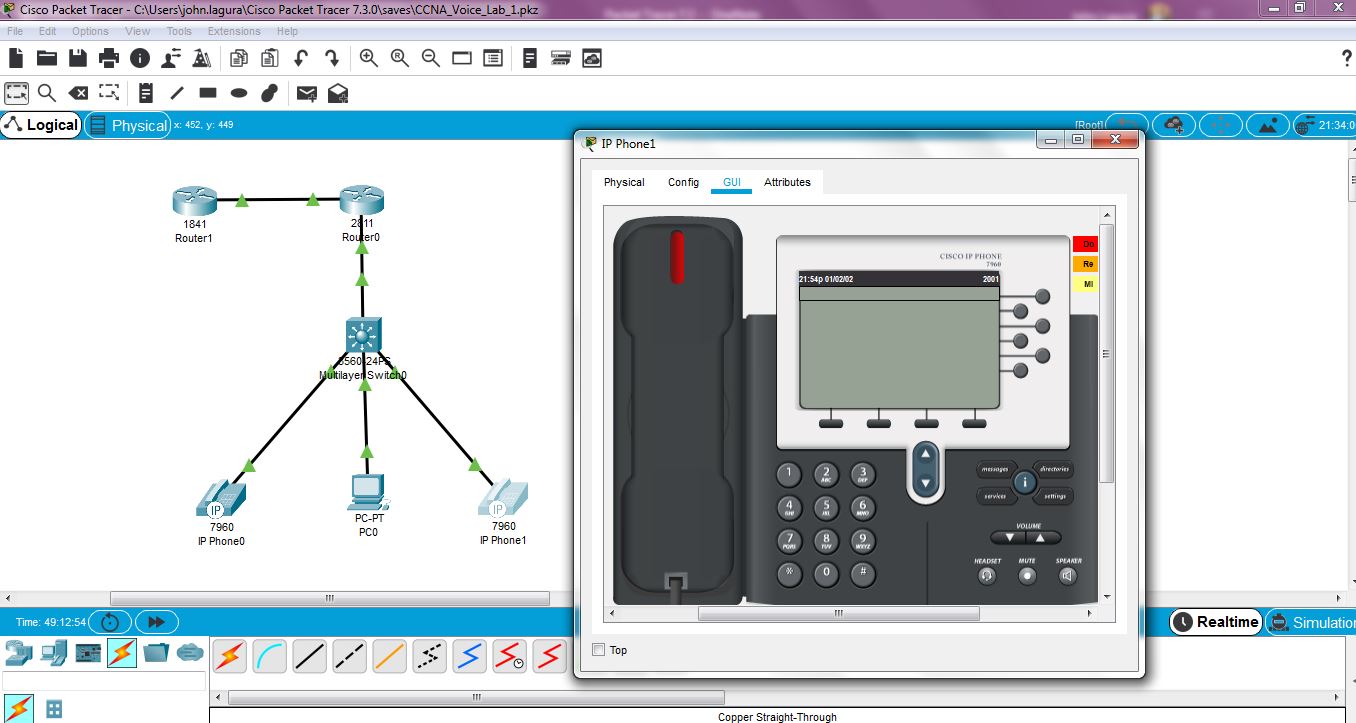
This is the Voice/Collaboration virtual lab I've built in Cisco Packet Tracer. I followed the CCNA Voice Lab Manual by Brent Sieling.


Configure Basic Router and Switch Setup.

Router>enable
Router#configure terminal
Enter configuration commands, one per line.  End with CNTL/Z.
Router(config)#hostname RtrPod1
RtrPod1(config)#no ip domain-lookup
RtrPod1(config)#enable secret class
RtrPod1(config)#line con 0
RtrPod1(config-line)#logging synchronous
RtrPod1(config-line)#exec-timeout 12 0
RtrPod1(config-line)#login
% Login disabled on line 0, until 'password' is set
RtrPod1(config-line)#password cisco
RtrPod1(config-line)#login
RtrPod1(config-line)#line vty 0 15
RtrPod1(config-line)#password cisco
RtrPod1(config-line)#exit


Switch>enable
Switch#configure terminal
Enter configuration commands, one per line.  End with CNTL/Z.
Switch(config)#hostname SwPod1
SwPod1(config)#enable secret class
SwPod1(config)#line con 0
SwPod1(config-line)#logging synchronous
SwPod1(config-line)#exec-timeout 120 0
SwPod1(config-line)#password cisco
SwPod1(config-line)#login
SwPod1(config-line)#line vty 0 15
SwPod1(config-line)#password cisco
SwPod1(config-line)#login
SwPod1(config-line)#exit


Create and name VLANs data, voice and network management.

SwPod1(config)#vlan 10
SwPod1(config-vlan)#name Data
SwPod1(config-vlan)#vlan 11
SwPod1(config-vlan)#name Management
SwPod1(config-vlan)#vlan 15
SwPod1(config-vlan)#name Voice
SwPod1(config-vlan)#exit


Configure the Trunk Port. Newer switch models default trunk encapsulation is dot1q.

SwPod1(config)#interface f0/1
SwPod1(config-if)#switchport trunk encapsulation dot1q
SwPod1(config-if)#switchport mode trunk
SwPod1(config-if)#no shutdown


Configure the Access Ports. Ensure CDP and PortFast are enabled.

SwPod1(config-if)#interface range f0/2-24
SwPod1(config-if-range)#switchport mode access
SwPod1(config-if-range)#switchport access vlan 10
SwPod1(config-if-range)#switchport voice vlan 15
SwPod1(config-if-range)#spanning-tree portfast
%Warning: portfast should only be enabled on ports connected to a single
host. Connecting hubs, concentrators, switches, bridges, etc... to this
interface  when portfast is enabled, can cause temporary bridging loops.
Use with CAUTION

SwPod1(config-if-range)#end
SwPod1#
%SYS-5-CONFIG_I: Configured from console by console

SwPod1#show run
Building configuration...

Current configuration : 4238 bytes
!
version 12.2(37)SE1
no service timestamps log datetime msec
no service timestamps debug datetime msec
no service password-encryption
!
hostname SwPod1
!
!
enable secret 5 $1$mERr$9cTjUIEqNGurQiFU.ZeCi1
!
!
spanning-tree mode pvst
!
!
interface FastEthernet0/1
 switchport trunk encapsulation dot1q
 switchport mode trunk
!
interface FastEthernet0/2
 switchport access vlan 10
 switchport mode access
 switchport nonegotiate
 switchport voice vlan 15
 spanning-tree portfast
!
interface FastEthernet0/3
 switchport access vlan 10
 switchport mode access
 switchport nonegotiate
 switchport voice vlan 15
 spanning-tree portfast


<SNIP>


Configure the Switch Management Interface (Switch Virtual Interface/SVI).

SwPod1(config)#interface vlan 11
SwPod1(config-if)#
%LINK-5-CHANGED: Interface Vlan11, changed state to up

SwPod1(config-if)#ip address 10.11.0.2 255.255.255.0
SwPod1(config-if)#exit
SwPod1(config)#ip default-gateway 10.11.0.1


Configure the Router Subinterfaces for Data, Management and Voice VLANs.

RtrPod1(config)#interface g0/1
RtrPod1(config-if)#description ### Trunk to SwPod1 ###
RtrPod1(config-if)#no shutdown
RtrPod1(config-if)#
%LINK-5-CHANGED: Interface GigabitEthernet0/1, changed state to up
%LINEPROTO-5-UPDOWN: Line protocol on Interface GigabitEthernet0/1, changed state to up
RtrPod8(config-if)#interface g0/1.10
RtrPod8(config-subif)#
%LINK-5-CHANGED: Interface GigabitEthernet0/1.10, changed state to up
%LINEPROTO-5-UPDOWN: Line protocol on Interface GigabitEthernet0/1.10, changed state to up
RtrPod1(config-subif)#description ### Data VLAN ###
RtrPod1(config-subif)#encapsulation dot1q 10
RtrPod1(config-subif)#ip address 10.10.0.1 255.255.255.0
RtrPod1(config-subif)#
RtrPod1(config-subif)#interface g0/1.11
RtrPod1(config-subif)#
%LINK-5-CHANGED: Interface GigabitEthernet0/1.11, changed state to up
%LINEPROTO-5-UPDOWN: Line protocol on Interface GigabitEthernet0/1.11, changed state to up
RtrPod1(config-subif)#description ### Management VLAN ###
RtrPod1(config-subif)#ip address 10.11.0.1 255.255.255.0

% Configuring IP routing on a LAN subinterface is only allowed if that
subinterface is already configured as part of an IEEE 802.10, IEEE 802.1Q,
or ISL vLAN.

RtrPod1(config-subif)#encapsulation dot1q 11
RtrPod1(config-subif)#ip address 10.11.0.1 255.255.255.0
RtrPod1(config-subif)#
RtrPod1(config-subif)#interface g0/1.15
RtrPod1(config-subif)#
%LINK-5-CHANGED: Interface GigabitEthernet0/1.15, changed state to up
%LINEPROTO-5-UPDOWN: Line protocol on Interface GigabitEthernet0/1.15, changed state to up
RtrPod1(config-subif)#description ### Voice VLAN ###
RtrPod1(config-subif)#encapsulation dot1q 15
RtrPod1(config-subif)#ip address 10.15.0.1 255.255.255.0


Verify Switch Layer 2 VLANs

SwPod1#show vlan

VLAN Name                             Status    Ports
---- -------------------------------- --------- -------------------------------
1    default                          active    Gig0/1, Gig0/2
10   Data                             active    Fa0/2, Fa0/3, Fa0/4, Fa0/5
                                                Fa0/6, Fa0/7, Fa0/8, Fa0/9
                                                Fa0/10, Fa0/11, Fa0/12, Fa0/13
                                                Fa0/14, Fa0/15, Fa0/16, Fa0/17
                                                Fa0/18, Fa0/19, Fa0/20, Fa0/21
                                                Fa0/22, Fa0/23, Fa0/24
11   Management                       active   
15   Voice                            active    Fa0/2, Fa0/3, Fa0/4, Fa0/5
                                                Fa0/6, Fa0/7, Fa0/8, Fa0/9
                                                Fa0/10, Fa0/11, Fa0/12, Fa0/13
                                                Fa0/14, Fa0/15, Fa0/16, Fa0/17
                                                Fa0/18, Fa0/19, Fa0/20, Fa0/21
                                                Fa0/22, Fa0/23, Fa0/24
1002 fddi-default                     active   
1003 token-ring-default               active   
1004 fddinet-default                  active   
1005 trnet-default                    active   

VLAN Type  SAID       MTU   Parent RingNo BridgeNo Stp  BrdgMode Trans1 Trans2
---- ----- ---------- ----- ------ ------ -------- ---- -------- ------ ------
1    enet  100001     1500  -      -      -        -    -        0      0
10   enet  100010     1500  -      -      -        -    -        0      0
11   enet  100011     1500  -      -      -        -    -        0      0
15   enet  100015     1500  -      -      -        -    -        0      0
1002 fddi  101002     1500  -      -      -        -    -        0      0  
1003 tr    101003     1500  -      -      -        -    -        0      0  
1004 fdnet 101004     1500  -      -      -        ieee -        0      0  
1005 trnet 101005     1500  -      -      -        ibm  -        0      0  

VLAN Type  SAID       MTU   Parent RingNo BridgeNo Stp  BrdgMode Trans1 Trans2
---- ----- ---------- ----- ------ ------ -------- ---- -------- ------ ------

Remote SPAN VLANs
------------------------------------------------------------------------------

Primary Secondary Type              Ports
------- --------- ----------------- ------------------------------------------


Verify Switch Port Assignment

SwPod1#show interface switchport
Name: Fa0/1
Switchport: Enabled
Administrative Mode: trunk
Operational Mode: trunk
Administrative Trunking Encapsulation: dot1q
Operational Trunking Encapsulation: dot1q
Negotiation of Trunking: On
Access Mode VLAN: 1 (default)
Trunking Native Mode VLAN: 1 (default)
Voice VLAN: none
Administrative private-vlan host-association: none
Administrative private-vlan mapping: none
Administrative private-vlan trunk native VLAN: none
Administrative private-vlan trunk encapsulation: dot1q
Administrative private-vlan trunk normal VLANs: none
Administrative private-vlan trunk private VLANs: none
Operational private-vlan: none
Trunking VLANs Enabled: All
Pruning VLANs Enabled: 2-1001
Capture Mode Disabled
Capture VLANs Allowed: ALL
Protected: false
Unknown unicast blocked: disabled
Unknown multicast blocked: disabled
Appliance trust: none

Name: Fa0/2
Switchport: Enabled
Administrative Mode: static access
Operational Mode: down
Administrative Trunking Encapsulation: negotiated
Operational Trunking Encapsulation: native
Negotiation of Trunking: Off
Access Mode VLAN: 10 (Data)
Trunking Native Mode VLAN: 1 (default)
Voice VLAN: 15
Administrative private-vlan host-association: none
Administrative private-vlan mapping: none
Administrative private-vlan trunk native VLAN: none
Administrative private-vlan trunk encapsulation: dot1q
Administrative private-vlan trunk normal VLANs: none
Administrative private-vlan trunk private VLANs: none
Operational private-vlan: none
Trunking VLANs Enabled: All
Pruning VLANs Enabled: 2-1001
Capture Mode Disabled
Capture VLANs Allowed: ALL
Protected: false
Unknown unicast blocked: disabled
Unknown multicast blocked: disabled
Appliance trust: none

Name: Fa0/3
Switchport: Enabled
Administrative Mode: static access
Operational Mode: down
Administrative Trunking Encapsulation: negotiated
Operational Trunking Encapsulation: native
Negotiation of Trunking: Off
Access Mode VLAN: 10 (Data)
Trunking Native Mode VLAN: 1 (default)
Voice VLAN: 15
Administrative private-vlan host-association: none
Administrative private-vlan mapping: none
Administrative private-vlan trunk native VLAN: none
Administrative private-vlan trunk encapsulation: dot1q
Administrative private-vlan trunk normal VLANs: none
Administrative private-vlan trunk private VLANs: none
Operational private-vlan: none
Trunking VLANs Enabled: All
Pruning VLANs Enabled: 2-1001
Capture Mode Disabled
Capture VLANs Allowed: ALL
Protected: false
Unknown unicast blocked: disabled
Unknown multicast blocked: disabled
Appliance trust: none


Verify Router Layer 3 Subinterface IP Assignment

RtrPod1#show ip interface brief
Interface              IP-Address      OK? Method Status                Protocol
GigabitEthernet0/0     unassigned      YES unset  administratively down down
GigabitEthernet0/1     unassigned      YES unset  up                    up
GigabitEthernet0/1.10  10.10.0.1       YES manual up                    up
GigabitEthernet0/1.11  10.11.0.1       YES manual up                    up
GigabitEthernet0/1.15  10.15.0.1       YES manual up                    up
GigabitEthernet0/2     unassigned      YES unset  administratively down down
Vlan1                  unassigned      YES unset  administratively down down


Configure DHCP Pools on the Router for Data and Voice Subnet. It's advisable to exclude the address range first and then make the network statement as the last command.

RtrPod1(config)#ip dhcp excluded-address 10.10.0.1 10.10.0.10
RtrPod1(config)#ip dhcp pool DATA
RtrPod1(dhcp-config)#default-router 10.10.0.1
RtrPod1(dhcp-config)#network 10.10.0.0 255.255.255.0
RtrPod1(dhcp-config)#exit
RtrPod1(config)#ip dhcp excluded-address 10.15.0.1 10.15.0.10
RtrPod1(config)#ip dhcp pool VOICE
RtrPod1(dhcp-config)#default-router 10.15.0.1
RtrPod1(dhcp-config)#option 150 ip 10.15.0.1
RtrPod1(dhcp-config)#network 10.15.0.0 255.255.255.0
RtrPod1(dhcp-config)#exit


Test PC Connectivity by ensuring to get an automatic IP address on the Data VLAN DHCP pool.
Verify the PC can Telnet to both the Router and Switch Management IP addresses.
Set PC IPv4 to DHCP

C:\>ipconfig

Bluetooth Connection:(default port)

   Link-local IPv6 Address.........: ::
   IP Address......................: 0.0.0.0
   Subnet Mask.....................: 0.0.0.0
   Default Gateway.................: 0.0.0.0

FastEthernet0 Connection:

   Link-local IPv6 Address.........: FE80::2D0:58FF:FE3B:79D0
   IP Address......................: 10.10.0.11
   Subnet Mask.....................: 255.255.255.0
   Default Gateway.................: 10.10.0.1

C:\>telnet 10.11.0.1
Trying 10.11.0.1 ...Open

User Access Verification

Password: <cisco>
RtrPod8>exit

[Connection to 10.11.0.1 closed by foreign host]

C:\>telnet 10.11.0.2
Trying 10.11.0.2 ...Open


User Access Verification

Password: <cisco>
SwPod1>


Connect an IP Phone to the Switch. Monitor Power over Ethernet (PoE) output on the Switch console.

SwPod1#
%ILPOWER-7-DETECT: Interface Fa0/3: Power Device detected: IEEE PD
%ILPOWER-5-POWER_GRANTED: Interface Fa0/3: Power granted
%LINK-5-CHANGED: Interface FastEthernet0/3, changed state to up
%LINEPROTO-5-UPDOWN: Line protocol on Interface FastEthernet0/3, changed state to up
%LINK-5-CHANGED: Interface FastEthernet0/3, changed state to up
SwPod1#
%ILPOWER-7-DETECT: Interface Fa0/4: Power Device detected: IEEE PD
%ILPOWER-5-POWER_GRANTED: Interface Fa0/4: Power granted
%LINK-5-CHANGED: Interface FastEthernet0/4, changed state to up
%LINEPROTO-5-UPDOWN: Line protocol on Interface FastEthernet0/4, changed state to up
%LINK-5-CHANGED: Interface FastEthernet0/4, changed state to up


Verify the Switch PoE usage. Take note each IP phone consumed about 10 Watts (total Used: 20 w). The Remaining power on the Switch is 350 w.

SwPod1#show power inline
Available:370.0(w)  Used:20.0(w)  Remaining:350.0(w)

Interface Admin  Oper       Power   Device              Class Max
                            (Watts)
--------- ------ ---------- ------- ------------------- ----- ----
Fa0/1     auto   off        0.0     n/a                 n/a   15.4
Fa0/2     auto   off        0.0     n/a                 n/a   15.4
Fa0/3     auto   on         10.0    IP Phone 7960       3     15.4
Fa0/4     auto   on         10.0    IP Phone 7960       3     15.4
Fa0/5     auto   off        0.0     n/a                 n/a   15.4
Fa0/6     auto   off        0.0     n/a                 n/a   15.4
Fa0/7     auto   off        0.0     n/a                 n/a   15.4
Fa0/8     auto   off        0.0     n/a                 n/a   15.4
Fa0/9     auto   off        0.0     n/a                 n/a   15.4
Fa0/10    auto   off        0.0     n/a                 n/a   15.4
Fa0/11    auto   off        0.0     n/a                 n/a   15.4
Fa0/12    auto   off        0.0     n/a                 n/a   15.4
Fa0/13    auto   off        0.0     n/a                 n/a   15.4
Fa0/14    auto   off        0.0     n/a                 n/a   15.4
Fa0/15    auto   off        0.0     n/a                 n/a   15.4
Fa0/16    auto   off        0.0     n/a                 n/a   15.4
Fa0/17    auto   off        0.0     n/a                 n/a   15.4
Fa0/18    auto   off        0.0     n/a                 n/a   15.4
Fa0/19    auto   off        0.0     n/a                 n/a   15.4
Fa0/20    auto   off        0.0     n/a                 n/a   15.4
Fa0/21    auto   off        0.0     n/a                 n/a   15.4
Fa0/22    auto   off        0.0     n/a                 n/a   15.4
Fa0/23    auto   off        0.0     n/a                 n/a   15.4
Fa0/24    auto   off        0.0     n/a                 n/a   15.4


Notice the IP phone got an IP address from the Voice DHCP pool.

RtrPod1#sh ip dhcp bind
IP address       Client-ID/              Lease expiration        Type
                 Hardware address
10.10.0.11       00D0.583B.79D0           --                     Automatic
10.15.0.11       0002.16D1.B005           --                     Automatic
10.15.0.12       00E0.A39E.541C           --                     Automatic


SwPod1#show mac address-table
          Mac Address Table
-------------------------------------------

Vlan    Mac Address       Type        Ports
----    -----------       --------    -----

   1    00e0.a39d.3802    DYNAMIC     Fa0/1
  10    00e0.a39d.3802    DYNAMIC     Fa0/1
  11    00e0.a39d.3802    DYNAMIC     Fa0/1
  15    0002.16d1.b005    DYNAMIC     Fa0/3
  15    00e0.a39d.3802    DYNAMIC     Fa0/1
  15    00e0.a39e.541c    DYNAMIC     Fa0/4

SwPod1#show cdp neighbor
Capability Codes: R - Router, T - Trans Bridge, B - Source Route Bridge
                  S - Switch, H - Host, I - IGMP, r - Repeater, P - Phone
Device ID    Local Intrfce   Holdtme    Capability   Platform    Port ID
RtrPod8      Fas 0/1          138            R       C2900       Gig 0/1
RtrPod8      Fas 0/1          138            R       C2900       Gig 0/1.10
RtrPod8      Fas 0/1          138            R       C2900       Gig 0/1.11
RtrPod8      Fas 0/1          138            R       C2900       Gig 0/1.15
IP Phone     Fas 0/3          151            H P     7960        
IP Phone     Fas 0/4          151            H P     7960    


Configure the new Router as the NTP Server with a Stratum of 4. CUCM will not trust an NTP server with a Stratum of 7 or higher.

Router>enable
Router#configure terminal
Enter configuration commands, one per line.  End with CNTL/Z.
Router(config)#hostname NTP_SERVER
NTP_SERVER(config)#interface f0/0
NTP_SERVER(config-if)#ip address 192.168.0.1 255.255.255.0
NTP_SERVER(config-if)#no shutdown
NTP_SERVER(config-if)#
%LINK-5-CHANGED: Interface FastEthernet0/0, changed state to up
NTP_SERVER(config-if)#exit
NTP_SERVER(config)#clock timezone SGT ?
  <-23 - 23>  Hours offset from UTC
NTP_SERVER(config)#clock timezone SGT 8
NTP_SERVER(config)#exit
NTP_SERVER#
%SYS-5-CONFIG_I: Configured from console by console

NTP_SERVER#clock set 14:04:00 25 Jul 2020
NTP_SERVER#configure terminal
Enter configuration commands, one per line.  End with CNTL/Z.
NTP_SERVER(config)#ntp ?
  authenticate        Authenticate time sources
  authentication-key  Authentication key for trusted time sources
  master              Act as NTP master clock
  server              Configure NTP server
  trusted-key         Key numbers for trusted time sources
  update-calendar     Configure NTP to update the calendar.
NTP_SERVER(config)#ntp master ?
  <1-15>  Act as NTP master clock
  <cr>
NTP_SERVER(config)#ntp master 4
NTP_SERVER(config)#end
NTP_SERVER#
%SYS-5-CONFIG_I: Configured from console by console

NTP_SERVER#show clock
22:5:18.274 SGT Sat Jul 25 2020


Configure NTP on the VoIP Gateway Router.

RtrPod1>enable
Password:<class>
RtrPod1#sh cdp n
Capability Codes: R - Router, T - Trans Bridge, B - Source Route Bridge
                  S - Switch, H - Host, I - IGMP, r - Repeater, P - Phone
Device ID    Local Intrfce   Holdtme    Capability   Platform    Port ID
RtrPod1#configure terminal
Enter configuration commands, one per line.  End with CNTL/Z.
RtrPod1(config)#interface g0/0
RtrPod1(config-if)#ip address 192.168.0.2 255.255.255.0
RtrPod1(config-if)#no shutdown
RtrPod1(config-if)#
%LINK-5-CHANGED: Interface GigabitEthernet0/0, changed state to up
%LINEPROTO-5-UPDOWN: Line protocol on Interface GigabitEthernet0/0, changed state to up
RtrPod1(config-if)#exit
RtrPod1(config)#ntp server 192.168.0.1
RtrPod1(config)#end
RtrPod1#
%SYS-5-CONFIG_I: Configured from console by console
RtrPod1#ping 192.168.0.1
Type escape sequence to abort.
Sending 5, 100-byte ICMP Echos to 192.168.0.1, timeout is 2 seconds:
!!!!!
Success rate is 100 percent (5/5), round-trip min/avg/max = 0/0/0 ms


Verify NTP and note NTP synchronization is slow.

RtrPod1#show ntp status
Clock is unsynchronized, stratum 16, no reference clock
nominal freq is 250.0000 Hz, actual freq is 249.9990 Hz, precision is 2**24
reference time is 00000000.00000000 (00:00:00.000 UTC Mon Jan 1 1990)
clock offset is 0.00 msec, root delay is 0.00  msec
root dispersion is 0.00 msec, peer dispersion is 0.00 msec.
loopfilter state is 'FSET' (Drift set from file), drift is - 0.000001193 s/s system poll interval is 4, never updated.

RtrPod1#show ntp status
Clock is synchronized, stratum 16, reference is 192.168.0.1
nominal freq is 250.0000 Hz, actual freq is 249.9990 Hz, precision is 2**24
reference time is 161A707E.0000039C (7:13:2.924 UTC Wed Dec 18 2047)
clock offset is 0.00 msec, root delay is 1.00  msec
root dispersion is 10.35 msec, peer dispersion is 0.12 msec.
loopfilter state is 'CTRL' (Normal Controlled Loop), drift is - 0.000001193 s/s system poll interval is 4, last update was 8 sec ago.

RtrPod1#show ntp association

address         ref clock       st   when     poll    reach  delay          offset            disp
 ~192.168.0.1   127.127.1.1     4    6        16      1      0.00           864579776566.00   0.00
 * sys.peer, # selected, + candidate, - outlyer, x falseticker, ~

RtrPod1#show ntp association

address         ref clock       st   when     poll    reach  delay          offset            disp
*~192.168.0.1   127.127.1.1     4    4        16      157    0.00           0.00              0.12
 * sys.peer, # selected, + candidate, - outlyer, x falseticker, ~

RtrPod1#show clock
14:12:14.270 UTC Sat Jul 25 2020

RtrPod1(config)#clock timezone SGT 8   // CONFIGURE SAME TIMEZONE WITH NTP SERVER (UTC +8)
RtrPod1(config)#end
RtrPod1#
%SYS-5-CONFIG_I: Configured from console by console

RtrPod1#show clock
22:23:58.876 SGT Sat Jul 25 2020

Saturday, August 1, 2020

Cisco Packet Tracer 7.3

I've been securing our Voice Infrastructure for a while now and I needed to refresh my Voice skills. There's a budget constraint in building my Voice/Collaboration Lab (especially during this COVID-19 pandemic) so I used Cisco Packet Tracer (PT) instead. PT has come a long way since my Cisco Networking Academy (NetAcad) days. In PT version 7.3, they've added new Cisco devices such as 4331 ISR, 3504 WLC, ASA 5506, run Dynamic ARP Inspection (DAI) and many more. You can download PT for free but you'll need to register to NetAcad first, which is also free. Just run and follow the installation wizard.


You'll need to allow PT in your personal firewall.


You can either login (sign up in NetAcad) for full functionality or login as Guest, which run limited functions. There's a simple "hack" for full PT access, just disable your PC Wifi/Internet connection, open PT and re-enable your Wifi.


This is my Voice/Collaboration Lab where I registered two 7960 IP phones using a 2811 router acting as Cisco Unified Communications Manager Express (CUCME). I'm using the CCNA Voice Lab Manual by Brent Sieling.


Saturday, July 4, 2020

Configuring SPAN on a Cisco Nexus Switch

This is how to configure SPAN (Switch Port Analyzer) on a Cisco Nexus switch.

N5K(config)# show monitor session all
Note: There are no sessions configured

N5K# configure terminal
Enter configuration commands, one per line.  End with CNTL/Z.
N5K(config)# monitor session  10
N5K(config-monitor)# ?
  description  Session description (max 32 characters)
  destination  Destination configuration
  filter       Filter configuration
  mtu          Set the MTU size for SPAN packets
  no           Negate a command or set its defaults
  shut         Shut a monitor session
  source       Source configuration
  end          Go to exec mode
  exit         Exit from command interpreter
  pop          Pop mode from stack or restore from name
  push         Push current mode to stack or save it under name
  where        Shows the cli context you are in

N5K(config-monitor)# source ?
  interface  Configure interfaces
  vlan       Vlan type
  vsan       Vsan type

N5K(config-monitor)# source interface ?
  ethernet          Ethernet IEEE 802.3z
  fc                Fiber Channel interface
  port-channel      Port Channel interface
  san-port-channel  SAN Port Channel interface
  vfc               Virtual FC interface

N5K(config-monitor)# source interface ethernet 1/30 ?
  <CR>  
  ,      Multi range separator
  -      Range separator
  .      Sub interface separator
  both   Both
  rx     Ingress
  tx     Egress

N5K(config-monitor)# source interface ethernet 1/30 tx ?
  <CR>  

N5K(config-monitor)# source interface ethernet 1/30 tx
N5K(config-monitor)# destination interface ethernet 1/35
N5K(config-monitor)# end
N5K# show monitor session 10
   session 10
---------------
type              : local
state             : down (Session admin shut)
acl-name          : acl-name not specified
source intf       :
    rx            :
    tx            : Eth1/30      
    both          :
source VLANs      :
    rx            :
source VSANs      :
    rx            :
destination ports : Eth1/35      

Legend: f = forwarding enabled, l = learning enabled


N5K(config)# monitor session 10
N5K(config-monitor)# no shut

N5K# show run monitor

!Command: show running-config monitor
!Time: Tue Oct  1 01:46:27 2019

version 7.0(1)N1(1)
monitor session 10
  source interface Ethernet1/30 tx
  destination interface Ethernet1/35
  no shut

N5K# show monitor ?
  <CR>     
  >         Redirect it to a file
  >>        Redirect it to a file in append mode
  internal  Commands for internal use
  session   Show session info
  |         Pipe command output to filter

N5K# show monitor

Session  State        Reason                  Description
-------  -----------  ----------------------  --------------------------------
10       down         No operational src/dst 

N5K# show monitor session 10

   session 10
---------------
type              : local
state             : down (No operational src/dst)
acl-name          : acl-name not specified
source intf       :
    rx            :
    tx            : Eth1/30      
    both          :
source VLANs      :
    rx            :
source VSANs      :
    rx            :
destination ports : Eth1/35      

Legend: f = forwarding enabled, l = learning enabled


N5K(config-if)# show run interface e1/30


!Command: show running-config interface Ethernet1/30
!Time: Tue Oct  1 01:51:06 2019

version 7.0(1)N1(1)

interface Ethernet1/30
  switchport mode trunk
  speed 1000
  duplex full


N5K(config-if)# show run interface e1/35


!Command: show running-config interface Ethernet1/35
!Time: Tue Oct  1 01:50:36 2019

version 7.0(1)N1(1)

interface Ethernet1/35
  description ### FREE ###


N5K(config)# configure terminal
N5K(config-if)# interface e1/35

N5K(config-if)# speed ?
  10     10Mb/s
  100    100Mb/s
  1000   1Gb/s
  10000  10Gb/s
  40000  40Gb/s
  auto   Auto negotiate speed

N5K(config-if)# speed 1000

N5K(config-if)# duplex full
N5K(config-if)# switchport mode trunk


N5K# show run int e1/35


!Command: show running-config interface Ethernet1/35
!Time: Tue Oct  1 01:51:58 2019

version 7.0(1)N1(1)

interface Ethernet1/35
  description ### FREE ###
  switchport mode trunk
  speed 1000
  duplex full


N5K# show monitor

Session  State        Reason                  Description
-------  -----------  ----------------------  --------------------------------
10       down         Dst in wrong mode


N5K(config-if)# interface e1/35
N5K(config-if)# switchport ?
  <CR>        
  access       Set access mode characteristics of the interface
  autostate    Include or exclude this port from vlan link up calculation
  block        Block specified outbound traffic for all VLANs
  description  Enter description of maximum 80 characters
  dot1q        Configure dot1q EtherType value
  host         Set port host
  mode         Enter the port mode
  monitor      Configures an interface as span-destination
  monitor      Monitor session related traffic
  priority     CoS Priority parameter
  trunk        Configure trunking parameters on an interface
  voice        Set voice mode characterestics of the interface

N5K(config-if)# switchport monitor


N5K(config-if)# show monitor session all

   session 10
---------------
type              : local
state             : up
acl-name          : acl-name not specified
source intf       :
    rx            :
    tx            : Eth1/30      
    both          :
source VLANs      :
    rx            :
source VSANs      :
    rx            :
destination ports : Eth1/35      

Legend: f = forwarding enabled, l = learning enabled


N5K(config-if)# show run interface e1/35


!Command: show running-config interface Ethernet1/35
!Time: Tue Oct  1 02:48:39 2019

version 7.0(1)N1(1)

interface Ethernet1/35
  description ### FREE ###
  switchport mode trunk
  switchport monitor
  speed 1000
  duplex full

N5K(config-if)# show interface e1/35
Ethernet1/35 is up
 Dedicated Interface
  Hardware: 1000/10000 Ethernet, address: 8c60.4f2b.268a (bia 8c60.4f2b.268a)
  Description: ### FREE ###
  MTU 1500 bytes, BW 1000000 Kbit, DLY 10 usec
  reliability 255/255, txload 4/255, rxload 1/255
  Encapsulation ARPA
  Port mode is trunk
  full-duplex, 1000 Mb/s, media type is 1G
  Beacon is turned off
  Input flow-control is off, output flow-control is off
  Rate mode is dedicated
  Switchport monitor is on
  EtherType is 0x8100
  Last link flapped 00:02:39
  Last clearing of "show interface" counters 00:57:01
  4 interface resets
  30 seconds input rate 0 bits/sec, 0 packets/sec
  30 seconds output rate 3741480 bits/sec, 547 packets/sec
  Load-Interval #2: 5 minute (300 seconds)
    input rate 80 bps, 0 pps; output rate 16.82 Mbps, 2.32 Kpps
  RX
    0 unicast packets  4 multicast packets  57 broadcast packets
    61 input packets  15360 bytes
    0 jumbo packets  0 storm suppression bytes
    0 runts  0 giants  0 CRC  0 no buffer
    0 input error  0 short frame  0 overrun   0 underrun  0 ignored
    0 watchdog  0 bad etype drop  0 bad proto drop  0 if down drop
    0 input with dribble  0 input discard
    0 Rx pause
  TX
    9230721 unicast packets  58953 multicast packets  13734 broadcast packets
    9303408 output packets  7566100980 bytes
    341 jumbo packets
    0 output error  0 collision  0 deferred  0 late collision
    0 lost carrier  0 no carrier  0 babble 0 output discard
    0 Tx pause


N5K# show run monitor

!Command: show running-config monitor
!Time: Tue Oct  1 05:24:29 2019

version 7.0(1)N1(1)
monitor session 10
  source interface Ethernet1/30 tx
  destination interface Ethernet1/35
  no shut

N5K(config)# no monitor session 10
N5K(config)# show run monitor

!Command: show running-config monitor
!Time: Tue Oct  1 05:24:41 2019

version 7.0(1)N1(1)


You can also filter the capture using ACL.
 
N5K(config)# ip access-list VLAN10
N5K(config-acl)# permit ip any any ?
  <CR>           
  dscp           Match packets with given dscp value
  fragments      Check non-initial fragments
  ingress-intf   Configure match based on ingress interface
  precedence     Match packets with given precedence value
  priority       Syntax: priority <value>; To set priority
  redirect       Syntax: redirect <intf-1,intf-2,...>; Redirect to interface(s)
  set-vlan       Syntax: set-vlan <vlan id>; To set vlan id
  strip-vlan     Syntax: strip-vlan; To remove packet vlan
  ttl            Match Packets with a given TTL value
  vlan           Configure match based on vlan
  vlan-priority  Configure match based on priority
  log            Log matches against this entry

N5K(config-acl)# permit ip any any vlan ?
  <0-4095>  VLAN number

N5K(config-acl)# permit ip any any vlan 10

N5K(config)# monitor session 10
N5K(config-monitor)# shut   // SHUTDOWN FIRST
N5K(config-monitor)# filter ?
  access-group  Access control group

N5K(config-monitor)# filter access-group ?
  WORD  Access control list name

N5K(config-monitor)# filter access-group VLAN100
N5K(config-monitor)# no shut  // RE-ENABLE
 

N5K# show monitor session 10

   session 10

---------------

type              : local

state             : up

acl-name          : VLAN10

source intf       :

    rx            :         

    tx            : Eth1/30         

    both          :         

source VLANs      :

    rx            :

destination ports : Eth1/35      


Legend: f = forwarding enabled, l = learning enabled


Friday, June 12, 2020

Configuring Syslog on a Cisco Nexus Switch

There's a couple of default VRF configured on the Cisco Nexus switch: default and management. The management VRF will be used if the Nexus switch is configured with a static default route (a Layer 3 switch).

N5K# show vrf
VRF-Name                           VRF-ID State   Reason                       
default                                 1 Up      --                           
management                              2 Up      --

N5K# configure terminal
Enter configuration commands, one per line.  End with CNTL/Z.
N5K(config)# logging ?
  console           Set console logging
  event             Interface events
  history           Modifies severity level or size for history table
  ip                IP configuration
  level             Facility parameter for syslog messages
  logfile           Set File logging
  message           Interface events
  module            Set module(linecard) logging
  monitor           Set terminal line(monitor) logging level
  origin-id         Enable origin information for Remote Syslog Server
  persistent        Set persistent logging
  rate-limit        Enables rate limit for log messages
  server            Enable forwarding to Remote Syslog Server
  source-interface  Enable Source-Interface for Remote Syslog Server
  timestamp         Set logging timestamp granularity

N5K(config)# logging origin-id ?
  hostname  Use hostname as origin-id of logging messages
  ip        Use ip address as origin-id of logging messages
  string    Use text string as origin-id of logging messages

N5K(config)# logging origin-id hostname    // THIS WILL DISPLAY THE DEVICE HOSTNAME IN SYSLOG
N5K(config)# logging server ?
  A.B.C.D|A:B::C:D|WORD  Hostname/IPv4/IPv6 address of the Remote Syslog Server

N5K(config)# logging server 10.9.6.7 ?
  <CR>     
  <0-7>     0-emerg;1-alert;2-crit;3-err;4-warn;5-notif;6-inform;7-debug
  facility  Facility to use when forwarding to server
  port      Destination Port when forwarding to remote server
  use-vrf   Display per-VRF information

N5K(config)# logging server 10.9.6.7 6 use-vrf ?
  WORD        VRF name (Max Size 32)
  default     Known VRF name
  management  Known VRF name

N5K(config)# logging server 10.9.6.7 6 use-vrf management


If you've configured Syslog with a wrong VRF, the show logging output will display an error "This server is temporarily unreachable." Ensure the Syslog IP address is reachable on the configured VRF. Note the default Syslog severity level is 6 (information) and default UDP port 514.

N5K# show logging

Logging console:                disabled
Logging monitor:                enabled (Severity: notifications)
Logging linecard:               enabled (Severity: notifications)
Logging fex:            enabled (Severity: notifications)
Logging timestamp:              Seconds
Logging source-interface :      disabled
Logging server:                 enabled
{10.9.6.7}
        server severity:        information
        server facility:        local7
        server VRF:             management
        server port:            514
Logging origin_id :             enabled (string: N5K)
Logging logflash:               disabled
Logging rate-limit:             enabled
Logging logfile:                enabled
        Name - messages: Severity - notifications Size - 4194304

Logging persistent :            disabled (Reason: Logflash CF card not online.)

N5K# ping 10.9.6.7 vrf management
PING 10.9.6.7 (10.9.6.7): 56 data bytes
64 bytes from 10.9.6.7: icmp_seq=0 ttl=232 time=35.613 ms
64 bytes from 10.9.6.7: icmp_seq=1 ttl=232 time=35.573 ms
64 bytes from 10.9.6.7: icmp_seq=2 ttl=232 time=35.69 ms
64 bytes from 10.9.6.7: icmp_seq=3 ttl=232 time=35.523 ms
64 bytes from 10.9.6.7: icmp_seq=4 ttl=232 time=35.57 ms

--- 10.9.6.7 ping statistics ---
5 packets transmitted, 5 packets received, 0.00% packet loss
round-trip min/avg/max = 35.523/35.593/35.69 ms

Friday, May 1, 2020

Configuring Splunk Enterprise for Cisco Networks Add-on (Syslog)

There are free online courses in Splunk website and I took the Free Splunk Fundamentals course.


You can download and install a free Splunk Enterprise in order to perform the lab exercises. Go to splunk.com > click Free Splunk.


Login or create a free Splunk account.


Select Splunk Enterprise > click Download Free 60-Day Trial.


Under Windows tab > select 64-bit Windows 10 > click Download Now.


Select the check boxes for the End User License Agreement (EULA) > click Start Your Download Now.


Click Save File.


Select Check this box to accept the License Agreement > click Next.


Create an administrator account.


You can optionally create a Desktop shortcut > click Install.


Click Yes to continue (run as admin).


Click Finish.


Splunk will be launched in a web browser. Login using the account created earlier.


A pop up message will appear > click Got it to continue.


Another pop up message will appear > click Don't show me this again to continue.


This is the Splunk Enterprise home page or whenever you clicked splunk>enterprise on upper left.


Create a new user with power role under Settings > USERS AND AUTHENTICATION > Users.


Click New User.


Type the Name (username) > optional Full Name > optional Email address > Set password (type twice to Confirm password) > select Time Zone: GMT+8:00.


Click on user (on Selected item column) to remove it and then click power to move it under Selected item(s) column > uncheck Require password change on first login > click Save.


To configure Splunk Enterprise as a Syslog server and listen to UDP port 514, click Find More Apps.


Type/search: cisco


Look for Cisco Networks Add-on for Splunk Enterprise > click Install.


Login to your account > click to accept the license agreement > click Login and Install.


A restart is required > click Restart Now.


The restart process take a few minutes.


Click OK and re-login to Splunk Enterprise


Go to Settings > Data > Data inputs.


Under UDP > click Add new.


Leave UDP selected > type Port: 514 > leave the other fields blank > click Next.


Under Select Source Type > type/search: cisco> select cisco:ios > leave the other settings in default > click Review.


Review the summary settings > click Submit.


Click Start Searching.


I configured the Cisco devices in my lab to send Syslogs to Splunk Enterprise running on my Windows 10 machine (192.168.1.100).


CSRv#configure terminal
Enter configuration commands, one per line.  End with CNTL/Z.
CSRv(config)#logging trap informational
CSRv(config)#logging origin-id hostname
CSRv(config)#logging host 192.168.1.100
CSRv(config)#end

CSRv#ping 192.168.1.100
Type escape sequence to abort.
Sending 5, 100-byte ICMP Echos to 192.168.1.100, timeout is 2 seconds:
!!!!!
Success rate is 100 percent (5/5), round-trip min/avg/max = 1/2/4 ms

CSRv#show logging
Syslog logging: enabled (0 messages dropped, 2 messages rate-limited, 0 flushes, 0 overruns, xml disabled, filtering disabled)

No Active Message Discriminator.

No Inactive Message Discriminator.

    Console logging: level debugging, 132 messages logged, xml disabled,
                     filtering disabled
    Monitor logging: level debugging, 0 messages logged, xml disabled,
                     filtering disabled
    Buffer logging:  level debugging, 146 messages logged, xml disabled,
                    filtering disabled
    Exception Logging: size (4096 bytes)
    Count and timestamp logging messages: disabled
    Persistent logging: disabled

No active filter modules.

    Trap logging: level informational, 141 message lines logged
        Logging to 192.168.1.100  (udp port 514, audit disabled,
              link up),
              2 message lines logged,
              0 message lines rate-limited,
              0 message lines dropped-by-MD,
              xml disabled, sequence number disabled
              filtering disabled
        Logging Source-Interface:       VRF Name:

Log Buffer (4096 bytes):

Apr 26 03:16:08.106: %SYS-6-LOGGINGHOST_STARTSTOP: Logging to host 192.168.1.100 port 0 CLI Request Triggered
Apr 26 03:16:09.106: %SYS-6-LOGGINGHOST_STARTSTOP: Logging to host 192.168.1.100 port 514 started - CLI initiated
Apr 26 03:16:09.486: %SYS-5-CONFIG_I: Configured from console by admin on vty1 (192.168.1.100)


SW1#configure terminal
Enter configuration commands, one per line.  End with CNTL/Z.
SW1(config)#logging trap informational
SW1(config)#logging host 192.168.1.100
SW1(config)#end

SW1#ping 192.168.1.100

Type escape sequence to abort.
Sending 5, 100-byte ICMP Echos to 192.168.1.100, timeout is 2 seconds:
!!!!!
Success rate is 100 percent (5/5), round-trip min/avg/max = 1/2/8 ms

SW1#show logging
Syslog logging: enabled (0 messages dropped, 1 messages rate-limited, 0 flushes, 0 overruns, xml disabled, filtering disabled)
    Console logging: level debugging, 35 messages logged, xml disabled,
                     filtering disabled
    Monitor logging: level debugging, 0 messages logged, xml disabled,
                     filtering disabled
    Buffer logging: level debugging, 35 messages logged, xml disabled,
                    filtering disabled
    Exception Logging: size (4096 bytes)
    Count and timestamp logging messages: disabled
    File logging: disabled
    Trap logging: level informational, 38 message lines logged
        Logging to 192.168.1.100, 1 message lines logged, xml disabled,
               filtering disabled
         
Log Buffer (4096 bytes):

Apr 26 03:17:29.553: %SYS-5-CONFIG_I: Configured from console by vty0 (192.168.1.100)


LAB-ASA5515x# configure terminal
LAB-ASA5515x(config)# logging enable
LAB-ASA5515x(config)# logging trap informational
LAB-ASA5515x(config)# logging device-id hostname
LAB-ASA5515x(config)# logging host inside 192.168.1.100
LAB-ASA5515x(config)# end

LAB-ASA5515x# ping 192.168.1.100
Type escape sequence to abort.
Sending 5, 100-byte ICMP Echos to 192.168.1.100, timeout is 2 seconds:
!!!!!
Success rate is 100 percent (5/5), round-trip min/avg/max = 1/2/10 ms

LAB-ASA5515x# show logging
Syslog logging: enabled
    Facility: 20
    Timestamp logging: disabled
    Hide Username logging: enabled
    Standby logging: disabled
    Debug-trace logging: disabled
    Console logging: disabled
    Monitor logging: disabled
    Buffer logging: disabled
    Trap logging: level informational, facility 20, 35180 messages logged
        Logging to inside 192.168.1.100, UDP TX:5
    Global TCP syslog stats::
        NOT_PUTABLE: 0, ALL_CHANNEL_DOWN: 0
        CHANNEL_FLAP_CNT: 0, SYSLOG_PKT_LOSS: 0
        PARTIAL_REWRITE_CNT: 0
    Permit-hostdown logging: disabled
    History logging: disabled
    Device ID: hostname "LAB-ASA5515x"
    Mail logging: disabled
    ASDM logging: disabled


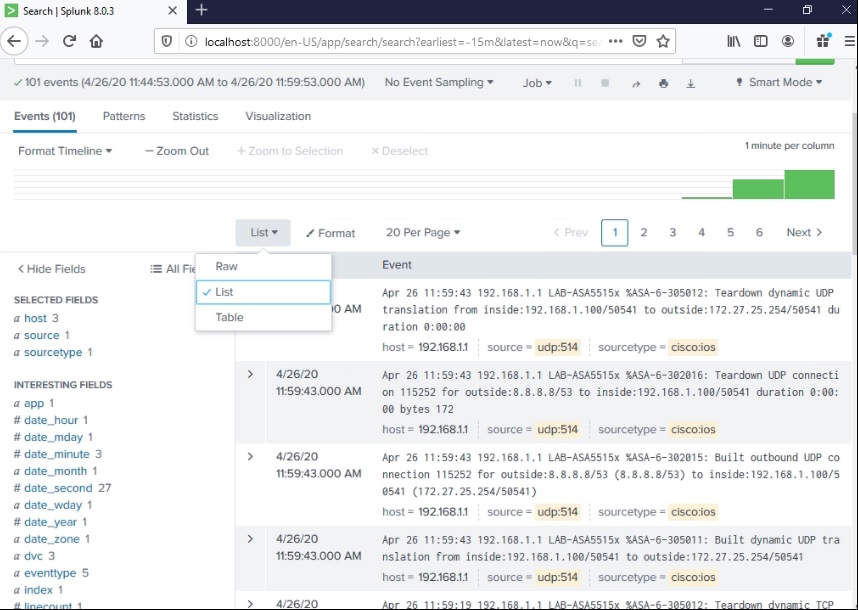
Click Time Range: Last 15 minutes > click search (magnifying glass icon).


I initially didn't get any Syslog message, so I had permit the port/application in my personal firewall.


Click List drop-down option > select Raw.


Notice the hostnames: CSRv (192.168.1.140) and LAB-ASA5515-X (192.168.1.1) were displayed since it's explicitly configured.