I never expected I would be able to configure and troubleshoot a live RIP network in my networking career. I always read about RIP in Cisco books and implement it in a lab environment. We're running RIP version 2 for our iDirect VSAT network due to simplicity and ease of configuration of its dynamic routing protocol
Router#show run | section rip
router rip
version 2
network 10.0.0.0
default-information originate
no auto-summary
!
address-family ipv4 vrf VRF-A
redistribute bgp 23703
network 10.0.0.0
no auto-summary
version 2
!
address-family ipv4 vrf VRF-B
redistribute bgp 23703
network 10.0.0.0
no auto-summary
version 2
exit-address-family
<OUTPUT TRUNCATED>
Router#show ip protocols
*** IP Routing is NSF aware ***
Routing Protocol is "application"
Sending updates every 0 seconds
Invalid after 0 seconds, hold down 0, flushed after 0
Outgoing update filter list for all interfaces is not set
Incoming update filter list for all interfaces is not set
Maximum path: 32
Routing for Networks:
Routing Information Sources:
Gateway Distance Last Update
Distance: (default is 4)
<OUTPUT TRUNCATED>
Routing Protocol is "rip"
Outgoing update filter list for all interfaces is not set
Incoming update filter list for all interfaces is not set
Sending updates every 30 seconds, next due in 18 seconds
Invalid after 180 seconds, hold down 180, flushed after 240
Redistributing: rip
Default version control: send version 2, receive version 2
Interface Send Recv Triggered RIP Key-chain
GigabitEthernet0/0.40 2 2
GigabitEthernet0/1 2 2
GigabitEthernet0/2 2 2
Loopback0 2 2
Automatic network summarization is not in effect
Maximum path: 4
Routing for Networks:
10.0.0.0
Routing Information Sources:
Gateway Distance Last Update
10.116.23.67 120 00:00:28
10.116.23.66 120 7w4d
Distance: (default is 120)
Router#show ip route rip
Codes: L - local, C - connected, S - static, R - RIP, M - mobile, B - BGP
D - EIGRP, EX - EIGRP external, O - OSPF, IA - OSPF inter area
N1 - OSPF NSSA external type 1, N2 - OSPF NSSA external type 2
E1 - OSPF external type 1, E2 - OSPF external type 2
i - IS-IS, su - IS-IS summary, L1 - IS-IS level-1, L2 - IS-IS level-2
ia - IS-IS inter area, * - candidate default, U - per-user static route
o - ODR, P - periodic downloaded static route, H - NHRP, l - LISP
a - application route
+ - replicated route, % - next hop override
Gateway of last resort is 10.106.193.57 to network 0.0.0.0
10.0.0.0/8 is variably subnetted, 276 subnets, 6 masks
R 10.113.1.128/26
[120/2] via 10.116.23.67, 00:00:14, GigabitEthernet0/0.400
R 10.113.2.0/26
[120/2] via 10.116.23.67, 00:00:14, GigabitEthernet0/0.400
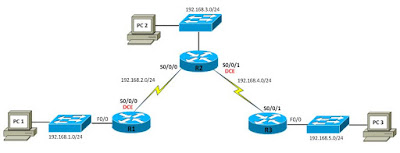
Below is a RIP lab I did while studying for Network+, which covers classful and classless network scenarios.
Scenario A: Running RIPv1 on Classful Networks
R1#configure terminal
Enter configuration commands, one per line. End with CNTL/Z.
R1(config)#no ip domain-lookup
R1(config)#enable secret cisco
R1(config)#banner motd $
Enter TEXT message. End with the character '$'
********************************
AUTHORIZED ACCESS ONLY
********************************
$
R1(config)#line console 0
R1(config-line)#password cisco
R1(config-line)#login
R1(config-line)#logging synchronous
R1(config-line)#line vty 0 4
R1(config-line)#password cisco
R1(config-line)#login
R1(config-line)#logging synchronous
R2#configure terminal
Enter configuration commands, one per line. End with CNTL/Z.
R2(config)#no ip domain-lookup
R2(config)#enable secret cisco
R2(config)#banner motd $
Enter TEXT message. End with the character '$'
********************************
AUTHORIZED ACCESS ONLY
********************************
$
R2(config)#line console 0
R2(config-line)#password cisco
R2(config-line)#login
R2(config-line)#logging synchronous
R2(config-line)#line vty 0 4
R2(config-line)#password cisco
R2(config-line)#login
R2(config-line)#logging synchronous
R3#configure terminal
Enter configuration commands, one per line. End with CNTL/Z.
R3(config)#no ip domain-lookup
R3(config)#enable secret cisco
R3(config)#banner motd $
Enter TEXT message. End with the character '$'
********************************
AUTHORIZED ACCESS ONLY
********************************
$
R3(config)#line console 0
R3(config-line)#password cisco
R3(config-line)#login
R3(config-line)#logging synchronous
R3(config-line)#line vty 0 4
R3(config-line)#password cisco
R3(config-line)#login
R3(config-line)#logging synchronous
R1(config)#interface fastethernet0/0
R1(config-if)#ip address 192.168.1.1 255.255.255.0
R1(config-if)#no shutdown
R1(config-if)#
*Dec 27 10:20:57.851: %LINK-3-UPDOWN: Interface FastEthernet0/0, changed state to up
*Dec 27 10:20:58.851: %LINEPROTO-5-UPDOWN: Line protocol on Interface FastEthernet0/0, changed state to up
R1(config-if)#interface serial0/0/0
R1(config-if)#ip address 192.168.2.1 255.255.255.0
R1(config-if)#clock rate 64000
R1(config-if)#no shutdown
R1(config-if)#
*Dec 27 10:21:28.215: %LINK-3-UPDOWN: Interface Serial0/0/0, changed state to down
R2(config)#interface fastethernet0/0
R2(config-if)#ip address 192.168.3.1 255.255.255.0
R2(config-if)#no shutdown
R2(config-if)#
*Dec 27 10:13:28.227: %LINEPROTO-5-UPDOWN: Line protocol on Interface FastEthernet0/0, changed state to up
R2(config-if)#interface serial0/0/0
R2(config-if)#ip address 192.168.2.2 255.255.255.0
R2(config-if)#no shutdown
R2(config-if)#
*Dec 27 10:14:05.835: %LINK-3-UPDOWN: Interface Serial0/0/0, changed state to up
*Dec 27 10:14:06.835: %LINEPROTO-5-UPDOWN: Line protocol on Interface Serial0/0/0, changed state to up
R2(config-if)#
R2(config-if)#interface serial0/0/1
R2(config-if)#ip address 192.168.4.2 255.255.255.0
R2(config-if)#clock rate 64000
R2(config-if)#no shutdown
R2(config-if)#
*Dec 27 10:14:23.315: %LINK-3-UPDOWN: Interface Serial0/0/1, changed state to down
R3(config)#interface fastethernet0/0
R3(config-if)#ip address 192.168.5.1 255.255.255.0
R3(config-if)#no shutdown
R3(config-if)#
*Dec 27 10:22:33.343: %LINK-3-UPDOWN: Interface FastEthernet0/0, changed state to up
*Dec 27 10:22:34.343: %LINEPROTO-5-UPDOWN: Line protocol on Interface FastEthernet0/0, changed state to up
R3(config-if)#interface serial0/0/1
R3(config-if)#ip address 192.168.4.1 255.255.255.0
R3(config-if)#no shutdown
R3(config-if)#
*Dec 27 10:22:52.659: %LINK-3-UPDOWN: Interface Serial0/0/1, changed state to up
*Dec 27 10:22:53.659: %LINEPROTO-5-UPDOWN: Line protocol on Interface Serial0/0/1, changed state to up
R1#show ip interface brief
Interface IP-Address OK? Method Status Protocol
FastEthernet0/0 192.168.1.1 YES manual up up
FastEthernet0/1 unassigned YES NVRAM administratively down down
Serial0/0/0 192.168.2.1 YES manual up up
Serial0/0/1 unassigned YES NVRAM administratively down down
Serial0/1/0 unassigned YES NVRAM administratively down down
Serial0/1/1 unassigned YES NVRAM administratively down down
R2#show ip interface brief
Interface IP-Address OK? Method Status Protocol
FastEthernet0/0 192.168.3.1 YES manual up up
FastEthernet0/1 unassigned YES NVRAM administratively down down
Serial0/0/0 192.168.2.2 YES manual up up
Serial0/0/1 192.168.4.2 YES manual up up
R3#show ip interface brief
Interface IP-Address OK? Method Status Protocol
FastEthernet0/0 192.168.5.1 YES manual up up
FastEthernet0/1 unassigned YES NVRAM administratively down down
Serial0/0/0 unassigned YES NVRAM administratively down down
Serial0/0/1 192.168.4.1 YES manual up up
R1(config)#router ?
bgp Border Gateway Protocol (BGP)
eigrp Enhanced Interior Gateway Routing Protocol (EIGRP)
isis ISO IS-IS
iso-igrp IGRP for OSI networks
mobile Mobile routes
odr On Demand stub Routes
ospf Open Shortest Path First (OSPF)
rip Routing Information Protocol (RIP)
R1(config)#router rip // ENABLE RIPv1
R1(config-router)#network ?
A.B.C.D Network number
R1(config-router)#network 192.168.1.0 // ENABLE RIP ON ALL INTERFACES THAT BELONGS TO THIS CLASSFUL NETWORK; INTERFACE WILL SEND AND RECEIVE RIP UPDATES EVERY 30 SECONDS
R1(config-router)#network 192.168.2.0
R2(config)#router rip
R2(config-router)#network 192.168.2.0
R2(config-router)#network 192.168.3.0
R2(config-router)#network 192.168.4.0
R3(config)#router rip
R3(config-router)#network 192.168.4.0
R3(config-router)#network 192.168.5.0
R1#show ip route
Codes: C - connected, S - static, R - RIP, M - mobile, B - BGP
D - EIGRP, EX - EIGRP external, O - OSPF, IA - OSPF inter area
N1 - OSPF NSSA external type 1, N2 - OSPF NSSA external type 2
E1 - OSPF external type 1, E2 - OSPF external type 2
i - IS-IS, su - IS-IS summary, L1 - IS-IS level-1, L2 - IS-IS level-2
ia - IS-IS inter area, * - candidate default, U - per-user static route
o - ODR, P - periodic downloaded static route
Gateway of last resort is not set
R 192.168.4.0/24 [120/1] via 192.168.2.2, 00:00:14, Serial0/0/0
R 192.168.5.0/24 [120/2] via 192.168.2.2, 00:00:14, Serial0/0/0
C 192.168.1.0/24 is directly connected, FastEthernet0/0
C 192.168.2.0/24 is directly connected, Serial0/0/0
R 192.168.3.0/24 [120/1] via 192.168.2.2, 00:00:14, Serial0/0/0
R2#show ip route
Codes: C - connected, S - static, R - RIP, M - mobile, B - BGP
D - EIGRP, EX - EIGRP external, O - OSPF, IA - OSPF inter area
N1 - OSPF NSSA external type 1, N2 - OSPF NSSA external type 2
E1 - OSPF external type 1, E2 - OSPF external type 2
i - IS-IS, su - IS-IS summary, L1 - IS-IS level-1, L2 - IS-IS level-2
ia - IS-IS inter area, * - candidate default, U - per-user static route
o - ODR, P - periodic downloaded static route
Gateway of last resort is not set
C 192.168.4.0/24 is directly connected, Serial0/0/1
R 192.168.5.0/24 [120/1] via 192.168.4.1, 00:00:14, Serial0/0/1
R 192.168.1.0/24 [120/1] via 192.168.2.1, 00:00:11, Serial0/0/0
C 192.168.2.0/24 is directly connected, Serial0/0/0
C 192.168.3.0/24 is directly connected, FastEthernet0/0
R3#show ip route
Codes: C - connected, S - static, R - RIP, M - mobile, B - BGP
D - EIGRP, EX - EIGRP external, O - OSPF, IA - OSPF inter area
N1 - OSPF NSSA external type 1, N2 - OSPF NSSA external type 2
E1 - OSPF external type 1, E2 - OSPF external type 2
i - IS-IS, su - IS-IS summary, L1 - IS-IS level-1, L2 - IS-IS level-2
ia - IS-IS inter area, * - candidate default, U - per-user static route
o - ODR, P - periodic downloaded static route
Gateway of last resort is not set
C 192.168.4.0/24 is directly connected, Serial0/0/1
C 192.168.5.0/24 is directly connected, FastEthernet0/0
R 192.168.1.0/24 [120/2] via 192.168.4.2, 00:00:19, Serial0/0/1
R 192.168.2.0/24 [120/1] via 192.168.4.2, 00:00:19, Serial0/0/1
R 192.168.3.0/24 [120/1] via 192.168.4.2, 00:00:19, Serial0/0/1
R1#show ip protocols
Routing Protocol is "rip"
Outgoing update filter list for all interfaces is not set
Incoming update filter list for all interfaces is not set
Sending updates every 30 seconds, next due in 25 seconds
Invalid after 180 seconds, hold down 180, flushed after 240
Redistributing: rip
Default version control: send version 1, receive any version
Interface Send Recv Triggered RIP Key-chain
FastEthernet0/0 1 1 2
Serial0/0/0 1 1 2
Automatic network summarization is in effect
Maximum path: 4
Routing for Networks:
192.168.1.0
192.168.2.0
Routing Information Sources:
Gateway Distance Last Update
192.168.2.2 120 00:00:12
Distance: (default is 120)
R1#debug ip rip
RIP protocol debugging is on
R1#
*Dec 27 10:34:32.271: RIP: sending v1 update to 255.255.255.255 via FastEthernet0/0 (192.168.1.1)
*Dec 27 10:34:32.271: RIP: build update entries
*Dec 27 10:34:32.271: network 192.168.2.0 metric 1
*Dec 27 10:34:32.271: network 192.168.3.0 metric 2
*Dec 27 10:34:32.271: network 192.168.4.0 metric 2
*Dec 27 10:34:32.271: network 192.168.5.0 metric 3
*Dec 27 10:34:32.335: RIP: sending v1 update to 255.255.255.255 via Serial0/0/0 (192.168.2.1)
*Dec 27 10:34:32.335: RIP: build update entries
*Dec 27 10:34:32.335: network 192.168.1.0 metric 1
R1#
*Dec 27 10:34:47.799: RIP: received v1 update from 192.168.2.2 on Serial0/0/0
*Dec 27 10:34:47.799: 192.168.3.0 in 1 hops
*Dec 27 10:34:47.799: 192.168.4.0 in 1 hops
*Dec 27 10:34:47.799: 192.168.5.0 in 2 hops
R1#
*Dec 27 10:35:00.971: RIP: sending v1 update to 255.255.255.255 via FastEthernet0/0 (192.168.1.1)
*Dec 27 10:35:00.971: RIP: build update entries
*Dec 27 10:35:00.971: network 192.168.2.0 metric 1
*Dec 27 10:35:00.971: network 192.168.3.0 metric 2
*Dec 27 10:35:00.971: network 192.168.4.0 metric 2
*Dec 27 10:35:00.971: network 192.168.5.0 metric 3
R1#
*Dec 27 10:35:01.987: RIP: sending v1 update to 255.255.255.255 via Serial0/0/0 (192.168.2.1)
*Dec 27 10:35:01.987: RIP: build update entries
*Dec 27 10:35:01.987: network 192.168.1.0 metric 1
Scenario B: Running RIPv1 with Subnets and Between Classful Networks

R1(config)#no ip domain-lookup
R1(config)#enable secret cisco
R1(config)#line console 0
R1(config-line)#password cisco
R1(config-line)#login
R1(config-line)#logging synchronous
R1(config-line)#line vty 0 4
R1(config-line)#password cisco
R1(config-line)#login
R1(config-line)#logging synchronous
R1(config)#interface fastethernet0/0
R1(config-if)#ip address 172.30.1.1 255.255.255.0
R1(config-if)#no shutdown
R1(config-if)#
*Dec 31 01:29:19.039: %LINEPROTO-5-UPDOWN: Line protocol on Interface FastEthernet0/0, changed state to up
R1(config-if)#interface serial0/0/0
R1(config-if)#ip address 172.30.2.1 255.255.255.0
R1(config-if)#clock rate 64000
R1(config-if)#no shutdown
R1(config-if)#
*Dec 31 01:29:47.275: %LINK-3-UPDOWN: Interface Serial0/0/0, changed state to down
R2(config)#no ip domain-lookup
R2(config)#enable secret cisco
R2(config)#line console 0
R2(config-line)#password cisco
R2(config-line)#login
R2(config-line)#logging synchronous
R2(config-line)#line vty 0 4
R2(config-line)#password cisco
R2(config-line)#login
R2(config-line)#logging synchronous
R2(config)#interface fastethernet0/0
R2(config-if)#ip address 172.30.3.1 255.255.255.0
R2(config-if)#no shutdown
R2(config-if)#
*Dec 31 01:22:51.327: %LINEPROTO-5-UPDOWN: Line protocol on Interface FastEthernet0/0, changed state to up
R2(config-if)#
R2(config-if)#interface serial0/0/0
R2(config-if)#ip address 172.30.2.2 255.255.255.0
R2(config-if)#no shutdown
R2(config-if)#
*Dec 31 01:23:12.959: %LINK-3-UPDOWN: Interface Serial0/0/0, changed state to up
*Dec 31 01:23:13.959: %LINEPROTO-5-UPDOWN: Line protocol on Interface Serial0/0/0, changed state to up
R2(config-if)#
R2(config-if)#interface serial0/0/1
R2(config-if)#ip address 192.168.4.9 255.255.255.0
R2(config-if)#clock rate 64000
R2(config-if)#no shutdown
R2(config-if)#
*Dec 31 01:23:38.871: %LINK-3-UPDOWN: Interface Serial0/0/1, changed state to down
R3(config)#no ip domain-lookup
R3(config)#enable secret cisco
R3(config)#line console 0
R3(config-line)#password cisco
R3(config-line)#login
R3(config-line)#logging synchronous
R3(config-line)#line vty 0 4
R3(config-line)#password cisco
R3(config-line)#login
R3(config-line)#logging synchronous
R3(config)#interface fastethernet0/0
R3(config-if)#ip address 192.168.5.1 255.255.255.0
R3(config-if)#no shutdown
R3(config-if)#
*Dec 31 01:32:41.579: %LINK-3-UPDOWN: Interface FastEthernet0/0, changed state to up
*Dec 31 01:32:42.579: %LINEPROTO-5-UPDOWN: Line protocol on Interface FastEthernet0/0, changed state to up
R3(config-if)#
R3(config-if)#interface serial0/0/1
R3(config-if)#ip address 192.168.4.10 255.255.255.0
R3(config-if)#no shutdown
R3(config-if)#
*Dec 31 01:33:02.847: %LINK-3-UPDOWN: Interface Serial0/0/1, changed state to up
*Dec 31 01:33:03.847: %LINEPROTO-5-UPDOWN: Line protocol on Interface Serial0/0/1, changed state to up
R1#show ip interface brief
Interface IP-Address OK? Method Status Protocol
FastEthernet0/0 172.30.1.1 YES manual up up
FastEthernet0/1 unassigned YES NVRAM administratively down down
Serial0/0/0 172.30.2.1 YES manual up up
Serial0/0/1 unassigned YES NVRAM administratively down down
Serial0/1/0 unassigned YES NVRAM administratively down down
Serial0/1/1 unassigned YES NVRAM administratively down down
R2#show ip interface brief
Interface IP-Address OK? Method Status Protocol
FastEthernet0/0 172.30.3.1 YES manual up up
FastEthernet0/1 unassigned YES NVRAM administratively down down
Serial0/0/0 172.30.2.2 YES manual up up
Serial0/0/1 192.168.4.9 YES manual up up
R3#show ip interface brief
Interface IP-Address OK? Method Status Protocol
FastEthernet0/0 192.168.5.1 YES manual up up
FastEthernet0/1 unassigned YES NVRAM administratively down down
Serial0/0/0 unassigned YES NVRAM administratively down down
Serial0/0/1 192.168.4.10 YES manual up up
R1(config)#router rip
R1(config-router)#network 172.30.0.0
R1(config-router)#passive-interface fastethernet0/0 // DISABLE RIPv1 UPDATE OUT THE LAN INTERFACE; PREVENT BROADCAST TO LAN DEVICES WHICH IS A SECURITY RISK
R2(config)#router rip
R2(config-router)#network 172.30.0.0
R2(config-router)#network 192.168.4.0
R2(config-router)#passive-interface fastethernet0/0
R3(config)#router rip
R3(config-router)#network 192.168.4.0
R3(config-router)#network 192.168.5.0
R3(config-router)#passive-interface fastethernet0/0
R1#show ip route // RIPv1 IS A CLASSFUL ROUTING PROTOCOL; DOESN'T INCLUDE SUBNET MASK IN ITS
UPDATE
Codes: C - connected, S - static, R - RIP, M - mobile, B - BGP
D - EIGRP, EX - EIGRP external, O - OSPF, IA - OSPF inter area
N1 - OSPF NSSA external type 1, N2 - OSPF NSSA external type 2
E1 - OSPF external type 1, E2 - OSPF external type 2
i - IS-IS, su - IS-IS summary, L1 - IS-IS level-1, L2 - IS-IS level-2
ia - IS-IS inter area, * - candidate default, U - per-user static route
o - ODR, P - periodic downloaded static route
Gateway of last resort is not set
172.30.0.0/24 is subnetted, 3 subnets
C 172.30.2.0 is directly connected, Serial0/0/0
R 172.30.3.0 [120/1] via 172.30.2.2, 00:00:00, Serial0/0/0
C 172.30.1.0 is directly connected, FastEthernet0/0
R 192.168.4.0/24 [120/1] via 172.30.2.2, 00:00:00, Serial0/0/0
R 192.168.5.0/24 [120/2] via 172.30.2.2, 00:00:00, Serial0/0/0
R2#show ip route
Codes: C - connected, S - static, R - RIP, M - mobile, B - BGP
D - EIGRP, EX - EIGRP external, O - OSPF, IA - OSPF inter area
N1 - OSPF NSSA external type 1, N2 - OSPF NSSA external type 2
E1 - OSPF external type 1, E2 - OSPF external type 2
i - IS-IS, su - IS-IS summary, L1 - IS-IS level-1, L2 - IS-IS level-2
ia - IS-IS inter area, * - candidate default, U - per-user static route
o - ODR, P - periodic downloaded static route
Gateway of last resort is not set
172.30.0.0/24 is subnetted, 3 subnets
C 172.30.2.0 is directly connected, Serial0/0/0
C 172.30.3.0 is directly connected, FastEthernet0/0
R 172.30.1.0 [120/1] via 172.30.2.1, 00:00:12, Serial0/0/0
C 192.168.4.0/24 is directly connected, Serial0/0/1
R 192.168.5.0/24 [120/1] via 192.168.4.10, 00:00:26, Serial0/0/1
R3#show ip route
Codes: C - connected, S - static, R - RIP, M - mobile, B - BGP
D - EIGRP, EX - EIGRP external, O - OSPF, IA - OSPF inter area
N1 - OSPF NSSA external type 1, N2 - OSPF NSSA external type 2
E1 - OSPF external type 1, E2 - OSPF external type 2
i - IS-IS, su - IS-IS summary, L1 - IS-IS level-1, L2 - IS-IS level-2
ia - IS-IS inter area, * - candidate default, U - per-user static route
o - ODR, P - periodic downloaded static route
Gateway of last resort is not set
R 172.30.0.0/16 [120/1] via 192.168.4.9, 00:00:19, Serial0/0/1
C 192.168.4.0/24 is directly connected, Serial0/0/1
C 192.168.5.0/24 is directly connected, FastEthernet0/0
R1#show ip protocols
Routing Protocol is "rip"
Outgoing update filter list for all interfaces is not set
Incoming update filter list for all interfaces is not set
Sending updates every 30 seconds, next due in 20 seconds
Invalid after 180 seconds, hold down 180, flushed after 240
Redistributing: rip
Default version control: send version 1, receive any version
Interface Send Recv Triggered RIP Key-chain
Serial0/0/0 1 1 2
Automatic network summarization is in effect
Maximum path: 4
Routing for Networks:
172.30.0.0
Passive Interface(s):
FastEthernet0/0
Routing Information Sources:
Gateway Distance Last Update
172.30.2.2 120 00:00:07
Distance: (default is 120)
R1#debug ip rip // RIPv1 UPDATES AREN'T SENT OUT F0/0 DUE TO THE passive-interface COMMAND
RIP protocol debugging is on
R1#
*Dec 31 01:47:53.723: RIP: sending v1 update to 255.255.255.255 via Serial0/0/0 (172.30.2.1)
*Dec 31 01:47:53.723: RIP: build update entries
*Dec 31 01:47:53.723: subnet 172.30.1.0 metric 1
*Dec 31 01:47:54.095: RIP: received v1 update from 172.30.2.2 on Serial0/0/0
*Dec 31 01:47:54.099: 172.30.3.0 in 1 hops
*Dec 31 01:47:54.099: 192.168.4.0 in 1 hops
*Dec 31 01:47:54.099: 192.168.5.0 in 2 hops
R1#
*Dec 31 01:48:20.059: RIP: received v1 update from 172.30.2.2 on Serial0/0/0
*Dec 31 01:48:20.059: 172.30.3.0 in 1 hops
*Dec 31 01:48:20.059: 192.168.4.0 in 1 hops
*Dec 31 01:48:20.059: 192.168.5.0 in 2 hops
*Dec 31 01:48:20.751: RIP: sending v1 update to 255.255.255.255 via Serial0/0/0 (172.30.2.1)
*Dec 31 01:48:20.751: RIP: build update entries
*Dec 31 01:48:20.751: subnet 172.30.1.0 metric 1
Scenario C: Running RIPv1 on a Stub Network

R2(config)#router rip
R2(config-router)#no network 192.168.4.0 // REMOVE 192.168.4.0/24 SUBNET FROM RIP ON R2; NO RIP UPDATES BETWEEN R2 AND R3 (ISP ROUTER); DON'T ADVERTISE 192.168.4.0/24 TO R1
R3(config)#no router rip // DISABLE RIP ON ISP ROUTER
R3(config)#ip route 172.30.0.0 255.255.0.0 serial0/0/1 // ROUTE 172.30.0.0/116 TO HOP TO R2
R2(config)#ip route 0.0.0.0 0.0.0.0 serial 0/0/1 // STATIC DEFAULT ROUTE FOR DESTINATION SUBNET NOT IN R2 ROUTING TABLE TO HOP TO R3
R2(config)#router rip
R2(config-router)#default-information ?
originate Distribute a default route
R2(config-router)#default-information originate // INCLUDE DEFAULT STATIC ROUTE IN RIP UPDATE TO R1
R2#show ip route
Codes: C - connected, S - static, R - RIP, M - mobile, B - BGP
D - EIGRP, EX - EIGRP external, O - OSPF, IA - OSPF inter area
N1 - OSPF NSSA external type 1, N2 - OSPF NSSA external type 2
E1 - OSPF external type 1, E2 - OSPF external type 2
i - IS-IS, su - IS-IS summary, L1 - IS-IS level-1, L2 - IS-IS level-2
ia - IS-IS inter area, * - candidate default, U - per-user static route
o - ODR, P - periodic downloaded static route
Gateway of last resort is 0.0.0.0 to network 0.0.0.0
172.30.0.0/24 is subnetted, 3 subnets
C 172.30.2.0 is directly connected, Serial0/0/0
C 172.30.3.0 is directly connected, FastEthernet0/0
R 172.30.1.0 [120/1] via 172.30.2.1, 00:00:22, Serial0/0/0
C 192.168.4.0/24 is directly connected, Serial0/0/1
S* 0.0.0.0/0 is directly connected, Serial0/0/1
R1#show ip route
Codes: C - connected, S - static, R - RIP, M - mobile, B - BGP
D - EIGRP, EX - EIGRP external, O - OSPF, IA - OSPF inter area
N1 - OSPF NSSA external type 1, N2 - OSPF NSSA external type 2
E1 - OSPF external type 1, E2 - OSPF external type 2
i - IS-IS, su - IS-IS summary, L1 - IS-IS level-1, L2 - IS-IS level-2
ia - IS-IS inter area, * - candidate default, U - per-user static route
o - ODR, P - periodic downloaded static route
Gateway of last resort is 172.30.2.2 to network 0.0.0.0
172.30.0.0/24 is subnetted, 3 subnets
C 172.30.2.0 is directly connected, Serial0/0/0
R 172.30.3.0 [120/1] via 172.30.2.2, 00:00:03, Serial0/0/0
C 172.30.1.0 is directly connected, FastEthernet0/0
R* 0.0.0.0/0 [120/1] via 172.30.2.2, 00:00:03, Serial0/0/0
R1#debug ip rip
RIP protocol debugging is on
R1#
*Dec 31 02:20:22.031: RIP: received v1 update from 172.30.2.2 on Serial0/0/0
*Dec 31 02:20:22.031: 0.0.0.0 in 1 hops
*Dec 31 02:20:22.031: 172.30.3.0 in 1 hops
R1#
*Dec 31 02:20:32.743: RIP: sending v1 update to 255.255.255.255 via Serial0/0/0 (172.30.2.1)
*Dec 31 02:20:32.743: RIP: build update entries
*Dec 31 02:20:32.743: subnet 172.30.1.0 metric 1
R3#show ip route
Codes: C - connected, S - static, R - RIP, M - mobile, B - BGP
D - EIGRP, EX - EIGRP external, O - OSPF, IA - OSPF inter area
N1 - OSPF NSSA external type 1, N2 - OSPF NSSA external type 2
E1 - OSPF external type 1, E2 - OSPF external type 2
i - IS-IS, su - IS-IS summary, L1 - IS-IS level-1, L2 - IS-IS level-2
ia - IS-IS inter area, * - candidate default, U - per-user static route
o - ODR, P - periodic downloaded static route
Gateway of last resort is not set
S 172.30.0.0/16 is directly connected, Serial0/0/1 // NO RIP ROUTES
C 192.168.4.0/24 is directly connected, Serial0/0/1
C 192.168.5.0/24 is directly connected, FastEthernet0/0
R3#ping 172.30.1.10
Type escape sequence to abort.
Sending 5, 100-byte ICMP Echos to 172.30.1.10, timeout is 2 seconds:
!!!!!
Success rate is 100 percent (5/5), round-trip min/avg/max = 56/56/56 ms
R3#traceroute 172.30.1.10
Type escape sequence to abort.
Tracing the route to 172.30.1.10
1 192.168.4.9 16 msec 12 msec 16 msec
2 172.30.2.1 24 msec 28 msec 28 msec
3 * * *
4 * * *
5 * * *
C:\Users\PC1>ipconfig
Windows IP Configuration
Ethernet adapter Local Area Connection:
Connection-specific DNS Suffix . :
Link-local IPv6 Address . . . . . : fe80::4562:9b92:c15f:91ff%10
IPv4 Address. . . . . . . . . . . : 172.30.1.10
Subnet Mask . . . . . . . . . . . : 255.255.255.0
Default Gateway . . . . . . . . . : 172.30.1.1
C:\Users\PC1>ping 172.30.1.1
Pinging 172.30.1.1 with 32 bytes of data:
Reply from 172.30.1.1: bytes=32 time=1ms TTL=255
Reply from 172.30.1.1: bytes=32 time=1ms TTL=255
Reply from 172.30.1.1: bytes=32 time=1ms TTL=255
Reply from 172.30.1.1: bytes=32 time=1ms TTL=255
Ping statistics for 172.30.1.1:
Packets: Sent = 4, Received = 4, Lost = 0 (0% loss),
Approximate round trip times in milli-seconds:
Minimum = 1ms, Maximum = 1ms, Average = 1ms
C:\Users\PC1>ping 192.168.5.1
Pinging 192.168.5.1 with 32 bytes of data:
Reply from 192.168.5.1: bytes=32 time=35ms TTL=253
Reply from 192.168.5.1: bytes=32 time=35ms TTL=253
Reply from 192.168.5.1: bytes=32 time=35ms TTL=253
Reply from 192.168.5.1: bytes=32 time=35ms TTL=253
Ping statistics for 192.168.5.1:
Packets: Sent = 4, Received = 4, Lost = 0 (0% loss),
Approximate round trip times in milli-seconds:
Minimum = 35ms, Maximum = 35ms, Average = 35ms
C:\Users\PC1>tracert 192.168.5.1
Tracing route to 192.168.5.1 over a maximum of 30 hops
1 1 ms 1 ms 1 ms 172.30.1.1
2 22 ms 21 ms 21 ms 172.30.2.2
3 52 ms 53 ms 53 ms 192.168.5.1
Router#show run | section rip
router rip
version 2
network 10.0.0.0
default-information originate
no auto-summary
!
address-family ipv4 vrf VRF-A
redistribute bgp 23703
network 10.0.0.0
no auto-summary
version 2
!
address-family ipv4 vrf VRF-B
redistribute bgp 23703
network 10.0.0.0
no auto-summary
version 2
exit-address-family
<OUTPUT TRUNCATED>
Router#show ip protocols
*** IP Routing is NSF aware ***
Routing Protocol is "application"
Sending updates every 0 seconds
Invalid after 0 seconds, hold down 0, flushed after 0
Outgoing update filter list for all interfaces is not set
Incoming update filter list for all interfaces is not set
Maximum path: 32
Routing for Networks:
Routing Information Sources:
Gateway Distance Last Update
Distance: (default is 4)
<OUTPUT TRUNCATED>
Routing Protocol is "rip"
Outgoing update filter list for all interfaces is not set
Incoming update filter list for all interfaces is not set
Sending updates every 30 seconds, next due in 18 seconds
Invalid after 180 seconds, hold down 180, flushed after 240
Redistributing: rip
Default version control: send version 2, receive version 2
Interface Send Recv Triggered RIP Key-chain
GigabitEthernet0/0.40 2 2
GigabitEthernet0/1 2 2
GigabitEthernet0/2 2 2
Loopback0 2 2
Automatic network summarization is not in effect
Maximum path: 4
Routing for Networks:
10.0.0.0
Routing Information Sources:
Gateway Distance Last Update
10.116.23.67 120 00:00:28
10.116.23.66 120 7w4d
Distance: (default is 120)
Router#show ip route rip
Codes: L - local, C - connected, S - static, R - RIP, M - mobile, B - BGP
D - EIGRP, EX - EIGRP external, O - OSPF, IA - OSPF inter area
N1 - OSPF NSSA external type 1, N2 - OSPF NSSA external type 2
E1 - OSPF external type 1, E2 - OSPF external type 2
i - IS-IS, su - IS-IS summary, L1 - IS-IS level-1, L2 - IS-IS level-2
ia - IS-IS inter area, * - candidate default, U - per-user static route
o - ODR, P - periodic downloaded static route, H - NHRP, l - LISP
a - application route
+ - replicated route, % - next hop override
Gateway of last resort is 10.106.193.57 to network 0.0.0.0
10.0.0.0/8 is variably subnetted, 276 subnets, 6 masks
R 10.113.1.128/26
[120/2] via 10.116.23.67, 00:00:14, GigabitEthernet0/0.400
R 10.113.2.0/26
[120/2] via 10.116.23.67, 00:00:14, GigabitEthernet0/0.400
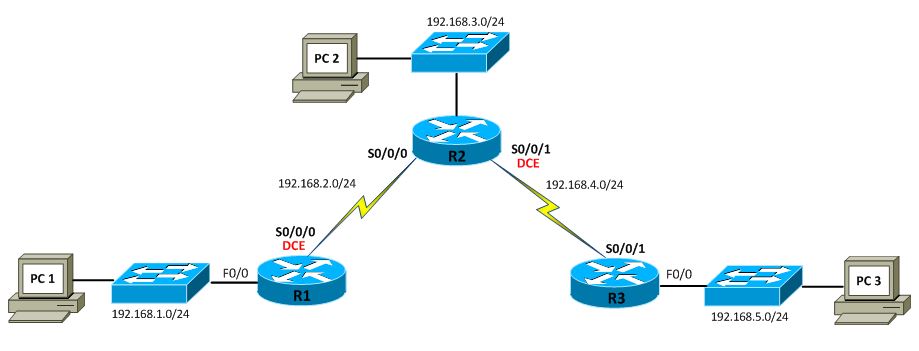
Below is a RIP lab I did while studying for Network+, which covers classful and classless network scenarios.
Scenario A: Running RIPv1 on Classful Networks
R1#configure terminal
Enter configuration commands, one per line. End with CNTL/Z.
R1(config)#no ip domain-lookup
R1(config)#enable secret cisco
R1(config)#banner motd $
Enter TEXT message. End with the character '$'
********************************
AUTHORIZED ACCESS ONLY
********************************
$
R1(config)#line console 0
R1(config-line)#password cisco
R1(config-line)#login
R1(config-line)#logging synchronous
R1(config-line)#line vty 0 4
R1(config-line)#password cisco
R1(config-line)#login
R1(config-line)#logging synchronous
R2#configure terminal
Enter configuration commands, one per line. End with CNTL/Z.
R2(config)#no ip domain-lookup
R2(config)#enable secret cisco
R2(config)#banner motd $
Enter TEXT message. End with the character '$'
********************************
AUTHORIZED ACCESS ONLY
********************************
$
R2(config)#line console 0
R2(config-line)#password cisco
R2(config-line)#login
R2(config-line)#logging synchronous
R2(config-line)#line vty 0 4
R2(config-line)#password cisco
R2(config-line)#login
R2(config-line)#logging synchronous
R3#configure terminal
Enter configuration commands, one per line. End with CNTL/Z.
R3(config)#no ip domain-lookup
R3(config)#enable secret cisco
R3(config)#banner motd $
Enter TEXT message. End with the character '$'
********************************
AUTHORIZED ACCESS ONLY
********************************
$
R3(config)#line console 0
R3(config-line)#password cisco
R3(config-line)#login
R3(config-line)#logging synchronous
R3(config-line)#line vty 0 4
R3(config-line)#password cisco
R3(config-line)#login
R3(config-line)#logging synchronous
R1(config)#interface fastethernet0/0
R1(config-if)#ip address 192.168.1.1 255.255.255.0
R1(config-if)#no shutdown
R1(config-if)#
*Dec 27 10:20:57.851: %LINK-3-UPDOWN: Interface FastEthernet0/0, changed state to up
*Dec 27 10:20:58.851: %LINEPROTO-5-UPDOWN: Line protocol on Interface FastEthernet0/0, changed state to up
R1(config-if)#interface serial0/0/0
R1(config-if)#ip address 192.168.2.1 255.255.255.0
R1(config-if)#clock rate 64000
R1(config-if)#no shutdown
R1(config-if)#
*Dec 27 10:21:28.215: %LINK-3-UPDOWN: Interface Serial0/0/0, changed state to down
R2(config)#interface fastethernet0/0
R2(config-if)#ip address 192.168.3.1 255.255.255.0
R2(config-if)#no shutdown
R2(config-if)#
*Dec 27 10:13:28.227: %LINEPROTO-5-UPDOWN: Line protocol on Interface FastEthernet0/0, changed state to up
R2(config-if)#interface serial0/0/0
R2(config-if)#ip address 192.168.2.2 255.255.255.0
R2(config-if)#no shutdown
R2(config-if)#
*Dec 27 10:14:05.835: %LINK-3-UPDOWN: Interface Serial0/0/0, changed state to up
*Dec 27 10:14:06.835: %LINEPROTO-5-UPDOWN: Line protocol on Interface Serial0/0/0, changed state to up
R2(config-if)#
R2(config-if)#interface serial0/0/1
R2(config-if)#ip address 192.168.4.2 255.255.255.0
R2(config-if)#clock rate 64000
R2(config-if)#no shutdown
R2(config-if)#
*Dec 27 10:14:23.315: %LINK-3-UPDOWN: Interface Serial0/0/1, changed state to down
R3(config)#interface fastethernet0/0
R3(config-if)#ip address 192.168.5.1 255.255.255.0
R3(config-if)#no shutdown
R3(config-if)#
*Dec 27 10:22:33.343: %LINK-3-UPDOWN: Interface FastEthernet0/0, changed state to up
*Dec 27 10:22:34.343: %LINEPROTO-5-UPDOWN: Line protocol on Interface FastEthernet0/0, changed state to up
R3(config-if)#interface serial0/0/1
R3(config-if)#ip address 192.168.4.1 255.255.255.0
R3(config-if)#no shutdown
R3(config-if)#
*Dec 27 10:22:52.659: %LINK-3-UPDOWN: Interface Serial0/0/1, changed state to up
*Dec 27 10:22:53.659: %LINEPROTO-5-UPDOWN: Line protocol on Interface Serial0/0/1, changed state to up
R1#show ip interface brief
Interface IP-Address OK? Method Status Protocol
FastEthernet0/0 192.168.1.1 YES manual up up
FastEthernet0/1 unassigned YES NVRAM administratively down down
Serial0/0/0 192.168.2.1 YES manual up up
Serial0/0/1 unassigned YES NVRAM administratively down down
Serial0/1/0 unassigned YES NVRAM administratively down down
Serial0/1/1 unassigned YES NVRAM administratively down down
R2#show ip interface brief
Interface IP-Address OK? Method Status Protocol
FastEthernet0/0 192.168.3.1 YES manual up up
FastEthernet0/1 unassigned YES NVRAM administratively down down
Serial0/0/0 192.168.2.2 YES manual up up
Serial0/0/1 192.168.4.2 YES manual up up
R3#show ip interface brief
Interface IP-Address OK? Method Status Protocol
FastEthernet0/0 192.168.5.1 YES manual up up
FastEthernet0/1 unassigned YES NVRAM administratively down down
Serial0/0/0 unassigned YES NVRAM administratively down down
Serial0/0/1 192.168.4.1 YES manual up up
R1(config)#router ?
bgp Border Gateway Protocol (BGP)
eigrp Enhanced Interior Gateway Routing Protocol (EIGRP)
isis ISO IS-IS
iso-igrp IGRP for OSI networks
mobile Mobile routes
odr On Demand stub Routes
ospf Open Shortest Path First (OSPF)
rip Routing Information Protocol (RIP)
R1(config)#router rip // ENABLE RIPv1
R1(config-router)#network ?
A.B.C.D Network number
R1(config-router)#network 192.168.1.0 // ENABLE RIP ON ALL INTERFACES THAT BELONGS TO THIS CLASSFUL NETWORK; INTERFACE WILL SEND AND RECEIVE RIP UPDATES EVERY 30 SECONDS
R1(config-router)#network 192.168.2.0
R2(config)#router rip
R2(config-router)#network 192.168.2.0
R2(config-router)#network 192.168.3.0
R2(config-router)#network 192.168.4.0
R3(config)#router rip
R3(config-router)#network 192.168.4.0
R3(config-router)#network 192.168.5.0
R1#show ip route
Codes: C - connected, S - static, R - RIP, M - mobile, B - BGP
D - EIGRP, EX - EIGRP external, O - OSPF, IA - OSPF inter area
N1 - OSPF NSSA external type 1, N2 - OSPF NSSA external type 2
E1 - OSPF external type 1, E2 - OSPF external type 2
i - IS-IS, su - IS-IS summary, L1 - IS-IS level-1, L2 - IS-IS level-2
ia - IS-IS inter area, * - candidate default, U - per-user static route
o - ODR, P - periodic downloaded static route
Gateway of last resort is not set
R 192.168.4.0/24 [120/1] via 192.168.2.2, 00:00:14, Serial0/0/0
R 192.168.5.0/24 [120/2] via 192.168.2.2, 00:00:14, Serial0/0/0
C 192.168.1.0/24 is directly connected, FastEthernet0/0
C 192.168.2.0/24 is directly connected, Serial0/0/0
R 192.168.3.0/24 [120/1] via 192.168.2.2, 00:00:14, Serial0/0/0
R2#show ip route
Codes: C - connected, S - static, R - RIP, M - mobile, B - BGP
D - EIGRP, EX - EIGRP external, O - OSPF, IA - OSPF inter area
N1 - OSPF NSSA external type 1, N2 - OSPF NSSA external type 2
E1 - OSPF external type 1, E2 - OSPF external type 2
i - IS-IS, su - IS-IS summary, L1 - IS-IS level-1, L2 - IS-IS level-2
ia - IS-IS inter area, * - candidate default, U - per-user static route
o - ODR, P - periodic downloaded static route
Gateway of last resort is not set
C 192.168.4.0/24 is directly connected, Serial0/0/1
R 192.168.5.0/24 [120/1] via 192.168.4.1, 00:00:14, Serial0/0/1
R 192.168.1.0/24 [120/1] via 192.168.2.1, 00:00:11, Serial0/0/0
C 192.168.2.0/24 is directly connected, Serial0/0/0
C 192.168.3.0/24 is directly connected, FastEthernet0/0
R3#show ip route
Codes: C - connected, S - static, R - RIP, M - mobile, B - BGP
D - EIGRP, EX - EIGRP external, O - OSPF, IA - OSPF inter area
N1 - OSPF NSSA external type 1, N2 - OSPF NSSA external type 2
E1 - OSPF external type 1, E2 - OSPF external type 2
i - IS-IS, su - IS-IS summary, L1 - IS-IS level-1, L2 - IS-IS level-2
ia - IS-IS inter area, * - candidate default, U - per-user static route
o - ODR, P - periodic downloaded static route
Gateway of last resort is not set
C 192.168.4.0/24 is directly connected, Serial0/0/1
C 192.168.5.0/24 is directly connected, FastEthernet0/0
R 192.168.1.0/24 [120/2] via 192.168.4.2, 00:00:19, Serial0/0/1
R 192.168.2.0/24 [120/1] via 192.168.4.2, 00:00:19, Serial0/0/1
R 192.168.3.0/24 [120/1] via 192.168.4.2, 00:00:19, Serial0/0/1
R1#show ip protocols
Routing Protocol is "rip"
Outgoing update filter list for all interfaces is not set
Incoming update filter list for all interfaces is not set
Sending updates every 30 seconds, next due in 25 seconds
Invalid after 180 seconds, hold down 180, flushed after 240
Redistributing: rip
Default version control: send version 1, receive any version
Interface Send Recv Triggered RIP Key-chain
FastEthernet0/0 1 1 2
Serial0/0/0 1 1 2
Automatic network summarization is in effect
Maximum path: 4
Routing for Networks:
192.168.1.0
192.168.2.0
Routing Information Sources:
Gateway Distance Last Update
192.168.2.2 120 00:00:12
Distance: (default is 120)
R1#debug ip rip
RIP protocol debugging is on
R1#
*Dec 27 10:34:32.271: RIP: sending v1 update to 255.255.255.255 via FastEthernet0/0 (192.168.1.1)
*Dec 27 10:34:32.271: RIP: build update entries
*Dec 27 10:34:32.271: network 192.168.2.0 metric 1
*Dec 27 10:34:32.271: network 192.168.3.0 metric 2
*Dec 27 10:34:32.271: network 192.168.4.0 metric 2
*Dec 27 10:34:32.271: network 192.168.5.0 metric 3
*Dec 27 10:34:32.335: RIP: sending v1 update to 255.255.255.255 via Serial0/0/0 (192.168.2.1)
*Dec 27 10:34:32.335: RIP: build update entries
*Dec 27 10:34:32.335: network 192.168.1.0 metric 1
R1#
*Dec 27 10:34:47.799: RIP: received v1 update from 192.168.2.2 on Serial0/0/0
*Dec 27 10:34:47.799: 192.168.3.0 in 1 hops
*Dec 27 10:34:47.799: 192.168.4.0 in 1 hops
*Dec 27 10:34:47.799: 192.168.5.0 in 2 hops
R1#
*Dec 27 10:35:00.971: RIP: sending v1 update to 255.255.255.255 via FastEthernet0/0 (192.168.1.1)
*Dec 27 10:35:00.971: RIP: build update entries
*Dec 27 10:35:00.971: network 192.168.2.0 metric 1
*Dec 27 10:35:00.971: network 192.168.3.0 metric 2
*Dec 27 10:35:00.971: network 192.168.4.0 metric 2
*Dec 27 10:35:00.971: network 192.168.5.0 metric 3
R1#
*Dec 27 10:35:01.987: RIP: sending v1 update to 255.255.255.255 via Serial0/0/0 (192.168.2.1)
*Dec 27 10:35:01.987: RIP: build update entries
*Dec 27 10:35:01.987: network 192.168.1.0 metric 1
Scenario B: Running RIPv1 with Subnets and Between Classful Networks

R1(config)#no ip domain-lookup
R1(config)#enable secret cisco
R1(config)#line console 0
R1(config-line)#password cisco
R1(config-line)#login
R1(config-line)#logging synchronous
R1(config-line)#line vty 0 4
R1(config-line)#password cisco
R1(config-line)#login
R1(config-line)#logging synchronous
R1(config)#interface fastethernet0/0
R1(config-if)#ip address 172.30.1.1 255.255.255.0
R1(config-if)#no shutdown
R1(config-if)#
*Dec 31 01:29:19.039: %LINEPROTO-5-UPDOWN: Line protocol on Interface FastEthernet0/0, changed state to up
R1(config-if)#interface serial0/0/0
R1(config-if)#ip address 172.30.2.1 255.255.255.0
R1(config-if)#clock rate 64000
R1(config-if)#no shutdown
R1(config-if)#
*Dec 31 01:29:47.275: %LINK-3-UPDOWN: Interface Serial0/0/0, changed state to down
R2(config)#no ip domain-lookup
R2(config)#enable secret cisco
R2(config)#line console 0
R2(config-line)#password cisco
R2(config-line)#login
R2(config-line)#logging synchronous
R2(config-line)#line vty 0 4
R2(config-line)#password cisco
R2(config-line)#login
R2(config-line)#logging synchronous
R2(config)#interface fastethernet0/0
R2(config-if)#ip address 172.30.3.1 255.255.255.0
R2(config-if)#no shutdown
R2(config-if)#
*Dec 31 01:22:51.327: %LINEPROTO-5-UPDOWN: Line protocol on Interface FastEthernet0/0, changed state to up
R2(config-if)#
R2(config-if)#interface serial0/0/0
R2(config-if)#ip address 172.30.2.2 255.255.255.0
R2(config-if)#no shutdown
R2(config-if)#
*Dec 31 01:23:12.959: %LINK-3-UPDOWN: Interface Serial0/0/0, changed state to up
*Dec 31 01:23:13.959: %LINEPROTO-5-UPDOWN: Line protocol on Interface Serial0/0/0, changed state to up
R2(config-if)#
R2(config-if)#interface serial0/0/1
R2(config-if)#ip address 192.168.4.9 255.255.255.0
R2(config-if)#clock rate 64000
R2(config-if)#no shutdown
R2(config-if)#
*Dec 31 01:23:38.871: %LINK-3-UPDOWN: Interface Serial0/0/1, changed state to down
R3(config)#no ip domain-lookup
R3(config)#enable secret cisco
R3(config)#line console 0
R3(config-line)#password cisco
R3(config-line)#login
R3(config-line)#logging synchronous
R3(config-line)#line vty 0 4
R3(config-line)#password cisco
R3(config-line)#login
R3(config-line)#logging synchronous
R3(config)#interface fastethernet0/0
R3(config-if)#ip address 192.168.5.1 255.255.255.0
R3(config-if)#no shutdown
R3(config-if)#
*Dec 31 01:32:41.579: %LINK-3-UPDOWN: Interface FastEthernet0/0, changed state to up
*Dec 31 01:32:42.579: %LINEPROTO-5-UPDOWN: Line protocol on Interface FastEthernet0/0, changed state to up
R3(config-if)#
R3(config-if)#interface serial0/0/1
R3(config-if)#ip address 192.168.4.10 255.255.255.0
R3(config-if)#no shutdown
R3(config-if)#
*Dec 31 01:33:02.847: %LINK-3-UPDOWN: Interface Serial0/0/1, changed state to up
*Dec 31 01:33:03.847: %LINEPROTO-5-UPDOWN: Line protocol on Interface Serial0/0/1, changed state to up
R1#show ip interface brief
Interface IP-Address OK? Method Status Protocol
FastEthernet0/0 172.30.1.1 YES manual up up
FastEthernet0/1 unassigned YES NVRAM administratively down down
Serial0/0/0 172.30.2.1 YES manual up up
Serial0/0/1 unassigned YES NVRAM administratively down down
Serial0/1/0 unassigned YES NVRAM administratively down down
Serial0/1/1 unassigned YES NVRAM administratively down down
R2#show ip interface brief
Interface IP-Address OK? Method Status Protocol
FastEthernet0/0 172.30.3.1 YES manual up up
FastEthernet0/1 unassigned YES NVRAM administratively down down
Serial0/0/0 172.30.2.2 YES manual up up
Serial0/0/1 192.168.4.9 YES manual up up
R3#show ip interface brief
Interface IP-Address OK? Method Status Protocol
FastEthernet0/0 192.168.5.1 YES manual up up
FastEthernet0/1 unassigned YES NVRAM administratively down down
Serial0/0/0 unassigned YES NVRAM administratively down down
Serial0/0/1 192.168.4.10 YES manual up up
R1(config)#router rip
R1(config-router)#network 172.30.0.0
R1(config-router)#passive-interface fastethernet0/0 // DISABLE RIPv1 UPDATE OUT THE LAN INTERFACE; PREVENT BROADCAST TO LAN DEVICES WHICH IS A SECURITY RISK
R2(config)#router rip
R2(config-router)#network 172.30.0.0
R2(config-router)#network 192.168.4.0
R2(config-router)#passive-interface fastethernet0/0
R3(config)#router rip
R3(config-router)#network 192.168.4.0
R3(config-router)#network 192.168.5.0
R3(config-router)#passive-interface fastethernet0/0
R1#show ip route // RIPv1 IS A CLASSFUL ROUTING PROTOCOL; DOESN'T INCLUDE SUBNET MASK IN ITS
UPDATE
Codes: C - connected, S - static, R - RIP, M - mobile, B - BGP
D - EIGRP, EX - EIGRP external, O - OSPF, IA - OSPF inter area
N1 - OSPF NSSA external type 1, N2 - OSPF NSSA external type 2
E1 - OSPF external type 1, E2 - OSPF external type 2
i - IS-IS, su - IS-IS summary, L1 - IS-IS level-1, L2 - IS-IS level-2
ia - IS-IS inter area, * - candidate default, U - per-user static route
o - ODR, P - periodic downloaded static route
Gateway of last resort is not set
172.30.0.0/24 is subnetted, 3 subnets
C 172.30.2.0 is directly connected, Serial0/0/0
R 172.30.3.0 [120/1] via 172.30.2.2, 00:00:00, Serial0/0/0
C 172.30.1.0 is directly connected, FastEthernet0/0
R 192.168.4.0/24 [120/1] via 172.30.2.2, 00:00:00, Serial0/0/0
R 192.168.5.0/24 [120/2] via 172.30.2.2, 00:00:00, Serial0/0/0
R2#show ip route
Codes: C - connected, S - static, R - RIP, M - mobile, B - BGP
D - EIGRP, EX - EIGRP external, O - OSPF, IA - OSPF inter area
N1 - OSPF NSSA external type 1, N2 - OSPF NSSA external type 2
E1 - OSPF external type 1, E2 - OSPF external type 2
i - IS-IS, su - IS-IS summary, L1 - IS-IS level-1, L2 - IS-IS level-2
ia - IS-IS inter area, * - candidate default, U - per-user static route
o - ODR, P - periodic downloaded static route
Gateway of last resort is not set
172.30.0.0/24 is subnetted, 3 subnets
C 172.30.2.0 is directly connected, Serial0/0/0
C 172.30.3.0 is directly connected, FastEthernet0/0
R 172.30.1.0 [120/1] via 172.30.2.1, 00:00:12, Serial0/0/0
C 192.168.4.0/24 is directly connected, Serial0/0/1
R 192.168.5.0/24 [120/1] via 192.168.4.10, 00:00:26, Serial0/0/1
R3#show ip route
Codes: C - connected, S - static, R - RIP, M - mobile, B - BGP
D - EIGRP, EX - EIGRP external, O - OSPF, IA - OSPF inter area
N1 - OSPF NSSA external type 1, N2 - OSPF NSSA external type 2
E1 - OSPF external type 1, E2 - OSPF external type 2
i - IS-IS, su - IS-IS summary, L1 - IS-IS level-1, L2 - IS-IS level-2
ia - IS-IS inter area, * - candidate default, U - per-user static route
o - ODR, P - periodic downloaded static route
Gateway of last resort is not set
R 172.30.0.0/16 [120/1] via 192.168.4.9, 00:00:19, Serial0/0/1
C 192.168.4.0/24 is directly connected, Serial0/0/1
C 192.168.5.0/24 is directly connected, FastEthernet0/0
R1#show ip protocols
Routing Protocol is "rip"
Outgoing update filter list for all interfaces is not set
Incoming update filter list for all interfaces is not set
Sending updates every 30 seconds, next due in 20 seconds
Invalid after 180 seconds, hold down 180, flushed after 240
Redistributing: rip
Default version control: send version 1, receive any version
Interface Send Recv Triggered RIP Key-chain
Serial0/0/0 1 1 2
Automatic network summarization is in effect
Maximum path: 4
Routing for Networks:
172.30.0.0
Passive Interface(s):
FastEthernet0/0
Routing Information Sources:
Gateway Distance Last Update
172.30.2.2 120 00:00:07
Distance: (default is 120)
R1#debug ip rip // RIPv1 UPDATES AREN'T SENT OUT F0/0 DUE TO THE passive-interface COMMAND
RIP protocol debugging is on
R1#
*Dec 31 01:47:53.723: RIP: sending v1 update to 255.255.255.255 via Serial0/0/0 (172.30.2.1)
*Dec 31 01:47:53.723: RIP: build update entries
*Dec 31 01:47:53.723: subnet 172.30.1.0 metric 1
*Dec 31 01:47:54.095: RIP: received v1 update from 172.30.2.2 on Serial0/0/0
*Dec 31 01:47:54.099: 172.30.3.0 in 1 hops
*Dec 31 01:47:54.099: 192.168.4.0 in 1 hops
*Dec 31 01:47:54.099: 192.168.5.0 in 2 hops
R1#
*Dec 31 01:48:20.059: RIP: received v1 update from 172.30.2.2 on Serial0/0/0
*Dec 31 01:48:20.059: 172.30.3.0 in 1 hops
*Dec 31 01:48:20.059: 192.168.4.0 in 1 hops
*Dec 31 01:48:20.059: 192.168.5.0 in 2 hops
*Dec 31 01:48:20.751: RIP: sending v1 update to 255.255.255.255 via Serial0/0/0 (172.30.2.1)
*Dec 31 01:48:20.751: RIP: build update entries
*Dec 31 01:48:20.751: subnet 172.30.1.0 metric 1
Scenario C: Running RIPv1 on a Stub Network

R2(config)#router rip
R2(config-router)#no network 192.168.4.0 // REMOVE 192.168.4.0/24 SUBNET FROM RIP ON R2; NO RIP UPDATES BETWEEN R2 AND R3 (ISP ROUTER); DON'T ADVERTISE 192.168.4.0/24 TO R1
R3(config)#no router rip // DISABLE RIP ON ISP ROUTER
R3(config)#ip route 172.30.0.0 255.255.0.0 serial0/0/1 // ROUTE 172.30.0.0/116 TO HOP TO R2
R2(config)#ip route 0.0.0.0 0.0.0.0 serial 0/0/1 // STATIC DEFAULT ROUTE FOR DESTINATION SUBNET NOT IN R2 ROUTING TABLE TO HOP TO R3
R2(config)#router rip
R2(config-router)#default-information ?
originate Distribute a default route
R2(config-router)#default-information originate // INCLUDE DEFAULT STATIC ROUTE IN RIP UPDATE TO R1
R2#show ip route
Codes: C - connected, S - static, R - RIP, M - mobile, B - BGP
D - EIGRP, EX - EIGRP external, O - OSPF, IA - OSPF inter area
N1 - OSPF NSSA external type 1, N2 - OSPF NSSA external type 2
E1 - OSPF external type 1, E2 - OSPF external type 2
i - IS-IS, su - IS-IS summary, L1 - IS-IS level-1, L2 - IS-IS level-2
ia - IS-IS inter area, * - candidate default, U - per-user static route
o - ODR, P - periodic downloaded static route
Gateway of last resort is 0.0.0.0 to network 0.0.0.0
172.30.0.0/24 is subnetted, 3 subnets
C 172.30.2.0 is directly connected, Serial0/0/0
C 172.30.3.0 is directly connected, FastEthernet0/0
R 172.30.1.0 [120/1] via 172.30.2.1, 00:00:22, Serial0/0/0
C 192.168.4.0/24 is directly connected, Serial0/0/1
S* 0.0.0.0/0 is directly connected, Serial0/0/1
R1#show ip route
Codes: C - connected, S - static, R - RIP, M - mobile, B - BGP
D - EIGRP, EX - EIGRP external, O - OSPF, IA - OSPF inter area
N1 - OSPF NSSA external type 1, N2 - OSPF NSSA external type 2
E1 - OSPF external type 1, E2 - OSPF external type 2
i - IS-IS, su - IS-IS summary, L1 - IS-IS level-1, L2 - IS-IS level-2
ia - IS-IS inter area, * - candidate default, U - per-user static route
o - ODR, P - periodic downloaded static route
Gateway of last resort is 172.30.2.2 to network 0.0.0.0
172.30.0.0/24 is subnetted, 3 subnets
C 172.30.2.0 is directly connected, Serial0/0/0
R 172.30.3.0 [120/1] via 172.30.2.2, 00:00:03, Serial0/0/0
C 172.30.1.0 is directly connected, FastEthernet0/0
R* 0.0.0.0/0 [120/1] via 172.30.2.2, 00:00:03, Serial0/0/0
R1#debug ip rip
RIP protocol debugging is on
R1#
*Dec 31 02:20:22.031: RIP: received v1 update from 172.30.2.2 on Serial0/0/0
*Dec 31 02:20:22.031: 0.0.0.0 in 1 hops
*Dec 31 02:20:22.031: 172.30.3.0 in 1 hops
R1#
*Dec 31 02:20:32.743: RIP: sending v1 update to 255.255.255.255 via Serial0/0/0 (172.30.2.1)
*Dec 31 02:20:32.743: RIP: build update entries
*Dec 31 02:20:32.743: subnet 172.30.1.0 metric 1
R3#show ip route
Codes: C - connected, S - static, R - RIP, M - mobile, B - BGP
D - EIGRP, EX - EIGRP external, O - OSPF, IA - OSPF inter area
N1 - OSPF NSSA external type 1, N2 - OSPF NSSA external type 2
E1 - OSPF external type 1, E2 - OSPF external type 2
i - IS-IS, su - IS-IS summary, L1 - IS-IS level-1, L2 - IS-IS level-2
ia - IS-IS inter area, * - candidate default, U - per-user static route
o - ODR, P - periodic downloaded static route
Gateway of last resort is not set
S 172.30.0.0/16 is directly connected, Serial0/0/1 // NO RIP ROUTES
C 192.168.4.0/24 is directly connected, Serial0/0/1
C 192.168.5.0/24 is directly connected, FastEthernet0/0
R3#ping 172.30.1.10
Type escape sequence to abort.
Sending 5, 100-byte ICMP Echos to 172.30.1.10, timeout is 2 seconds:
!!!!!
Success rate is 100 percent (5/5), round-trip min/avg/max = 56/56/56 ms
R3#traceroute 172.30.1.10
Type escape sequence to abort.
Tracing the route to 172.30.1.10
1 192.168.4.9 16 msec 12 msec 16 msec
2 172.30.2.1 24 msec 28 msec 28 msec
3 * * *
4 * * *
5 * * *
C:\Users\PC1>ipconfig
Windows IP Configuration
Ethernet adapter Local Area Connection:
Connection-specific DNS Suffix . :
Link-local IPv6 Address . . . . . : fe80::4562:9b92:c15f:91ff%10
IPv4 Address. . . . . . . . . . . : 172.30.1.10
Subnet Mask . . . . . . . . . . . : 255.255.255.0
Default Gateway . . . . . . . . . : 172.30.1.1
C:\Users\PC1>ping 172.30.1.1
Pinging 172.30.1.1 with 32 bytes of data:
Reply from 172.30.1.1: bytes=32 time=1ms TTL=255
Reply from 172.30.1.1: bytes=32 time=1ms TTL=255
Reply from 172.30.1.1: bytes=32 time=1ms TTL=255
Reply from 172.30.1.1: bytes=32 time=1ms TTL=255
Ping statistics for 172.30.1.1:
Packets: Sent = 4, Received = 4, Lost = 0 (0% loss),
Approximate round trip times in milli-seconds:
Minimum = 1ms, Maximum = 1ms, Average = 1ms
C:\Users\PC1>ping 192.168.5.1
Pinging 192.168.5.1 with 32 bytes of data:
Reply from 192.168.5.1: bytes=32 time=35ms TTL=253
Reply from 192.168.5.1: bytes=32 time=35ms TTL=253
Reply from 192.168.5.1: bytes=32 time=35ms TTL=253
Reply from 192.168.5.1: bytes=32 time=35ms TTL=253
Ping statistics for 192.168.5.1:
Packets: Sent = 4, Received = 4, Lost = 0 (0% loss),
Approximate round trip times in milli-seconds:
Minimum = 35ms, Maximum = 35ms, Average = 35ms
C:\Users\PC1>tracert 192.168.5.1
Tracing route to 192.168.5.1 over a maximum of 30 hops
1 1 ms 1 ms 1 ms 172.30.1.1
2 22 ms 21 ms 21 ms 172.30.2.2
3 52 ms 53 ms 53 ms 192.168.5.1


