Friday, December 1, 2017

Cisco CSR1000v in VirtualBox and GNS3

If you're a member of APNIC just like me, you can attend their free training and download PDF handouts on various networking topics like BGP, IPv6, DNS, etc.

You can download the CSR1000v ISO in Cisco.com website (CCO login and privilege are needed). I created first a Linux 64-bit virtual machine in VirtualBox.

I gave the VM a 2 GB (2048 MB) RAM.


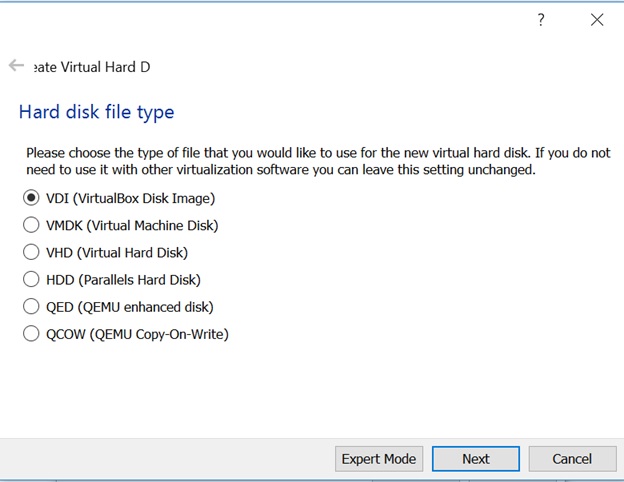
I gave the VM an 8 GB HD space.


I limited the HD space with only 8 GB space.


Type a Name for the VM.


Go Settings > Storage > Empty > Choose Virtual Optical Disk File > choose the CSR1000V OVA file > OK.


Power on to bootup the VM.


Open GNS3 and go to Edit > Preferences > VirtualBox VMs > New


GNS3 will auto detect/add the created VM (CSR1000V) then click ‘Use as a linked base VM (experimental) > click Finish > Apply > OK.


To edit VM settings in GNS3, go to Edit > Preferences > VirtualBox VMs > CSR1000V > Edit


Under General settings > tick Enable remote console.


Power off the VirtualBox VM (CSR1000V) by doing a right-click > Close > Power Off.
 

Close and re-open GNS3 drag the CSR1000V node (you can optionally change the icon) > right-click > Start.

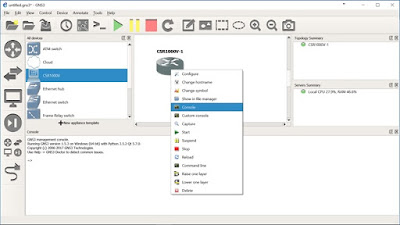


Right-click on the node > choose Console
 

Notice it opened the aux port and displays diag prompt.


You'll need to activate the eval license on the CSR1000v in order to configure advance features. Save and reboot the router in order for the license to take effect.


Issue the platform console serial command in order for the console connection to work in GNS3.


I ended up running a Cisco 7200 router instead with IOS 15.3 in GNS3. The Cisco 7200 router can support serial connections compared to a CSR1000v which is limited to Ethernet (Gig E).


Thursday, November 2, 2017

Configuring Bootloader Commands on a Cisco 3560 Switch

I needed to upgrade some Cisco 3560 switches to support SSH for remote management access. So I've TFTP's the K9 IOS and changed the boot variable using the boot system flash command but there was no output when I did a show run. You can use the show boot to display the bootloader variable on a Cisco 3560 switch.

Switch#show ip ssh      // SSH ISN'T SUPPORTED ON IP BASE IOS (NO K9)
                 ^
% Invalid input detected at '^' marker.

Switch#show version | inc IOS
Cisco IOS Software, C3560 Software (C3560-IPBASE-M), Version 12.2(35)SE5, RELEASE SOFTWARE (fc1)

Switch#dir     // OLDER C3560 HAS ONLY 16 MB FLASH, SO DELETE CURRENT IOS
Directory of flash:/

    2  -rwx        2276   Mar 08 1993 01:43:58  vlan.dat
    3  -rwx         184   Mar 14 1993 13:27:57  private-config.text
    5  drwx         128   Mar 15 1993 10:27:25  c3560-i9-mz.121-19.EA1d     // DIRECTORY FILE
   85  -rwx        9124   Mar 14 1993 13:27:57  config.text

15998976 bytes total (9533440 bytes free)
Switch#dir flash:/c3560-i9-mz.121-19.EA1d
Directory of flash:/c3560-i9-mz.121-19.EA1d/

    6  drwx        2432   Mar 01 1993 00:04:02  html
   83  -rwx     3453772   Mar 01 1993 00:05:05  c3560-i9-mz.121-19.EA1d.bin     // IOS FILE
   84  -rwx         331   Mar 01 1993 00:05:05  info

Switch#delete flash:/c3560-i9-mz.121-19.EA1d/c3560-i9-mz.121-19.EA1d.bin
Delete filename [/c3560-i9-mz.121-19.EA1d/c3560-i9-mz.121-19.EA1d.bin]?
Delete flash:/c3560-i9-mz.121-19.EA1d/c3560-i9-mz.121-19.EA1d.bin? [confirm]

Switch#dir     // NEWER C3560 SWITCH HAS 32 MB FLASH AND CAN FIT MULTIPLE IOS
Directory of flash:/

    2  -rwx        6755  Jun 10 1993 02:18:55 +00:00  config.text
    3  -rwx        2276  Apr 11 2016 04:57:50 +00:00  vlan.dat
  464  -rwx    11773249  Jun 10 1993 03:10:35 +00:00  c3560-ipbasek9-mz.122-55.SE11.bin
    4  -rwx         167  Jun 10 1993 02:18:55 +00:00  private-config.text
    5  -rwx        2072  Jun 10 1993 02:18:55 +00:00  multiple-fs
    6  drwx         512   Mar 1 1993 00:07:25 +00:00  c3560-ipbase-mz.122-35.SE5

27998208 bytes total (6766080 bytes free)     
Switch#show run | inc boot
Switch#configure terminal
Enter configuration commands, one per line.  End with CNTL/Z.
Switch(config)#boot ?
  boothlpr             Boot Helper System Image
  config-file          Configuration File
  enable-break         Enable Break while booting
  helper               Helper Image(s)
  helper-config-file   Helper Configuration File
  manual               Manual Boot
  private-config-file  Private Configuration File
  system               System Image

Switch(config)#boot system ?
  WORD  pathlist of boot file(s) ... file1;file2;...

Switch(config)#boot system flash:c3560-ipbasek9-mz.122-55.SE11.bin
Switch(config)#end
Switch#show run | inc boot      // DOESN'T DISPLAY THE boot SEQUENCE COMMANDS IN SHOW RUN

Switch#show boot     // USE THIS COMMAND INSTEAD TO VERIFY BOOT VARIABLE
BOOT path-list      : flash:c3560-ipbasek9-mz.122-55.SE11.bin
Config file         : flash:/config.text
Private Config file : flash:/private-config.text
Enable Break        : no
Manual Boot         : no
HELPER path-list    :
Auto upgrade        : yes
Auto upgrade path   :

Switch#write memory
Building configuration...
[OK]
Switch#reload
Proceed with reload? [confirm]


 <OUTPUT TRUNCATED>


Switch#show version | inc IOS
Cisco IOS Software, C3560 Software (C3560-IPBASEK9-M), Version 12.2(55)SE11, RELEASE SOFTWARE (fc3)
Switch#show ip ssh
SSH Enabled - version 1.99     
Authentication timeout: 120 secs; Authentication retries: 3