Saturday, April 12, 2014

Using a Cisco Router as a TFTP Server

I got a security license key from Cisco that I need to TFTP and install on a remote router (for work). The only problem was the distance and I was also quite lazy to travel since it was on a Friday. I've found a convenient way of transferring files between two routers by configuring one of them to act as a TFTP server. FTP was supported on older IOS train but was removed due to security exploits.


First, I transferred the license key file from my PC to a local router. Since we've got public IP address assigned to the WAN interface, it's easy to transfer the file over the Internet.

2811#copy tftp://172.27.110.121/FGL17481234_201404032246235678.lic flash
Destination filename [FGL17481234_201404032246235678.lic]?
Accessing tftp://172.16.110.121/FGL17481234_201404032246235678.lic...
LoadingFGL17481234_201404032246235678.lic from 172.16.110.121 (via FastEthernet0/1): !
[OK - 1154 bytes]

1154 bytes copied in 1.380 secs (836 bytes/sec)

2811#show flash
-#- --length-- -----date/time------ path
1       130552 Mar 15 2010 07:04:52 P00308010200.bin
2         1648 Sep 21 2005 15:13:32 sdmconfig-2811.cfg
3         3492 Jul 21 2011 01:44:24 eDonkey.pdlm
4       763392 Sep 21 2005 15:14:16 es.tar
5       820224 Sep 21 2005 15:14:40 common.tar
6         1038 Sep 21 2005 15:14:56 home.shtml
7       113152 Sep 21 2005 15:15:14 home.tar
8       504643 Sep 21 2005 15:15:32 128MB.sdf
9      1208320 Sep 21 2005 15:15:50 ips.tar
10        3100 Nov 30 2007 07:57:56 bittorrent.pldm
11        9411 Jul 11 2009 02:59:10 startup-config
12    57694284 Sep 09 2009 07:09:10 c2800nm-advipservicesk9-mz.124-24.T1.bin
13      130956 Mar 15 2010 07:05:28 P00308010200.sbn
14      708448 Mar 15 2010 07:05:48 P00308010200.sb2
15         461 Mar 15 2010 07:06:06 P00308010200.loads
16        3100 Jul 21 2011 01:43:50 bittorrent.pdlm
17        2251 Jul 21 2011 01:44:06 directconnect.pdlm
18        2377 Jul 21 2011 01:44:40 gnutella.pdlm
19        1752 Jul 21 2011 01:44:58 kazaa2.pdlm
20        1154 Apr 04 2014 06:43:48 FGL17481234_201404032246235678.lic


We use the tftp-server command to function as a TFTP server and specify the location and filename that can be downloaded.

2811(config)#tftp-server flash:FGL17481234_201404032246235678.lic


The remote Cisco 2911 router doesn't have the permanent security license installed yet. We verify this using the show version command.


2911#show version
Cisco IOS Software, C2900 Software (C2900-UNIVERSALK9-M), Version 15.x(x)Mx, RELEASE SOFTWARE (fc2)
Technical Support: http://www.cisco.com/techsupport
Copyright (c) 1986-2013 by Cisco Systems, Inc.
Compiled Thu 20-Jun-13 13:06 by prod_rel_team

ROM: System Bootstrap, Version 15.0(1r)M16, RELEASE SOFTWARE (fc1)

2811 uptime is 1 day, 3 hours, 21 minutes
System returned to ROM by power-on
System restarted at 03:22:36 UTC Thu Apr 3 2014
System image file is "flash0:c2900-universalk9-mz.SPA.15x-x.Mx.bin"
Last reload type: Normal Reload
Last reload reason: power-on


This product contains cryptographic features and is subject to United
States and local country laws governing import, export, transfer and
use. Delivery of Cisco cryptographic products does not imply
third-party authority to import, export, distribute or use encryption.
Importers, exporters, distributors and users are responsible for
compliance with U.S. and local country laws. By using this product you
agree to comply with applicable laws and regulations. If you are unable
to comply with U.S. and local laws, return this product immediately.

A summary of U.S. laws governing Cisco cryptographic products may be found at:
http://www.cisco.com/wwl/export/crypto/tool/stqrg.html

If you require further assistance please contact us by sending email to
export@cisco.com.

Cisco CISCO2911/K9 (revision 1.0) with 483328K/40960K bytes of memory.
Processor board ID FGL17481234
3 Gigabit Ethernet interfaces
1 terminal line
DRAM configuration is 64 bits wide with parity enabled.
255K bytes of non-volatile configuration memory.
250880K bytes of ATA System CompactFlash 0 (Read/Write)


License Info:

License UDI:

-------------------------------------------------
Device#   PID                   SN
-------------------------------------------------
*0        CISCO2911/K9          FGL174811234    


Technology Package License Information for Module:'c2900'

-----------------------------------------------------------------
Technology    Technology-package           Technology-package
              Current       Type           Next reboot 
------------------------------------------------------------------
ipbase        ipbasek9      Permanent      ipbasek9
security      None          None           None  
uc            uck9          Permanent      uck9
data          None          None           None

Configuration register is 0x2102


We use the copy tftp flash command to transfer the file. Next, we issue the license install command from privileged EXEC prompt and perform a reload afterwards to take effect.

2911#copy tftp://202.1.1.5 flash
Source filename []? FGL17481234_201404032246235678.lic
Destination filename [FGL17481234_201404032246235678.lic]?
Accessing tftp://202.1.1.5/FGL17481234_201404032246235678.lic...
Loading FGL17481234_201404032246235678.lic from 202.1.1.5 (via GigabitEthernet0/1): !
[OK - 1154 bytes]

1154 bytes copied in 0.452 secs (2553 bytes/sec)


2911#show flash | inc .lic                

241       1154 Apr 4 2014 06:47:56 +00:00 FGL17481234_201404032246235678.lic


2911#license install flash:FGL17481234_201404032246235678.lic
Installing licenses from "flash:FGL17481234_201404032246235678.lic"
Installing...Feature:securityk9...Successful:Supported
1/1 licenses were successfully installed
0/1 licenses were existing licenses
0/1 licenses were failed to install

2911#reload
Proceed with reload? [confirm]
Connection closed by foreign host.


2911#show version
Cisco IOS Software, C2900 Software (C2900-UNIVERSALK9-M), Version 15.x(x)Mx, RELEASE SOFTWARE (fc2)
Technical Support: http://www.cisco.com/techsupport
Copyright (c) 1986-2013 by Cisco Systems, Inc.
Compiled Thu 20-Jun-13 13:06 by prod_rel_team

ROM: System Bootstrap, Version 15.0(1r)M16, RELEASE SOFTWARE (fc1)

2911 uptime is 1 minute
System returned to ROM by reload at 06:50:36 UTC Fri Apr 4 2014
System image file is "flash0:c2900-universalk9-mz.SPA.15x-x.Mx.bin"
Last reload type: Normal Reload
Last reload reason: Reload Command


This product contains cryptographic features and is subject to United
States and local country laws governing import, export, transfer and
use. Delivery of Cisco cryptographic products does not imply
third-party authority to import, export, distribute or use encryption.
Importers, exporters, distributors and users are responsible for
compliance with U.S. and local country laws. By using this product you
agree to comply with applicable laws and regulations. If you are unable
to comply with U.S. and local laws, return this product immediately.

A summary of U.S. laws governing Cisco cryptographic products may be found at:
http://www.cisco.com/wwl/export/crypto/tool/stqrg.html

If you require further assistance please contact us by sending email to
export@cisco.com.

Cisco CISCO2911/K9 (revision 1.0) with 483328K/40960K bytes of memory.
Processor board ID FGL17481234
3 Gigabit Ethernet interfaces
1 terminal line
1 Virtual Private Network (VPN) Module
DRAM configuration is 64 bits wide with parity enabled.
255K bytes of non-volatile configuration memory.
250880K bytes of ATA System CompactFlash 0 (Read/Write)


License Info:

License UDI:

-------------------------------------------------
Device#   PID                   SN
-------------------------------------------------
*0        CISCO2911/K9          FGL17481234    


Technology Package License Information for Module:'c2900'

-----------------------------------------------------------------
Technology    Technology-package           Technology-package
              Current       Type           Next reboot 
------------------------------------------------------------------
ipbase        ipbasek9      Permanent      ipbasek9
security      securityk9    Permanent      securityk9
uc            uck9          Permanent      uck9
data          None          None           None

Configuration register is 0x2102


Perform a config and file clean up in the router's flash:
 
2811(config)#no tftp-server flash:FGL17481234_201404032246235678.lic
2811(config)#end
2811#delete flash:FGL17481234_201404032246235678.lic
Delete filename [FGL17481234_201404032246235678.lic]?
Delete flash:/FGL17481234_201404032246235678.lic? [confirm]

My Cisco 2511 Router IOS Upgrade

I bought a really cheap Cisco 2511 router to function as my terminal server. This legacy router (even the 2511-RJ model) is sold at a premium price on Ebay since it can be used as a terminal server/access server in both lab and production environment.


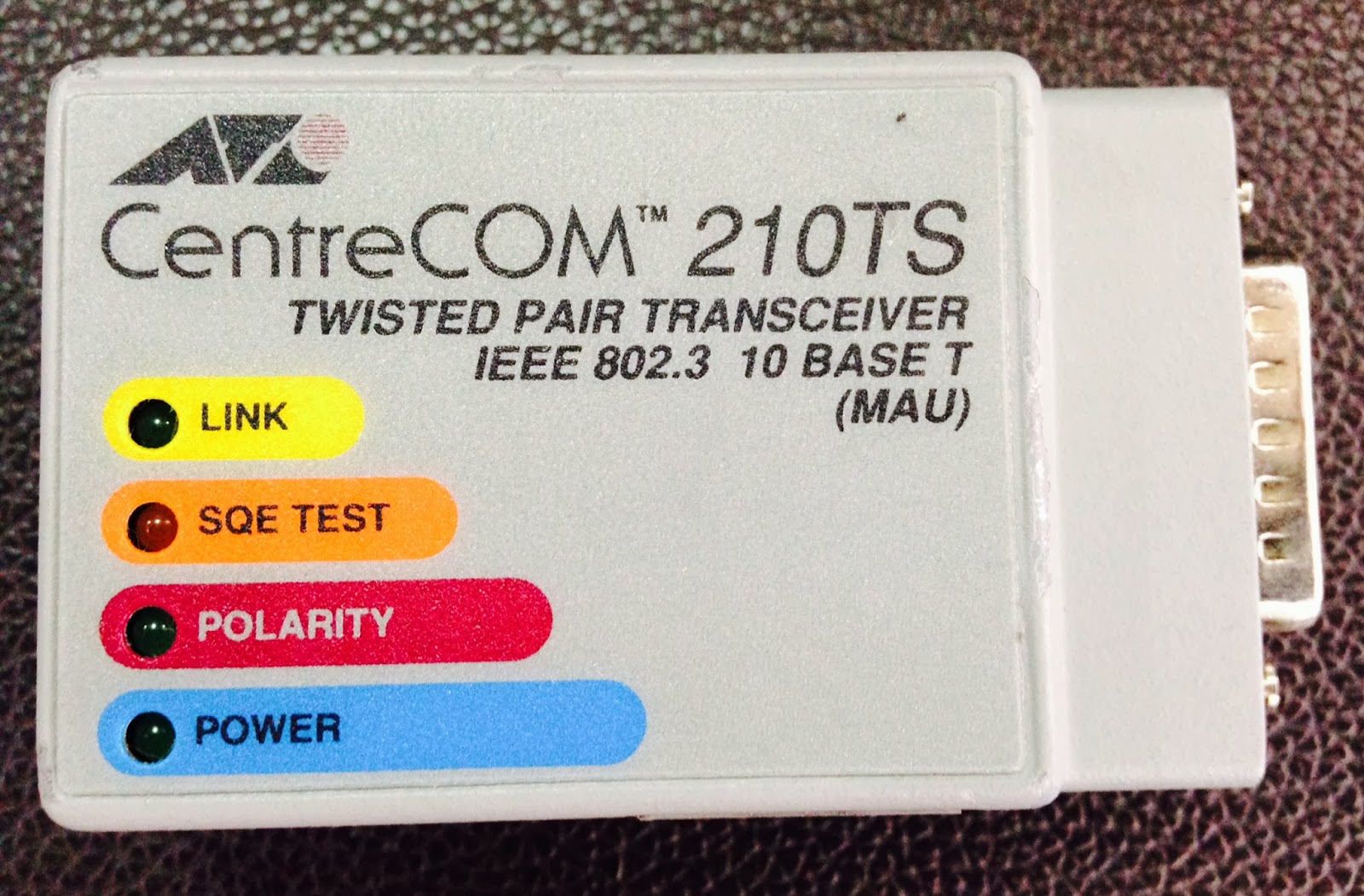
I also bought an AUI Ethernet adapter which is needed to connect the 2511 with an RJ45 cable to my PC when upgrading the IOS via TFTP (the router was sold operating in ROMmon mode).


So I gave the router an IP address and performed the IOS upgrade. I plan to use AUI adapter in order for the 2511 to join my network lab later on. This would allow me to access my rack remotely using my iPad or laptop via wireless inside my room (rack is sitting at my living room).


System Bootstrap, Version 11.0(10c), SOFTWARE
Copyright (c) 1986-1996 by cisco Systems
2500 processor with 14336 Kbytes of main memory

              Restricted Rights Legend

Use, duplication, or disclosure by the Government is
subject to restrictions as set forth in subparagraph
(c) of the Commercial Computer Software - Restricted
Rights clause at FAR sec. 52.227-19 and subparagraph
(c) (1) (ii) of the Rights in Technical Data and Computer
Software clause at DFARS sec. 252.227-7013.

           cisco Systems, Inc.
           170 West Tasman Drive
           San Jose, California 95134-1706


Cisco Internetwork Operating System Software
IOS (tm) 3000 Bootstrap Software (IGS-BOOT-R), Version 11.0(10c), RELEASE SOFTWARE (fc1)
Copyright (c) 1986-1996 by cisco Systems, Inc.
Compiled Fri 27-Dec-96 17:33 by loreilly
Image text-base: 0x01010000, data-base: 0x00001000

cisco 2511 (68030) processor (revision M) with 14336K/2048K bytes of memory.
Processor board ID 16240666, with hardware revision 00000000
X.25 software, Version 2.0, NET2, BFE and GOSIP compliant.
1 Ethernet/IEEE 802.3 interface.
2 Serial network interfaces.
16 terminal lines.
32K bytes of non-volatile configuration memory.
16384K bytes of processor board System flash (Read/Write)

Notice: NVRAM invalid, possibly due to write erase.
         --- System Configuration Dialog ---

At any point you may enter a question mark '?' for help.
Use ctrl-c to abort configuration dialog at any prompt.
Default settings are in square brackets '[]'.
Would you like to enter the initial configuration dialog? [yes]: no

Would you like to terminate autoinstall? [yes]:


Press RETURN to get started!


%LINEPROTO-5-UPDOWN: Line protocol on Interface Ethernet0, changed state to down
%LINEPROTO-5-UPDOWN: Line protocol on Interface Serial0, changed state to down
%LINEPROTO-5-UPDOWN: Line protocol on Interface Serial1, changed state to down
%LINK-3-UPDOWN: Interface Ethernet0, changed state to up
%LINK-3-UPDOWN: Interface Serial0, changed state to down
%LINK-3-UPDOWN: Interface Serial1, changed state to down
%SYS-5-RESTART: System restarted --
Cisco Internetwork Operating System Software
IOS (tm) 3000 Bootstrap Software (IGS-BOOT-R), Version 11.0(10c), RELEASE SOFTWARE (fc1)
Copyright (c) 1986-1996 by cisco Systems, Inc.
Compiled Fri 27-Dec-96 17:33 by loreilly
%LINK-5-CHANGED: Interface Serial0, changed state to administratively down
%LINK-5-CHANGED: Interface Ethernet0, changed state to administratively down
%LINK-5-CHANGED: Interface Serial1, changed state to administratively down
Router(boot)>enable
Router(boot)#show ip interface brief
Interface        IP-Address      OK?  Method    Status                 Protocol
Ethernet0        unassigned      YES  not set   administratively down  down
Serial0          unassigned      YES  not set   administratively down  down
Serial1          unassigned      YES  not set   administratively down  down
Router(boot)#configure terminal
Enter configuration commands, one per line.  End with CNTL/Z.
Router(boot)(config)#interface Ethernet0       // AUI PORT
Router(boot)(config-if)#ip address 192.168.1.1 255.255.255.0
Router(boot)(config-if)#no shutdown
Router(boot)(config-if)#end
Router(boot)#
%LINEPROTO-5-UPDOWN: Line protocol on Interface Ethernet0, changed state to up
%SYS-5-CONFIG_I: Configured from console by console
%LINK-3-UPDOWN: Interface Ethernet0, changed state to up
Router(boot)#ping 192.168.1.2
Type escape sequence to abort.
Sending 5, 100-byte ICMP Echos to 192.168.1.2, timeout is 2 seconds:
!!!!!
Success rate is 100 percent (5/5), round-trip min/avg/max = 4/204/1004 ms
Router(boot)#copy tftp://192.168.1.2/c2500-is-l.122-15.T17.bin flash
                      ^
% Invalid input detected at '^' marker.

Router(boot)#copy ?
  tftp
  rcp
  flash
  mop
  running-config
  startup-config
  flh-log

Router(boot)#copy tftp?
tftp

Router(boot)#copy tftp ?
  flash
  running-config
  startup-config

Router(boot)#copy tftp flash

System flash directory:
No files in System flash
[0 bytes used, 16777216 available, 16777216 total]
Address or name of remote host [255.255.255.255]? 192.168.1.2
Source file name? c2500-is-l.122-15.T17.bin
Destination file name [c2500-is-l.122-15.T17.bin]?
Accessing file 'c2500-is-l.122-15.T17.bin' on 192.168.1.2...
Loading c2500-is-l.122-15.T17.bin from 192.168.1.2 (via Ethernet0): ! [OK]

Device needs erasure before copying new file
Erase flash device before writing? [confirm]

Copy 'c2500-is-l.122-15.T17.bin' from server
  as 'c2500-is-l.122-15.T17.bin' into Flash WITH erase? [yes/no]yes
Erasing device... eeeeeeeeeeeeeeeeeeeeeeeeeeeeeeeeeeeeeeeeeeeeeeeeeeeeeeeeeeeeeeee ...erased
Loading c2500-is-l.122-15.T17.bin from 192.168.1.2 (via Ethernet0):

!!!!!!!!!!!!!!!!!!!!!!!!!!!!!!!!!!!!!!!!!!!!!!!!!!!!!!!!!!!!!!!!!!!!!!!!!!!!!!!!!!!!!!!!!!!!!!!!!!!!!!!!!!!!!!!!!

<OUTPUT TRUNCATED>

!!!!!!!!!!!!!!!!!!!!!!!!!!!!!!!!!!!!!!!!!!!!!
[OK - 16425536/16777216 bytes]

Verifying checksum...  OK (0x2AF7)
Flash copy took 0:08:05 [hh:mm:ss]

Router(boot)#show version
Cisco Internetwork Operating System Software
IOS (tm) 3000 Bootstrap Software (IGS-BOOT-R), Version 11.0(10c), RELEASE SOFTWARE (fc1)
Copyright (c) 1986-1996 by cisco Systems, Inc.
Compiled Fri 27-Dec-96 17:33 by loreilly
Image text-base: 0x01010000, data-base: 0x00001000

ROM: System Bootstrap, Version 11.0(10c), SOFTWARE

Router uptime is 17 minutes
System restarted by power-on
Running default software

cisco 2511 (68030) processor (revision M) with 14336K/2048K bytes of memory.
Processor board ID 16240666, with hardware revision 00000000
X.25 software, Version 2.0, NET2, BFE and GOSIP compliant.
1 Ethernet/IEEE 802.3 interface.
2 Serial network interfaces.
16 terminal lines.
32K bytes of non-volatile configuration memory.
16384K bytes of processor board System flash (Read/Write)

Configuration register is 0x2101     // DIDN'T NOTICE CONFREG RIGHT AWAY (BOOTS INTO BOOTSTRAP)

Router(boot)#reload

System configuration has been modified. Save? [yes/no]: yes
Building configuration...
[OK]
Proceed with reload? [confirm]

%SYS-5-RELOAD: Reload requested
System Bootstrap, Version 11.0(10c), SOFTWARE
Copyright (c) 1986-1996 by cisco Systems
2500 processor with 14336 Kbytes of main memory

              Restricted Rights Legend

Use, duplication, or disclosure by the Government is
subject to restrictions as set forth in subparagraph
(c) of the Commercial Computer Software - Restricted
Rights clause at FAR sec. 52.227-19 and subparagraph
(c) (1) (ii) of the Rights in Technical Data and Computer
Software clause at DFARS sec. 252.227-7013.

           cisco Systems, Inc.
           170 West Tasman Drive
           San Jose, California 95134-1706


Cisco Internetwork Operating System Software
IOS (tm) 3000 Bootstrap Software (IGS-BOOT-R), Version 11.0(10c), RELEASE SOFTWARE (fc1)
Copyright (c) 1986-1996 by cisco Systems, Inc.
Compiled Fri 27-Dec-96 17:33 by loreilly
Image text-base: 0x01010000, data-base: 0x00001000

cisco 2511 (68030) processor (revision M) with 14336K/2048K bytes of memory.
Processor board ID 16240666, with hardware revision 00000000
X.25 software, Version 2.0, NET2, BFE and GOSIP compliant.
1 Ethernet/IEEE 802.3 interface.
2 Serial network interfaces.
16 terminal lines.
32K bytes of non-volatile configuration memory.
16384K bytes of processor board System flash (Read/Write)


Press RETURN to get started!


%LINEPROTO-5-UPDOWN: Line protocol on Interface Ethernet0, changed state to up
%LINEPROTO-5-UPDOWN: Line protocol on Interface Serial0, changed state to down
%LINEPROTO-5-UPDOWN: Line protocol on Interface Serial1, changed state to down
%LINK-3-UPDOWN: Interface Ethernet0, changed state to up
%LINK-3-UPDOWN: Interface Serial0, changed state to down
%LINK-3-UPDOWN: Interface Serial1, changed state to down
%SYS-5-CONFIG_I: Configured from memory by console
%SYS-5-RESTART: System restarted --
Cisco Internetwork Operating System Software
IOS (tm) 3000 Bootstrap Software (IGS-BOOT-R), Version 11.0(10c), RELEASE SOFTWARE (fc1)
Copyright (c) 1986-1996 by cisco Systems, Inc.
Compiled Fri 27-Dec-96 17:33 by loreilly
%LINK-5-CHANGED: Interface Serial0, changed state to administratively down
%LINK-5-CHANGED: Interface Serial1, changed state to administratively down
Router(boot)>show version
Cisco Internetwork Operating System Software
IOS (tm) 3000 Bootstrap Software (IGS-BOOT-R), Version 11.0(10c), RELEASE SOFTWARE (fc1)
Copyright (c) 1986-1996 by cisco Systems, Inc.
Compiled Fri 27-Dec-96 17:33 by loreilly
Image text-base: 0x01010000, data-base: 0x00001000

ROM: System Bootstrap, Version 11.0(10c), SOFTWARE

Router uptime is 0 minutes
System restarted by reload
Running default software

cisco 2511 (68030) processor (revision M) with 14336K/2048K bytes of memory.
Processor board ID 16240666, with hardware revision 00000000
X.25 software, Version 2.0, NET2, BFE and GOSIP compliant.
1 Ethernet/IEEE 802.3 interface.
2 Serial network interfaces.
16 terminal lines.
32K bytes of non-volatile configuration memory.
16384K bytes of processor board System flash (Read/Write)

Configuration register is 0x2101

Router(boot)>enable
Router(boot)#show flash

System flash directory:
File  Length   Name/status
  1   16425536  c2500-is-l.122-15.T17.bin
[16425600 bytes used, 351616 available, 16777216 total]
16384K bytes of processor board System flash (Read/Write)
Router(boot)#co?
configure  connect  copy

Router(boot)#config-register 0x2102       
Translating "config-register"...domain server (255.255.255.255)   
% Unknown command or computer name, or unable to find computer address
Router(boot)#configure terminal
Enter configuration commands, one per line.  End with CNTL/Z.
Router(boot)(config)#co?
config-register

Router(boot)(config)#config-register ?     
  <0x0-0xFFFFFFFF>

Router(boot)(config)#config-register 0x2102
Router(boot)(config)#exit
%SYS-5-CONFIG_I: Configured from console by console
Router(boot)#reload

System configuration has been modified. Save? [yes/no]: yes
Building configuration...
[OK]
Proceed with reload? [confirm]

%SYS-5-RELOAD: Reload requested
System Bootstrap, Version 11.0(10c), SOFTWARE
Copyright (c) 1986-1996 by cisco Systems
2500 processor with 14336 Kbytes of main memory

F3: 15535804+889700+1236752 at 0x3000060

              Restricted Rights Legend

Use, duplication, or disclosure by the Government is
subject to restrictions as set forth in subparagraph
(c) of the Commercial Computer Software - Restricted
Rights clause at FAR sec. 52.227-19 and subparagraph
(c) (1) (ii) of the Rights in Technical Data and Computer
Software clause at DFARS sec. 252.227-7013.

           cisco Systems, Inc.
           170 West Tasman Drive
           San Jose, California 95134-1706


Cisco Internetwork Operating System Software
IOS (tm) 2500 Software (C2500-IS-L), Version 12.2(15)T17, RELEASE SOFTWARE (fc1)
Technical Support: http://www.cisco.com/techsupport
Copyright (c) 1986-2005 by cisco Systems, Inc.
Compiled Sat 13-Aug-05 15:26 by kehsiao
Image text-base: 0x0308038C, data-base: 0x00001000


cisco 2511 (68030) processor (revision M) with 14336K/2048K bytes of memory.
Processor board ID 16240666, with hardware revision 00000000
Bridging software.
X.25 software, Version 3.0.0.
1 Ethernet/IEEE 802.3 interface(s)
2 Serial network interface(s)
16 terminal line(s)
32K bytes of non-volatile configuration memory.
16384K bytes of processor board System flash (Read ONLY)


Press RETURN to get started!


*Mar  1 00:00:10.983: %LINK-3-UPDOWN: Interface Ethernet0, changed state to up
*Mar  1 00:00:10.987: %LINK-3-UPDOWN: Interface Serial0, changed state to down
*Mar  1 00:00:11.355: %LINK-3-UPDOWN: Interface Serial1, changed state to down
*Mar  1 00:00:30.823: %LINEPROTO-5-UPDOWN: Line protocol on Interface Ethernet0, changed state to down
*Mar  1 00:00:34.527: %SYS-5-CONFIG_I: Configured from memory by console
*Mar  1 00:00:34.535: %LINK-5-CHANGED: Interface Serial0, changed state to administratively down
*Mar  1 00:00:37.759: %LINK-5-CHANGED: Interface Serial1, changed state to administratively down
*Mar  1 00:00:37.763: %LINEPROTO-5-UPDOWN: Line protocol on Interface Serial0, changed state to down
*Mar  1 00:00:40.459: %LINEPROTO-5-UPDOWN: Line protocol on Interface Serial1, changed state to down
*Mar  1 00:01:18.251: %SYS-5-RESTART: System restarted --
Cisco Internetwork Operating System Software
IOS (tm) 2500 Software (C2500-IS-L), Version 12.2(15)T17, RELEASE SOFTWARE (fc1)
Technical Support: http://www.cisco.com/techsupport
Copyright (c) 1986-2005 by cisco Systems, Inc.
Compiled Sat 13-Aug-05 15:26 by kehsiao
*Mar  1 00:01:18.255: %SNMP-5-COLDSTART: SNMP agent on host Router is undergoing a cold start
*Mar  1 00:01:18.379: %LINK-3-UPDOWN: Interface Virtual-Access1, changed state to up
*Mar  1 00:01:19.379: %LINEPROTO-5-UPDOWN: Line protocol on Interface Virtual-Access1, changed state to up
Router>enable
Router#show version
Cisco Internetwork Operating System Software
IOS (tm) 2500 Software (C2500-IS-L), Version 12.2(15)T17, RELEASE SOFTWARE (fc1)
Technical Support: http://www.cisco.com/techsupport
Copyright (c) 1986-2005 by cisco Systems, Inc.
Compiled Sat 13-Aug-05 15:26 by kehsiao
Image text-base: 0x0308038C, data-base: 0x00001000

ROM: System Bootstrap, Version 11.0(10c), SOFTWARE
BOOTLDR: 3000 Bootstrap Software (IGS-BOOT-R), Version 11.0(10c), RELEASE SOFTWARE (fc1)

Router uptime is 1 minute
System returned to ROM by reload
System image file is "flash:c2500-is-l.122-15.T17.bin"

cisco 2511 (68030) processor (revision M) with 14336K/2048K bytes of memory.
Processor board ID 16240666, with hardware revision 00000000
Bridging software.
X.25 software, Version 3.0.0.
1 Ethernet/IEEE 802.3 interface(s)
2 Serial network interface(s)
16 terminal line(s)
32K bytes of non-volatile configuration memory.
16384K bytes of processor board System flash (Read ONLY)

Configuration register is 0x2102

Router#configure terminal
Enter configuration commands, one per line.  End with CNTL/Z.
Router(config)#hostname 2511-TS
511-TS(config)#end
2511-TS#show run
*Mar  1 00:05:12.075: %SYS-5-CONFIG_I: Configured from console by consolerun
Building configuration...

Current configuration : 689 bytes
!
version 12.2
service timestamps debug datetime msec
service timestamps log datetime msec
no service password-encryption
service udp-small-servers
service tcp-small-servers
!
hostname 2511-TS
!
logging queue-limit 100
!
ip subnet-zero
!
!
!
!
interface Ethernet0
 ip address 192.168.1.1 255.255.255.0
 no ip route-cache
 no ip mroute-cache
!
interface Serial0
 no ip address
 no ip route-cache
 no ip mroute-cache
 shutdown
 no fair-queue
!
interface Serial1
 no ip address
 no ip route-cache
 no ip mroute-cache
 shutdown
!
no ip http server
ip classless
!
!
!
!
!
line con 0
line 1 16
 flush-at-activation
 transport input all
line aux 0
 transport input all
line vty 0 4
 login
!
end

Saturday, March 29, 2014

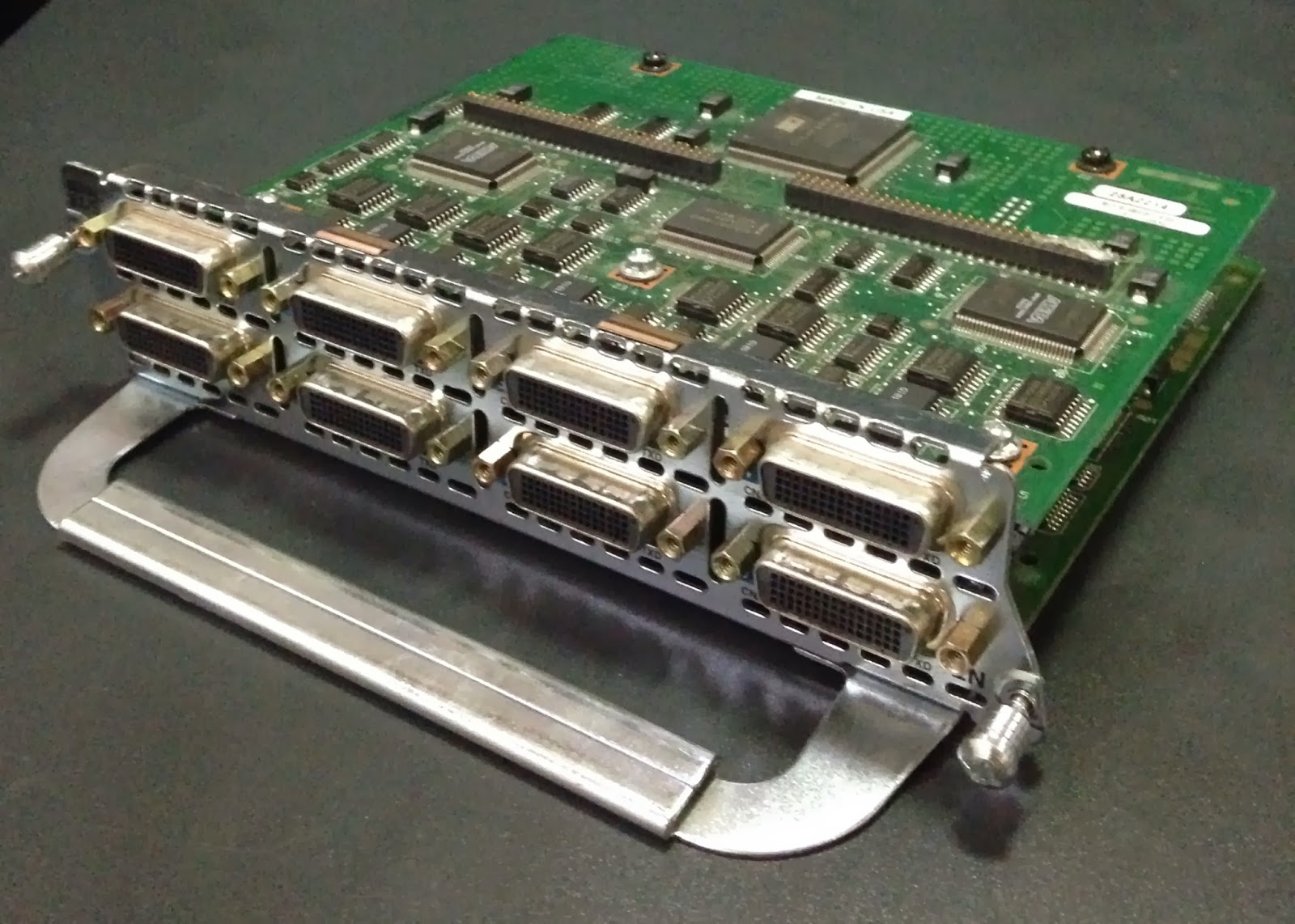
My Cisco 2811 and NM-8A/S

Kudos to my Mom for doing a splendid job packing my Cisco 2811 routers! I just realized how heavy they were (I got two) when the package arrived. So I went ahead and tested if the 3x fans are working.


I almost woke up my baby girl who was sleeping that night when I booted up the 2811 router for the first time. It made a loud noise fan upon boot up but went silent afterwards.

Router#show version
Cisco IOS Software, 2800 Software (C2800NM-ADVIPSERVICESK9-M), Version 12.4(16), RELEASE SOFTWARE (fc1)
Technical Support: http://www.cisco.com/techsupport
Copyright (c) 1986-2007 by Cisco Systems, Inc.
Compiled Wed 20-Jun-07 07:19 by prod_rel_team

ROM: System Bootstrap, Version 12.4(13r)T, RELEASE SOFTWARE (fc1)

Router uptime is 6 minutes
System returned to ROM by power-on
System image file is "flash:c2800nm-advipservicesk9-mz.124-16.bin"


This product contains cryptographic features and is subject to United
States and local country laws governing import, export, transfer and
use. Delivery of Cisco cryptographic products does not imply
third-party authority to import, export, distribute or use encryption.
Importers, exporters, distributors and users are responsible for
compliance with U.S. and local country laws. By using this product you
agree to comply with applicable laws and regulations. If you are unable
to comply with U.S. and local laws, return this product immediately.

A summary of U.S. laws governing Cisco cryptographic products may be found at:
http://www.cisco.com/techsupport

If you require further assistance please contact us by sending email to
export@cisco.com.

Cisco 2811 (revision 53.51) with 249856K/12288K bytes of memory.
Processor board ID FHK1129F477
2 FastEthernet interfaces
2 Serial(sync/async) interfaces
1 Virtual Private Network (VPN) Module
DRAM configuration is 64 bits wide with parity enabled.
239K bytes of non-volatile configuration memory.
62720K bytes of ATA CompactFlash (Read/Write)

Configuration register is 0x2102

Router#show environment all

 Main Power Supply is AC

 Fan 1 OK
 Fan 2 OK
 Fan 3 OK

 System Temperature: 24 Celsius (normal)

 Environmental information last updated 00:00:03 ago


I also tested my NM-8A/S network module and upgraded the IOS on my 2811. My Frame Relay switch is now ready. All I need now are my serial cables. The 2811 will also make a perfect Call Manager Express (CME) router if I choose to take the Cisco voice track.

Router#show inventory
NAME: "2811 chassis", DESCR: "2811 chassis"
PID: CISCO2811         , VID: V05 , SN: FHK1129F40H

NAME: "Eight Port Low-Speed A/S Serial", DESCR: "Eight Port Low-Speed A/S Serial"
PID: NM-8A/S=          , VID: 1.0, SN: 28816743

Router#show ip interface brief
Interface                  IP-Address      OK? Method Status                Protocol
FastEthernet0/0            unassigned      YES unset  administratively down down
FastEthernet0/1            unassigned      YES unset  administratively down down
Serial1/0                  unassigned      YES unset  administratively down down
Serial1/1                  unassigned      YES unset  administratively down down
Serial1/2                  unassigned      YES unset  administratively down down
Serial1/3                  unassigned      YES unset  administratively down down
Serial1/4                  unassigned      YES unset  administratively down down
Serial1/5                  unassigned      YES unset  administratively down down
Serial1/6                  unassigned      YES unset  administratively down down
Serial1/7                  unassigned      YES unset  administratively down down

Router#show diag
Slot 0:
        C2811 Motherboard with 2FE and integrated VPN Port adapter, 2 ports
        Port adapter is analyzed
        Port adapter insertion time unknown
        Onboard VPN             : v2.2.0
        EEPROM contents at hardware discovery:
        PCB Serial Number        : FOC11276FF2
        Hardware Revision        : 1.0
        Top Assy. Part Number    : 800-26920-04
        Board Revision           : A0
        Deviation Number         : 0
        Fab Version              : 04
        RMA Test History         : 00
        RMA Number               : 0-0-0-0
        RMA History              : 00
        Processor type           : 87
        Hardware date code       : 20070710
        Chassis Serial Number    : FHK1129F40H
        Chassis MAC Address      : 001c.58b9.3d58
        MAC Address block size   : 24
        CLEI Code                : COM7R00ARA
        Product (FRU) Number     : CISCO2811
        Part Number              : 73-10258-05
        Version Identifier       : V05
        EEPROM format version 4
        EEPROM contents (hex):
          0x00: 04 FF C1 8B 46 4F 43 31 31 32 37 36 46 46 32 40
          0x10: 03 E7 41 01 00 C0 46 03 20 00 69 28 04 42 41 30
          0x20: 88 00 00 00 00 02 04 03 00 81 00 00 00 00 04 00
          0x30: 09 87 83 01 32 41 36 C2 8B 46 48 4B 31 31 32 39
          0x40: 46 34 30 48 C3 06 00 1C 58 B9 3D 58 43 00 18 C6
          0x50: 8A 43 4F 4D 37 52 30 30 41 52 41 CB 8F 43 49 53
          0x60: 43 4F 32 38 31 31 20 20 20 20 20 20 82 49 28 12
          0x70: 05 89 56 30 35 20 D9 02 40 C1 FF FF FF FF FF FF

Slot 1:
        Sync/Async Port adapter, 8 ports
        Port adapter is analyzed
        Port adapter insertion time unknown
        EEPROM contents at hardware discovery:
        Hardware revision 1.0           Board revision E0
        Serial number     28816743      Part number    800-01225-03
        FRU Part Number     NM-8A/S=
        Test history      0x0           RMA number     00-00-00
        EEPROM format version 1
        EEPROM contents (hex):
          0x00: 01 25 01 00 0101 25 01 00 01 B7 B5 67 50 04 C9 03 00 00 00 00
          0x10: 70 00 00 00 02 08 02 17 FF FF FF FF FF FF FF FF
          0x20: FF FF FF FF FF FF FF FF FF FF FF FF FF FF FF FF
          0x30: FF FF FF FF FF FF FF FF FF FF FF FF

Router#copy tftp://192.168.1.2/c2800nm-adventerprisek9-mz.124-24.T8.bin flash
Destination filename [c2800nm-adventerprisek9-mz.124-24.T8.bin]?
Accessing tftp://192.168.1.2/c2800nm-adventerprisek9-mz.124-24.T8.bin...
Erase flash: before copying? [confirm]
Erasing the flash filesystem will remove all files! Continue? [confirm]
Erasing device... eeeeeeeeeeeeeeeeeeeeeeeeeeeeeeeeeeeeeeeeeeeeeeeeeeeeeeeeeeeeeeeeeeeeeeeeeeeeeeeeeeeeeeeeeeeeeeeeeeeeeeeeeeeeeeeeeeeeeeeeeeeeeeeeeeeeeeeeeeeeeeeeeeeeeeeeeeeeeeeeeeeeeeeeeeeeeeeeeeeeeeeeeeeeeeeeeeeeeeeeeeeeeeeeeeeeeeeeeeeeeeeeeeeeeeeeeeeeeeeeeeeeeeeeeeeeeeeeeeeeeeeeeeeeeeeeeeeeeeeeeeeeeeeeeeeeeeeeeeeeeeeeeeeeeeeeeeeeeeeeeeeeeeeeeeeeeeeeeeeeeeeeeeeeeeeeeeeeeeeeeeeeeeeeeeeeeeeeeeeeeeeeeeeeeeeeeeeeeeeeeeeeeeeeeeeeeeeeeeeeeeeeeeeeeeeeeeeeeeeeeeeeeeeeeeeeeeeeeeeeeeeeeeeeeeeeeeeeeeeeeeeeeeeeee ...erased
Erase of flash: complete
Loading c2800nm-adventerprisek9-mz.124-24.T8.bin from 192.168.1.2 (via FastEthernet0/0): !!!!!!!!!!!!!!!!!!!!!!!!!!!!!!!!!!!!!!!!!!!!!!!!!!!!!!!!!!!!!!!!!!!!!!!!!!!!!!!!!!!!!!!!!!!!!!!!!!!!!!!!!!!!!!!!!!!!!!!!!!!!!!!!!!!!!!!!!!!!!!!!!!!!!!!!!!!!!!!!!!!!!!!!!!!!!!!!!!!!!!!!!!!!!!!!!!!!!!!!!!!!!!!!!!!!!!!!!!!!!!!!!!!!!!!!!
[OK - 59490092 bytes]

Verifying checksum... CCCCCCCCCCCCCCCCCCCCCCCCCCCCCCCCCCCCCCCCCCCCCCCCCCCCCCCCCCCCCCCCCCCCCCCCCCCCCCCCCCCCCCCCCCCCCCCCCCCCCCCCCCCCCCCCC OK (0xEFB5)
59490092 bytes copied in 779.836 secs (76285 bytes/sec)
Router#show flash

CompactFlash directory:
File  Length   Name/status
  1   59490092  c2800nm-adventerprisek9-mz.124-24.T8.bin
[59490156 bytes used, 4735120 available, 64225276 total]
62720K bytes of ATA CompactFlash (Read/Write)

Router#reload

System configuration has been modified. Save? [yes/no]: y
Building configuration...
[OK]
Proceed with reload? [confirm]

*Jan 31 00:16:35.791: %SYS-5-RELOAD: Reload requested by console. Reload Reason: Reload Command.

System Bootstrap, Version 12.4(13r)T, RELEASE SOFTWARE (fc1)
Technical Support: http://www.cisco.com/techsupport
Copyright (c) 2006 by cisco Systems, Inc.

Initializing memory for ECC
.
c2811 platform with 262144 Kbytes of main memory
Main memory is configured to 64 bit mode with ECC enabled


Readonly ROMMON initialized

program load complete, entry point: 0x8000f000, size: 0x38bbd64
Self decompressing the image : ################################################################################################################################################################################################################################################################################################################################################### [OK]

Smart Init is enabled
smart init is sizing iomem
  ID            MEMORY_REQ                 TYPE
0003E7          0X00474800 C2811 Mainboard
000025          0X00033480 Eight port Async/Sync
                0X00264050 Onboard VPN
                0X000021B8 Onboard USB
                0X002C29F0 public buffer pools
                0X00211000 public particle pools
TOTAL:          0X00BE1878

If any of the above Memory Requirements are
"UNKNOWN", you may be using an unsupported
configuration or there is a software problem and
system operation may be compromised.
Rounded IOMEM up to: 12Mb.
Using 4 percent iomem. [12Mb/256Mb]

              Restricted Rights Legend

Use, duplication, or disclosure by the Government is
subject to restrictions as set forth in subparagraph
(c) of the Commercial Computer Software - Restricted
Rights clause at FAR sec. 52.227-19 and subparagraph
(c) (1) (ii) of the Rights in Technical Data and Computer
Software clause at DFARS sec. 252.227-7013252.227-7013.

           cisco Systems, Inc.
           170 West Tasman Drive
           San Jose, California 95134-1706


Cisco IOS Software, 2800 Software (C2800NM-ADVENTERPRISEK9-M), Version 12.4(24)T8, RELEASE SOFTWARE (fc1)
Technical Support: http://www.cisco.com/techsupport
Copyright (c) 1986-2012 by Cisco Systems, Inc.
Compiled Sun 09-Sep-12 04:01 by prod_rel_team


This product contains cryptographic features and is subject to United
States and local country laws governing import, export, transfer and
use. Delivery of Cisco cryptographic products does not imply
third-party authority to import, export, distribute or use encryption.
Importers, exporters, distributors and users are responsible for
compliance with U.S. and local country laws. By using this product you
agree to comply with applicable laws and regulations. If you are unable
to comply with U.S. and local laws, return this product immediately.

A summary of U.S. laws governing Cisco cryptographic products may be found at:
http://www.cisco.com/techsupport

If you require further assistance please contact us by sending email to
export@cisco.com.

Installed image archive
Cisco 2811 (revision 49.46) with 249856K/12288K bytes of memory.
Processor board ID FHK1129F40H
2 FastEthernet interfaces
8 Low-speed serial(sync/async) interfaces
1 Virtual Private Network (VPN) Module
DRAM configuration is 64 bits wide with parity enabled.
239K bytes of non-volatile configuration memory.
62720K bytes of ATA CompactFlash (Read/Write)


Press RETURN to get started!


*Jan 31 00:20:31.731: %VPN_HW-6-INFO_LOC: Crypto engine: onboard 0  State changed to: Initialized
*Jan 31 00:20:31.739: %VPN_HW-6-INFO_LOC: Crypto engine: onboard 0  State changed to: Enabled
*Jan 31 00:20:33.851: %LINEPROTO-5-UPDOWN: Line protocol on Interface VoIP-Null0, changed state to up
*Jan 31 00:20:33.851: %LINK-3-UPDOWN: Interface FastEthernet0/0, changed state to up
*Jan 31 00:20:33.851: %LINK-3-UPDOWN: Interface FastEthernet0/1, changed state to up
*Jan 31 00:20:33.855: %LINK-3-UPDOWN: Interface Serial1/0, changed state to down
*Jan 31 00:20:33.855: %LINK-3-UPDOWN: Interface Serial1/1, changed state to down
*Jan 31 00:20:33.855: %LINK-3-UPDOWN: Interface Serial1/2, changed state to down
*Jan 31 00:20:33.855: %LINK-3-UPDOWN: Interface Serial1/3, changed state to down
*Jan 31 00:20:33.855: %LINK-3-UPDOWN: Interface Serial1/4, changed state to down
*Jan 31 00:20:33.855: %LINK-3-UPDOWN: Interface Serial1/5, changed state to down
*Jan 31 00:20:33.855: %LINK-3-UPDO
Router>WN: Interface Serial1/6, changed state to down
*Jan 31 00:20:33.855: %LINK-3-UPDOWN: Interface Serial1/7, changed state to down
*Jan 31 00:20:35.275: %LINEPROTO-5-UPDOWN: Line protocol on Interface FastEthernet0/0, changed state to up
*Jan 31 00:20:35.275: %LINEPROTO-5-UPDOWN: Line protocol on Interface FastEthernet0/1, changed state to down
*Jan 31 00:20:35.275: %LINEPROTO-5-UPDOWN: Line protocol on Interface Serial1/0, changed state to down
*Jan 31 00:20:35.275: %LINEPROTO-5-UPDOWN: Line protocol on Interface Serial1/1, changed state to down
*Jan 31 00:20:35.275: %LINEPROTO-5-UPDOWN: Line protocol on Interface Serial1/2, changed state to down
*Jan 31 00:20:35.275: %LINEPROTO-5-UPDOWN: Line protocol on Interface Serial1/3, changed state to down
*Jan 31 00:20:35.275: %LINEPROTO-5-UPDOWN: Line protocol on Interface Serial1/4, changed state to down
*Jan 31 00:20:35.275: %LINEPROTO-5-UPDOWN: Line protocol on Interface Serial1/5, changed state to down
*Jan 31 00:20:35.275: %LINEPROTO-5-UPDOWN: Line protocol on Interface Serial1/6, changed state to down
*Jan 31 00:20:35.275: %LINEPROTO-5-UPDOWN: Line protocol on Interface Serial1/7, changed state to down
*Jan 31 00:20:37.635: %LINK-5-CHANGED: Interface FastEthernet0/1, changed state to administratively down
*Jan 31 00:20:37.679: %LINK-5-CHANGED: Interface Serial1/0, changed state to administratively down
*Jan 31 00:20:37.695: %LINK-5-CHANGED: Interface Serial1/1, changed state to administratively down
*Jan 31 00:20:37.703: %LINK-5-CHANGED: Interface Serial1/2, changed state to administratively down
*Jan 31 00:20:37.711: %LINK-5-CHANGED: Interface Serial1/3, changed state to administratively down
*Jan 31 00:20:37.723: %LINK-5-CHANGED: Interface Serial1/4, changed state to administratively down
*Jan 31 00:20:37.731: %LINK-5-CHANGED: Interface Serial1/5, changed state to administratively down
*Jan 31 00:20:37.739: %LINK-5-CHANGED: Interface Serial1/6, changed state to administratively down
*Jan 31 00:20:37.751: %LINK-5-CHANGED: Interface Serial1/7, changed state to administratively down
*Jan 31 00:20:39.439: %SYS-5-RESTART: System restarted --
Cisco IOS Software, 2800 Software (C2800NM-ADVENTERPRISEK9-M), Version 12.4(24)T8, RELEASE SOFTWARE (fc1)
Technical Support: http://www.cisco.com/techsupport
Copyright (c) 1986-2012 by Cisco Systems, Inc.
Compiled Sun 09-Sep-12 04:01 by prod_rel_team
*Jan 31 00:20:39.451: %SNMP-5-COLDSTART: SNMP agent on host Router is undergoing a cold start
*Jan 31 00:20:39.711: %SYS-6-BOOTTIME: Time taken to reboot after reload =  243 seconds
*Jan 31 00:20:39.895: %CRYPTO-6-ISAKMP_ON_OFF: ISAKMP is OFF
*Jan 31 00:20:39.895: %CRYPTO-6-GDOI_ON_OFF: GDOI is OFF
*Jan 31 00:20:39.899: %CRYPTO-6-ISAKMP_ON_OFF: ISAKMP is OFF
*Jan 31 00:20:39.899: %CRYPTO-6-GDOI_ON_OFF: GDOI is OFF
Router>enable
Router#show version
Cisco IOS Software, 2800 Software (C2800NM-ADVENTERPRISEK9-M), Version 12.4(24)T8, RELEASE SOFTWARE (fc1)
Technical Support: http://www.cisco.com/techsupport
Copyright (c) 1986-2012 by Cisco Systems, Inc.
Compiled Sun 09-Sep-12 04:01 by prod_rel_team

ROM: System Bootstrap, Version 12.4(13r)T, RELEASE SOFTWARE (fc1)

Router uptime is 1 minute
System returned to ROM by reload at 00:16:35 UTC Fri Jan 31 2014
System image file is "flash:c2800nm-adventerprisek9-mz.124-24.T8.bin"


This product contains cryptographic features and is subject to United
States and local country laws governing import, export, transfer and
use. Delivery of Cisco cryptographic products does not imply
third-party authority to import, export, distribute or use encryption.
Importers, exporters, distributors and users are responsible for
compliance with U.S. and local country laws. By using this product you
agree to comply with applicable laws and regulations. If you are unable
to comply with U.S. and local laws, return this product immediately.

A summary of U.S. laws governing Cisco cryptographic products may be found at:
http://www.cisco.com/techsupport

If you require further assistance please contact us by sending email to
export@cisco.com.

Cisco 2811 (revision 53.50) with 249856K/12288K bytes of memory.
Processor board ID FHK1129F40H
2 FastEthernet interfaces
8 Low-speed serial(sync/async) interfaces
1 Virtual Private Network (VPN) Module
DRAM configuration is 64 bits wide with parity enabled.
239K bytes of non-volatile configuration memory.
62720K bytes of ATA CompactFlash (Read/Write)

Configuration register is 0x2102


Saturday, February 8, 2014

Testing Cisco WAN Interface Card (WIC)

My serial WICs started to arrive one by one. These will be used for my spoke routers. I also plan to use a NM-8A/S (8-port Asynchronous/Synchronous network module) for my Frame Relay switch.

The first thing I wanted to check is whether they've arrived in working condition. These are my quick handy commands in verifying them. Make sure to "ground" yourself by holding something metallic for a few seconds. You can also use an anti-static wrist band in order to avoid electrostatic discharge (ESD) that could potentially damage the WICs.


1841-1#show inventory
NAME: "chassis", DESCR: "1841 chassis"
PID: CISCO1841         , VID: V06 , SN: FHK143872B5

NAME: "WIC 0", DESCR: "WAN Interface Card - Serial 2T"
PID: WIC-2T=           , VID: 1.0, SN: 27148634

NAME: "WIC 1", DESCR: "WAN Interface Card - Serial (1T)"
PID: WIC-1T=           , VID: 1.0, SN: 32317356


1841-1#show version
Cisco IOS Software, 1841 Software (C1841-ADVENTERPRISEK9-M), Version 12.4(24)T2, RELEASE SOFTWARE (fc2)
Technical Support: http://www.cisco.com/techsupport
Copyright (c) 1986-2009 by Cisco Systems, Inc.
Compiled Mon 19-Oct-09 16:11 by prod_rel_team

ROM: System Bootstrap, Version 12.4(13r)T, RELEASE SOFTWARE (fc1)

1841-1 uptime is 1 minute
System returned to ROM by power-on
System image file is "flash:c1841-adventerprisek9-mz.124-24.T2.bin"


This product contains cryptographic features and is subject to United
States and local country laws governing import, export, transfer and
use. Delivery of Cisco cryptographic products does not imply
third-party authority to import, export, distribute or use encryption.
Importers, exporters, distributors and users are responsible for
compliance with U.S. and local country laws. By using this product you
agree to comply with applicable laws and regulations. If you are unable
to comply with U.S. and local laws, return this product immediately.

A summary of U.S. laws governing Cisco cryptographic products may be found at:
http://www.cisco.com/techsupport

If you require further assistance please contact us by sending email to
export@cisco.com.

Cisco 1841 (revision 7.0) with 238592K/23552K bytes of memory.
Processor board ID FHK143872B5
2 FastEthernet interfaces
3 Serial(sync/async) interfaces
1 Virtual Private Network (VPN) Module
DRAM configuration is 64 bits wide with parity disabled.
191K bytes of NVRAM.
62720K bytes of ATA CompactFlash (Read/Write)

Configuration register is 0x2102


1841-1#show diag
Slot 0:
        C1841 2FE 2SLOT Mainboard Port adapter, 5 ports
        Port adapter is analyzed
        Port adapter insertion time 00:02:09 ago
        EEPROM contents at hardware discovery:
        Chassis MAC Address      : b4a4.e308.3de4
        MAC Address block size   : 34
        PCB Serial Number        : FOC14356TP9
        Hardware Revision        : 7.0
        Part Number              : 73-8191-08
        Board Revision           : H0
        Top Assy. Part Number    : 800-23434-07
        Deviation Number         : 0
        Fab Version              : 04
        CLEI Code                : IPMNN10DRA
        RMA Test History         : 00
        RMA Number               : 0-0-0-0
        RMA History              : 00
        Product (FRU) Number     : CISCO1841
        Version Identifier       : V06
        Processor type           : 86
        Chassis Serial Number    : FHK143872B5
        EEPROM format version 4
        EEPROM contents (hex):
          0x00: 04 FF C3 06 B4 A4 E3 08 3D E4 43 00 22 C1 8B 46
          0x10: 4F 43 31 34 33 35 36 54 50 39 40 04 1B 41 07 00
          0x20: 82 49 1F FF 08 42 48 30 C0 46 03 20 00 5B 8A 07
          0x30: 88 00 00 00 00 02 04 C6 8A 49 50 4D 4E 4E 31 30
          0x40: 44 52 41 03 00 81 00 00 00 00 04 00 CB 89 43 49
          0x50: 53 43 4F 31 38 34 31 89 56 30 36 20 D9 03 40 C1
          0x60: C2 09 86 C2 8B 46 48 4B 31 34 33 38 37 32 42 35
          0x70: FF FF FF FF FF FF FF FF FF FF FF FF FF FF FF FF
          0x80: FF FF FF FF FF FF FF FF FF FF FF FF FF FF FF FF
          0x90: FF FF FF FF FF FF FF FF FF FF FF FF FF FF FF FF
          0xA0: FF FF FF FF FF FF FF FF FF FF FF FF FF FF FF FF
          0xB0: FF FF FF FF FF FF FF FF FF FF FF FF FF FF FF FF
          0xC0: FF FF FF FF FF FF FF FF FF FF FF FF FF FF FF FF
          0xD0: FF FF FF FF FF FF FF FF FF FF FF FF FF FF FF FF
          0xE0: FF FF FF FF FF FF FF FF FF FF FF FF FF FF FF FF
          0xF0: FF FF FF FF FF FF FF FF FF FF FF FF FF FF FF FF
          0x100: FF FF FF FF FF FF FF FF FF FF FF FF FF FF FF FF
          0x110: FF FF FF FF FF FF FF FF FF FF FF FF FF FF FF FF
          0x120: FF FF FF FF FF FF FF FF FF FF FF FF FF FF FF FF
          0x130: FF FF FF FF FF FF FF FF FF FF FF FF FF FF FF FF
          0x140: FF FF FF FF FF FF FF FF FF FF FF FF FF FF FF FF
          0x150: FF FF FF FF FF FF FF FF FF FF FF FF FF FF FF FF
          0x160: FF FF FF FF FF FF FF FF FF FF FF FF FF FF FF FF
          0x170: FF FF FF FF FF FF FF FF FF FF FF FF FF FF FF FF
          0x180: FF FF FF FF FF FF FF FF FF FF FF FF FF FF FF FF
          0x190: FF FF FF FF FF FF FF FF FF FF FF FF FF FF FF FF
          0x1A0: FF FF FF FF FF FF FF FF FF FF FF FF FF FF FF FF
          0x1B0: FF FF FF FF FF FF FF FF FF FF FF FF FF FF FF FF
          0x1C0: FF FF FF FF FF FF FF FF FF FF FF FF FF FF FF FF
          0x1D0: FF FF FF FF FF FF FF FF FF FF FF FF FF FF FF FF
          0x1E0: FF FF FF FF FF FF FF FF FF FF FF FF FF FF FF FF
          0x1F0: FF FF FF FF FF FF FF FF FF FF FF FF FF FF FF FF

        WIC/HWIC Slot 0:
        Serial 2T (12in1)
        Hardware revision 1.0           Board revision F0
        Serial number     27148634      Part number    800-03181-01
        FRU Part Number     WIC-2T=
        Test history      0x0           RMA number     00-00-00
        Connector type    PCI
        EEPROM format version 1
        EEPROM contents (hex):
          0x20: 01 12 01 00 01 9E 41 5A 50 0C 6D 01 00 00 00 00
          0x30: 78 00 00 00 01 11 20 00 FF FF FF FF FF FF FF FF

        WIC/HWIC Slot 1:
        Serial 1T WAN daughter card
        Hardware revision 1.0           Board revision B0
        Serial number     32317356      Part number    800-01514-02
        FRU Part Number     WIC-1T=
        Test history      0x0           RMA number     00-00-00
        Connector type    Wan Module
        EEPROM format version 1
        EEPROM contents (hex):
          0x20: 01 02 01 00 01 ED 1F AC 50 05 EA 02 00 00 00 00
          0x30: 58 00 00 00 04 05 16 01 FF FF FF FF FF FF FF FF


1841-1#show ip interface brief
Interface                  IP-Address      OK? Method Status                Protocol
FastEthernet0/0            172.16.1.5      YES NVRAM  up                    down
FastEthernet0/1            172.16.20.254   YES NVRAM  up                    down
Serial0/0/0                unassigned      YES unset  administratively down down
Serial0/0/1                unassigned      YES unset  administratively down down
Serial0/1/0                unassigned      YES unset  administratively down down

Saturday, January 18, 2014

My Complete Network Lab Setup

This is a continuation of my previous post and fully integrated the Layer 2 switched network and added a couple of 1841 routers.

There were some minor modifications on the 871w router for NAT to function properly. I also opened ICMP, SSH and Telnet ports on the ASA5505 firewall for troubleshooting and testing purposes. The switch's management IP were changed I used the 172.16.0.0 /16 subnet solely for my lab. I then isolate my wifi users on the 192.168.1.0 /24 subnet.

871W#configure terminal
871W(config-if)#interface fastethernet0     // MOVE TRUNK FROM FE3 TO FE0 PORT
871W(config-if)#description TRUNK TO ASA5505
871W(config-if)#do show ip interface brief
Interface                  IP-Address      OK? Method Status                Protocol
BVI1                       192.168.1.1     YES NVRAM  up                    up
Dot11Radio0                unassigned      YES NVRAM  up                    up
FastEthernet0              unassigned      YES unset  up                    up
FastEthernet1              unassigned      YES unset  administratively down down
FastEthernet2              unassigned      YES unset  administratively down down
FastEthernet3              unassigned      YES unset  administratively down down
FastEthernet4              59.189.109.1    YES DHCP   up                    up
Group-Async4               unassigned      YES NVRAM  down                  down
NVI0                       unassigned      YES unset  administratively down down
Vlan1                      unassigned      YES NVRAM  up                    up
871W(config)#ip route 172.16.0.0 255.255.0.0 192.168.1.2     // ROUTE TO LAB NETWORK
871W(config)#access-list 10 permit 172.16.0.0 0.0.255.255   
871W(config)#do show access-list 10
Standard IP access list 10
    10 permit 172.16.0.0, wildcard bits 0.0.255.255 (54 matches)      // NAT ACL FOR 172.16.0.0/16 (LAB)
    20 permit 192.168.1.0, wildcard bits 0.0.0.255 (862 matches)    // NAT ACL FOR 192.168.1.0 /24 (WIFI)

871W(config)#exit
871W#show ip nat translations | include 172.16.1.6
udp 59.189.105.139:49226  172.16.1.6:49226      8.8.8.8:33506         8.8.8.8:33506
udp 59.189.105.139:49227  172.16.1.6:49227      8.8.8.8:33507         8.8.8.8:33507
udp 59.189.105.139:49228  172.16.1.6:49228      8.8.8.8:33508         8.8.8.8:33508
udp 59.189.105.139:49229  172.16.1.6:49229      8.8.8.8:33509         8.8.8.8:33509
udp 59.189.105.139:49230  172.16.1.6:49230      8.8.8.8:33510         8.8.8.8:33510
udp 59.189.105.139:49231  172.16.1.6:49231      8.8.8.8:33511         8.8.8.8:33511
udp 59.189.105.139:49232  172.16.1.6:49232      8.8.8.8:33512         8.8.8.8:33512
udp 59.189.105.139:49233  172.16.1.6:49233      8.8.8.8:33513         8.8.8.8:33513
udp 59.189.105.139:49234  172.16.1.6:49234      8.8.8.8:33514         8.8.8.8:33514
udp 59.189.105.139:49235  172.16.1.6:49235      8.8.8.8:33515         8.8.8.8:33515
udp 59.189.105.139:49236  172.16.1.6:49236      8.8.8.8:33516         8.8.8.8:33516
udp 59.189.105.139:49237  172.16.1.6:49237      8.8.8.8:33517         8.8.8.8:33517
udp 59.189.105.139:49238  172.16.1.6:49238      8.8.8.8:33518         8.8.8.8:33518
udp 59.189.105.139:49239  172.16.1.6:49239      8.8.8.8:33519         8.8.8.8:33519
udp 59.189.105.139:49240  172.16.1.6:49240      8.8.8.8:33520         8.8.8.8:33520
udp 59.189.105.139:49241  172.16.1.6:49241      8.8.8.8:33521         8.8.8.8:33521
udp 59.189.105.139:49242  172.16.1.6:49242      8.8.8.8:33522         8.8.8.8:33522
udp 59.189.105.139:49243  172.16.1.6:49243      8.8.8.8:33523         8.8.8.8:33523


871W#ping 172.16.1.6     // PING AND TELNET TO 1841-2 LAB ROUTER

Type escape sequence to abort.
Sending 5, 100-byte ICMP Echos to 172.16.1.6, timeout is 2 seconds:
!!!!!
Success rate is 100 percent (5/5), round-trip min/avg/max = 1/2/4 ms
871W#telnet 172.16.1.6
Trying 172.16.1.6 ... Open

+--------------------------------------------------------------+
| This equipment is privately owned and monitored.             |
| Disconnect immediately if you are not an authorized user.    |
+--------------------------------------------------------------+


User Access Verification

Username:


----


ASA5505# configure terminal
ASA5505(config)# interface ethernet0/0     // WAN PORT
ASA5505(config-if)# description LINK TO 871W
ASA5505(config-if)# interface ethernet0/1     // LAN PORT
ASA5505(config-if)# description TRUNK TO SW1
ASA5505(config-if)# exit
ASA5505(config)# banner motd +--------------------------------------------------------------+
ASA5505(config)# banner motd | This equipment is privately owned and monitored.             |
ASA5505(config)# banner motd | Disconnect immediately if you are not an authorized user.    |
ASA5505(config)# banner motd +--------------------------------------------------------------+
ASA5505(config)# policy-map global_policy
ASA5505(config-pmap)# class inspection_default
ASA5505(config-pmap-c)# inspect icmp error    // FOR TRACEROUTE FUNCTION
ASA5505(config-pmap-c)# exit
ASA5505(config-pmap)# exit
ASA5505(config)# access-list OUTSIDE-IN extended permit icmp any 172.16.0.0 255.255.0.0 echo   
ASA5505(config)# access-list OUTSIDE-IN extended permit tcp any 172.16.0.0 255.255.0.0 eq telnet
ASA5505(config)# access-list OUTSIDE-IN extended permit tcp any 172.16.0.0 255.255.0.0 eq ssh
ASA5505(config)# access-list OUTSIDE-IN extended permit icmp any any time-exceeded     // FOR TRACEROUTE FUNCTION
ASA5505(config)# access-list OUTSIDE-IN extended permit icmp any any unreachable     // FOR TRACEROUTE FUNCTION


PING TO SWITCHES:

ASA5505# ping 172.16.1.2    // SW1
Type escape sequence to abort.
Sending 5, 100-byte ICMP Echos to 172.16.1.2, timeout is 2 seconds:
!!!!!
Success rate is 100 percent (5/5), round-trip min/avg/max = 1/1/1 ms

ASA5505# ping 172.16.1.3    // SW2
Type escape sequence to abort.
Sending 5, 100-byte ICMP Echos to 172.16.1.3, timeout is 2 seconds:
!!!!!
Success rate is 100 percent (5/5), round-trip min/avg/max = 1/2/10 ms

ASA5505# ping 172.16.1.4    // SW3
Type escape sequence to abort.
Sending 5, 100-byte ICMP Echos to 172.16.1.4, timeout is 2 seconds:
!!!!!
Success rate is 100 percent (5/5), round-trip min/avg/max = 1/1/1 ms


PING TO ROUTERS:

ASA5505# ping 172.16.1.6    // 1841-2
Type escape sequence to abort.
Sending 5, 100-byte ICMP Echos to 172.16.1.6, timeout is 2 seconds:
!!!!!
Success rate is 100 percent (5/5), round-trip min/avg/max = 1/1/1 ms


PING TO OUTSIDE:


ASA5505# ping 8.8.8.8    // GOOGLE PUBLIC DNS
Type escape sequence to abort.
Sending 5, 100-byte ICMP Echos to 8.8.8.8, timeout is 2 seconds:
!!!!!
Success rate is 100 percent (5/5), round-trip min/avg/max = 20/24/30 ms

ASA5505# ping www.cisco.com
Type escape sequence to abort.
Sending 5, 100-byte ICMP Echos to 60.254.168.170, timeout is 2 seconds:
!!!!!
Success rate is 100 percent (5/5), round-trip min/avg/max = 40/48/50 ms


----


SW1#configure terminal
Enter configuration commands, one per line.  End with CNTL/Z.
SW1(config)#interface fastethernet0/8
SW1(config-if)#description TRUNK TO ASA5505
SW1(config-if)#switchport trunk encapsulation dot1q
SW1(config-if)#switchport mode trunk
SW1(config-if)#do show interface description
Interface                      Status         Protocol Description
Vl1                            up             up       L3 MANAGEMENT VLAN
Fa0/1                          up             up       L2 ETHERCHANNEL TO SW2 (LINK#1)
Fa0/2                          up             up       L2 ETHERCHANNEL TO SW2 (LINK#2)
Fa0/3                          up             up       L2 ETHECHANNEL TO SW3 (LINK#1)
Fa0/4                          up             up       L2 ETHECHANNEL TO SW3 (LINK#2)
Fa0/5                          down           down
Fa0/6                          down           down
Fa0/7                          down           down
Fa0/8                          up             up       TRUNK TO ASA5505
Gi0/1                          down           down
Po1                            up             up       L2 ETHERCHANNEL TO SW2
Po2                            up             up       L2 ETHECHANNEL TO SW3
SW1(config)#interface vlan1
SW1(config-if)#ip address 172.16.1.2 255.255.255.0   // CHANGED MANAGEMENT IP ADDRESS
SW1(config)#ip default-gateway 172.16.1.1     // ASA INSIDE IP ADDRESS
SW1(config)#exit
00:41:14: %SYS-5-CONFIG_I: Configured from console by console
SW1#ping 172.16.1.1

Type escape sequence to abort.
Sending 5, 100-byte ICMP Echos to 172.16.1.1, timeout is 2 seconds:
!!!!!
Success rate is 100 percent (5/5), round-trip min/avg/max = 1/202/1007 ms


SW2#configure terminal
Enter configuration commands, one per line.  End with CNTL/Z.
SW2(config)#interface vlan1
SW2(config-if)#ip address 172.16.1.3 255.255.255.0
SW2(config)#interface fastethernet0/8
SW2(config-if)#description LINK TO 1841-1
SW2(config-if)#switchport mode trunk
SW2(config-if)#exit
SW2(config)#ip default-gateway 172.16.1.1
SW2(config)#exit
SW2#
01:00:29: %SYS-5-CONFIG_I: Configured from console by console
SW2#ping 172.16.1.1

Type escape sequence to abort.
Sending 5, 100-byte ICMP Echos to 172.16.1.1, timeout is 2 seconds:
!!!!!
Success rate is 100 percent (5/5), round-trip min/avg/max = 1/201/1000 ms


----


SW3#configure terminal
Enter configuration commands, one per line.  End with CNTL/Z.
SW3(config)#interface vlan1
SW3(config-if)#ip address 172.16.1.4 255.255.255.0
SW3(config-if)#exit
SW3(config)#ip default-gateway 172.16.1.1
SW3(config)#interface fastethernet0/8
SW3(config-if)#description LINK TO 1841-2
SW3(config-if)#switchport mode trunk
SW3(config-if)#do show interface description
Interface                      Status         Protocol Description
Vl1                            up             up       L3 MANAGEMENT VLAN
Fa0/1                          up             up       L2 ETHERCHANNEL TO SW1 (LINK#1)
Fa0/2                          up             up       L2 ETHERCHANNEL TO SW1 (LINK#2)
Fa0/3                          up             up       L2 ETHERCHANNEL TO SW2 (LINK#1)
Fa0/4                          up             up       L2 ETHERCHANNEL TO SW2 (LINK#2)
Fa0/5                          down           down
Fa0/6                          down           down
Fa0/7                          down           down
Fa0/8                          down           down     LINK TO 1841-2
Gi0/1                          down           down
Po1                            up             up       L2 ETHERCHANNEL TO SW1
Po2                            up             up       L2 ETHERCHANNEL TO SW2
SW3(config)#exit
*Mar  1 00:59:09.169: %SYS-5-CONFIG_I: Configured from console by console
SW3#ping 172.16.1.1

Type escape sequence to abort.
Sending 5, 100-byte ICMP Echos to 172.16.1.1, timeout is 2 seconds:
!!!!!
Success rate is 100 percent (5/5), round-trip min/avg/max = 1/203/1006 ms


----


Router#show ip interface brief
Interface                  IP-Address      OK? Method Status                Protocol
FastEthernet0/0            unassigned      YES NVRAM  up                    up
FastEthernet0/1            unassigned      YES NVRAM  administratively down down
Router#configure terminal
Router(config)# hostname 1841-2
1841-2(config)#service timestamps debug datetime msec localtime show-timezone
1841-2(config)#service timestamps log datetime msec localtime show-timezone
1841-2(config)#service password-encryption
1841-2(config)#banner login #
Enter TEXT message.  End with the character '#'
+--------------------------------------------------------------+
| This equipment is privately owned and monitored.             |
| Disconnect immediately if you are not an authorized user.    |
+--------------------------------------------------------------+
#
1841-2(config)#logging buffered 4096
1841-2(config)#enable password cisco
1841-2(config)#ip domain name lagura.com
1841-2(config)#ip name-server 8.8.8.8
1841-2(config)#ip name-server 4.2.2.2
1841-2(config)#username cisco privilege 15 password cisco
1841-2(config)#interface fastethernet0/0
1841-2(config-if)#description CONNECTION TO WAN
1841-2(config-if)#ip address 172.16.1.6 255.255.255.0
1841-2(config-if)#interface fastethernet0/1
1841-2(config-if)#description CONNECTION TO LAN
1841-2(config-if)#ip address 172.16.20.254 255.255.255.0
1841-2(config-if)#no shutdown
1841-2(config-if)#exit
*Nov  6 09:24:53.155: %SYS-5-CONFIG_I: Configured from console by console
*Nov  6 09:24:54.235: %LINK-3-UPDOWN: Interface FastEthernet0/1, changed state to up
*Nov  6 09:24:55.235: %LINEPROTO-5-UPDOWN: Line protocol on Interface FastEthernet0/1, changed state to up
*Nov  6 09:25:00.671: %LINEPROTO-5-UPDOWN: Line protocol on Interface FastEthernet0/1, changed state to down
1841-2(config)#ip route 0.0.0.0 0.0.0.0 172.16.1.1   // STATIC DEFAULT ROUTE TO ASA INSIDE IP ADDRESS
1841-2(config)#router eigrp 1
1841-2(config-router)#network 172.16.0.0 0.0.255.255
1841-2(config-router)#no auto-summary
1841-2(config-router)#exit1841-2(config)#line vty 0 4
1841-2(config-line)#exec-timeout 0
1841-2(config-line)#logging synchronous
1841-2(config-line)#login local
1841-2(config-line)#line console 0
1841-2(config-line)#no exec-timeout
1841-2(config-line)#logging synchronous
1841-2(config-line)#end
1841-2#ping 172.16.1.1      // ASA INSIDE IP ADDRESS

Type escape sequence to abort.
Sending 5, 100-byte ICMP Echos to 172.16.1.1, timeout is 2 seconds:
!!!!!
Success rate is 100 percent (5/5), round-trip min/avg/max = 1/2/4 ms

1841-2#ping 8.8.8.8

Type escape sequence to abort.
Sending 5, 100-byte ICMP Echos to 8.8.8.8, timeout is 2 seconds:
!!!!!
Success rate is 100 percent (5/5), round-trip min/avg/max = 24/27/28 ms
1841-2#ping www.cisco.com

Translating "www.cisco.com"...domain server (8.8.8.8) [OK]

Translating "www.cisco.com"...domain server (8.8.8.8) [OK]

Translating "www.cisco.com"...domain server (8.8.8.8) [OK]

Type escape sequence to abort.
Sending 5, 100-byte ICMP Echos to 23.58.240.170, timeout is 2 seconds:
!!!!!
Success rate is 100 percent (5/5), round-trip min/avg/max = 20/21/24 ms

1841-2#traceroute www.google.com

Type escape sequence to abort.
Tracing the route to www.google.com (74.125.200.105)

  1 192.168.1.1 0 msec 0 msec 4 msec
  2 cm1.delta104.maxonline.com.sg (59.189.104.1) 8 msec 12 msec 12 msec
  3 172.20.43.1 12 msec 12 msec 12 msec
  4 172.26.43.1 32 msec 12 msec 16 msec
  5 172.20.7.114 28 msec 12 msec 12 msec
  6 203.117.36.89 12 msec 16 msec 16 msec
  7 203.117.36.21 [MPLS: Label 16040 Exp 0] 28 msec 12 msec 12 msec
  8 203.117.35.206 12 msec 12 msec 12 msec
  9 72.14.196.189 12 msec 12 msec 12 msec
 10 66.249.95.124 12 msec
    66.249.95.122 16 msec 20 msec
 11 72.14.239.61 12 msec
    209.85.244.23 12 msec 16 msec
 12  *  *  *
 13 www.google.com (74.125.200.105) 20 msec 28 msec 16 msec


Below are the logical network diagram and the actual physical setup of my lab. I plan to add more stuff like DDNS, enable EIGRP, use PRTG monitoring and experiment on the different styles of VPN and MPLS. I'll also rack mount my gears to a 12 RU rack to give it a more "professional" look.